
The Damon Salvatore AI edit is a 20-second vampire-romance montage with a new male lead every time. He pushes open a church door and walks in while the guests turn to look. Then comes the walk up the aisle, a vintage convertible, a night party and a quiet kitchen scene. People post it with their own face in the lead, or a friend's with permission, and the mood does the rest.
We build the Damon Salvatore AI video generator on aiMakeVideo. This guide covers what the edit is, how it is structured, how one photo becomes the lead, what we had to fix before it matched the trend, how to post it, and what it costs.
The short version: upload one clear photo and press generate. There is no prompt to write. You get a 20-second 1:1 MP4 at 720p with the original audio, or silent if you prefer. Make your Damon Salvatore video.
Made with our generator from one AI-generated portrait. The lead and the guests are AI-generated.
What the Damon Salvatore AI trend is
The name refers to a vampire character from The Vampire Diaries, a TV drama whose fans have been cutting music edits of its characters for years. The AI trend takes one such edit and puts a new face in the lead. A dark-haired male lead in a black blazer arrives at a church full of guests, and the edit cuts through a run of romantic, slightly dangerous moments. It spread on TikTok as people started recasting the lead with their own faces.
You will see it called the Damon Salvatore AI trend, the Damon Salvatore edit or the vampire-romance AI edit. They all refer to the same 20-second montage: the same places, the same order and the same cuts.
The scenes the edit moves through
The edit has 18 shots in four places. The lead changes clothes with the scene, whatever he wears in your photo.
| Time | Scene | Outfit |
|---|---|---|
| 0–3 s | The church entrance: he pushes the white door and steps in from the daylight, the guests in the pews turn to look, and an older guest glances back over his shoulder | Black blazer, white shirt |
| 3–4 s | A quick close-up insert | — |
| 4–11 s | The walk up the aisle, ending on a smiling close-up | Black blazer, white shirt |
| 11–15 s | Night, then the vintage convertible | Leather jacket |
| 15–17 s | The night party: a wave, then leaning in to talk | Leather jacket |
| 17–20 s | The kitchen | White T-shirt |
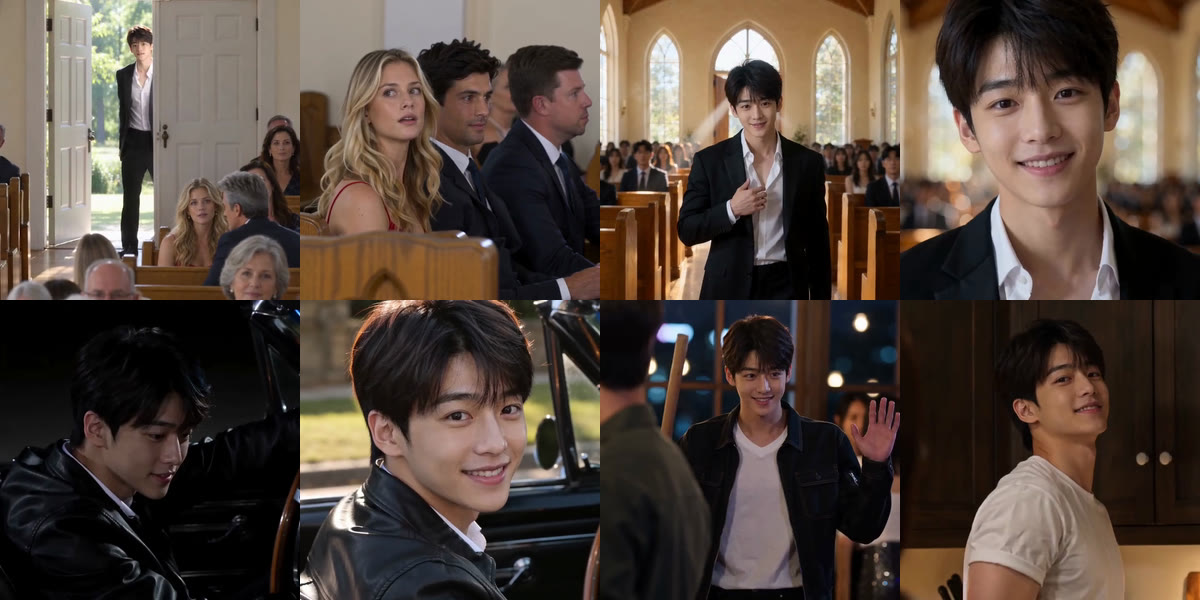
Because the shots, the order and the cuts are fixed, the only thing your photo has to decide is who the lead is. That is why there is no prompt box.
How to make your own, step by step
1. Pick one photo
This is the AI-generated portrait behind the example above:
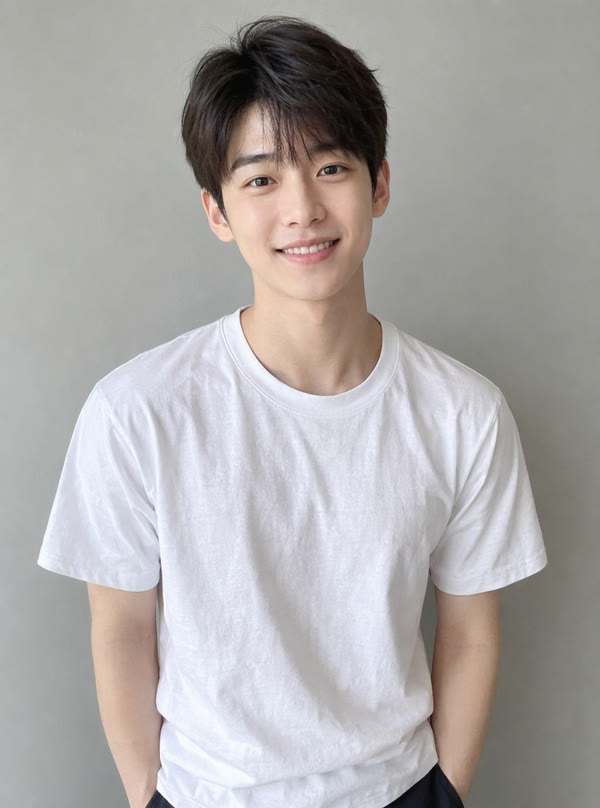
Notice that he is in a plain white T-shirt, and the video still puts him in a blazer, a leather jacket and a white tee. Your face and hair come from the photo. The outfits come from the edit.
What works best:
- One person, face clearly visible. A waist-up or full-body photo is fine, as long as the face is sharp.
- Even light, facing the camera. Side angles and strong shadows make the likeness drift.
- No sunglasses and no group photos. Both make it harder to tell which face is the lead.
- Yourself, or an adult who agreed. More on that below.
2. Choose the sound
Original audio keeps the track from the reference clip under the video. Silent gives you the video with no sound, so you can add the trending sound inside TikTok, Reels or Shorts. If you plan to post on TikTok, read the posting section below before you choose.
3. Generate
Press generate. You can leave the page while it renders; the finished video waits in My videos. You get a 20-second 1:1 MP4 at 720p.
What we fixed before it matched the trend
A fixed edit is only worth something if it matches the clip people know. Our first versions did not, and the fixes are a good checklist for any version you see.
- The entrance. An early version opened on the church with the doors already open and the lead already inside. The trend opens on him pushing the door and stepping in from the daylight. We rebuilt the first three seconds until that moment was there.
- Which way the guests face. In one early render the guests in the foreground had their backs to the camera. In the trend they face the camera, with their backs to the door, and turn around to look at him. That is the whole joke of the first shot, so it had to be right.
- Wardrobe that follows the cuts. The jacket-to-T-shirt change has to land on the cut to the kitchen, not in the middle of the party, and an open shirt should not sprout jewelry that was never there. Both happened in testing, and both are fixed.
- Likeness, honestly. The lead looks close to the photo, not like a perfect copy. A clear, front-facing photo gives the closest result.
If your video comes out clearly wrong, tell support. When a run fails outright, the 900 credits go back without you asking.
How to post it on TikTok
The edit is made to be posted, so here is a route that keeps the trend's sound and stays within the platform's rules.
- Generate it Silent. Adding the sound inside TikTok links your post to that sound's page, where people browsing the trend can find it. With Original audio, the video simply plays as it is.
- Upload and add the sound. Upload the MP4, use Add sound to pick the trending sound, and move its start point until the cuts sit on the beat.
- Leave the square as it is. The video is 1:1, so it plays with space above and below. Put your caption text there rather than over his face.
- Turn on the AI label. Switch on TikTok's AI-generated content setting in the post options before you publish.
- Write a caption that sells the entrance. "POV: you arrive late to the wedding", "Main character walks in" or "When the vampire is the plus-one" all fit, with generic tags such as #aiedit or #vampireedit. Leave the actors' names out of the caption and tags: the video is not them, and tagging them makes it look like it is.
Reels and Shorts work the same way: post the Silent version and add audio in the app, or post it with the original audio.
Damon Salvatore AI prompt: building the edit yourself
You can make one scene. With an image-to-video tool, a starting prompt looks like this:
The man in the photo walks into a sunlit wedding church through a white door,
wearing a black blazer over a white shirt. Guests in the pews turn to look at
him. Slow cinematic push-in, warm romantic film look, square 1:1.
That gives you a nice entrance, which is one of the four places. For the full edit you would repeat the process for the aisle, the convertible, the party and the kitchen, and that is where it gets hard.
Keeping one face across 18 shots made in separate generations is the biggest problem: the lead tends to look like a slightly different man in each place. The outfits then have to change on exactly the right cuts, from blazer to leather jacket to T-shirt. The guests in the first shot have to face the camera and turn on time, which takes many retries on its own. And every cut has to fall where the track expects it, or the edit loses its pull.
The generator handles all of that, so the only thing you bring is the photo.
What it costs
- 900 credits per video: 20 seconds, 1:1, 720p.
- The smallest one-time pack is 900 credits for $9.90 at the time of writing, which covers one video. See pricing for the current packs.
- A failed run refunds itself. You can try again with the same photo or a different one.
Rights and consent
- Only yourself, or an adult who agreed. Do not upload photos of children, celebrities or people who have not said yes.
- Personal sharing only. The original audio belongs to its rights holders. Credits pay for the video, not a music license, so the videos are not for commercial use.
- Mark it as AI-generated with the platform's own setting, as in step 4 of the posting section.
- Not official. aiMakeVideo is an independent fan/trend tool. We are not affiliated with the show, the network, the actors or any rights holders.
Damon Salvatore AI FAQ
Do I need to look like the character?
No. The point of the trend is putting a different face in the lead. Any clear, front-facing photo works.
Do I need to wear a blazer in my photo?
No. The outfits follow the scenes: a black blazer in church, a leather jacket in the convertible and at the party, a white T-shirt in the kitchen.
How do I post the Damon Salvatore AI edit on TikTok with the trending sound?
Choose Silent when you generate and download the MP4. Upload it to TikTok, add the trending sound with Add sound, and turn on the AI-generated content setting before you post.
Why is the video square?
The edit is made in 1:1, the same square frame for every scene. On TikTok and Reels it plays with space above and below, which is a good place for a caption.
Is the sound included?
Yes, by default the original audio is under the video. Choose Silent to add the trending sound yourself when you post.
Can I choose which scenes are in it?
No. The scenes, their order and the cuts are fixed, because that is what makes it the trend. You choose the photo and the sound.
More AI video trends
- Tiny Desk AI: one to five photos, your band in the office concert. Read the Tiny Desk AI trend guide.
- Gangnam Style AI: three photos, three friends in the night-time trio clip. Read the Gangnam Style AI trio guide.
- All AI video trends on aiMakeVideo.
Disclosure: aiMakeVideo makes the generator described here. The lead and the guests in the examples are AI-generated. Details are current as of October 2026.