
The Tiny Desk AI trend takes one famous office-concert clip and recasts it with new faces. One person sings in big, joyful close-ups. A small band is squeezed behind a desk full of instruments, records and bookshelves. Then comes a saxophone solo, and the whole band is back. People fill the band with their friends, coworkers, family or teammates, and the joke lands in a second because everything else stays exactly the same.
We build the Tiny Desk AI video generator on aiMakeVideo, so this guide covers more than the basics. It explains what makes a version read as the trend, who to put in your band, what we check before we call a render good, and where a do-it-yourself version usually falls apart.
The short version: add one clear photo of the lead singer and, if you like, up to four bandmates. Pick the sound and render. You get a 19-second vertical MP4 in 720p or 1080p with no watermark, usually in 5 to 10 minutes. Make your Tiny Desk video.
Made with our generator from five AI-generated people. Nobody in this video is real, and it is not a real Tiny Desk performance.
What the Tiny Desk AI trend is
Tiny Desk concerts are NPR's long-running series of short live sets, filmed behind a desk in an office. The trend is built on one of those sets: Charlie Wilson performing "Outstanding", a song first released by The Gap Band. The clip has everything a template needs. The close-ups are full of feeling, the band is crammed into a tiny space, and the sax solo is impossible to miss.
The AI wave started with a sports parody that circulated as the "All-Loss Tiny Desk Concert". After that, people began putting anyone into the band. You will find the same video under several names: Tiny Desk AI, Outstanding Tiny Desk, the Outstanding Tiny Desk set or Tiny Desk concert AI. They all mean the same clip, with the same shots, cuts and timing.
That is also why the format is so easy to remake well or badly. Viewers know the original. If the cuts drift, the band looks wrong or the singer's mouth floats off the beat, the video stops reading as the trend.
The five shots that make it read
The clip is 19 seconds long and has five shots. Each one belongs to a part in the band:
| Time | Shot | Who is on screen |
|---|---|---|
| 0–1.4 s | An opening close-up of the lead singer, side-on, one hand raised | Lead singer |
| 1.4–6.7 s | The wide shot: the keyboard player at the red keyboard, two backup singers standing behind | Keyboard, both backup singers |
| 6.7–13 s | The long close-up of the lead singer, the heart of the clip | Lead singer |
| 13–16.4 s | The saxophone solo, with the keyboard player in the foreground | Saxophone, keyboard |
| 16.4–19 s | Back to the whole band behind the desk | Keyboard, both backup singers |
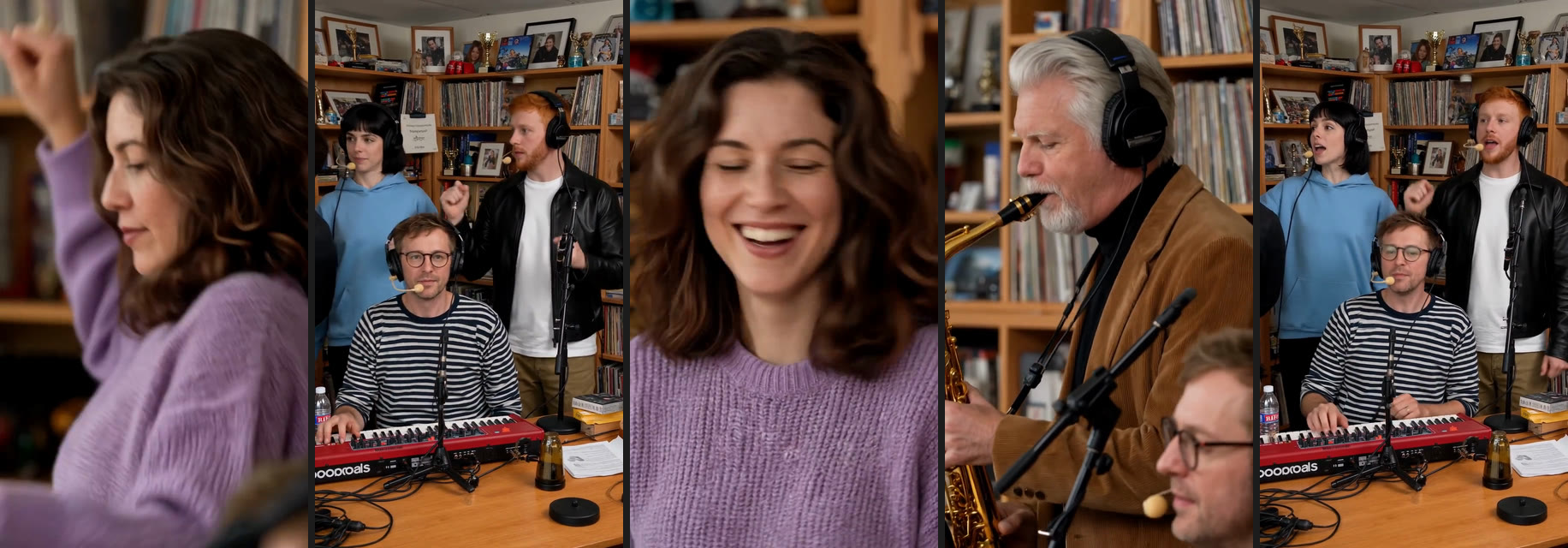
The camera, the cuts and the order of the shots are fixed. Your photos only decide who plays each part. That is why the generator does not ask you to write a prompt: the part of the video that makes it the trend is already decided, and changing it would only make the result look less like the clip people know.
Who to put in the band
The five parts are not equal, and that is what makes casting fun. The lead carries the two close-ups. The keyboard player is in three of the five shots. The saxophone gets one big moment. The two backup singers stand behind in the wide shots. A few line-ups that work:
- The office team. Whoever is leaving, turning 40 or just closed the big deal sings lead. The rest of the team fills the band. It makes a good farewell or birthday post for the team chat.
- Your own sports team. The trend started with a sports parody, but the generator does not accept real athletes or coaches. Your five-a-side squad, your bowling league or your fantasy league is the funnier version anyway: the captain sings lead and the worst player of the season takes the sax solo.
- The family band. A parent or grandparent on lead, the kids on keyboard and sax, cousins on backup vocals. Ask everyone first, and keep it to adults.
- The wedding party. One half of the couple on lead, the other on keyboard, best friends on backup. It plays well at the reception or in the wedding group chat.
- The group chat. Whoever lost the bet sings lead. Everyone else gets to watch.
- Just you. One photo is enough. You sing lead and play keyboard, and AI musicians fill the rest.
Whatever the line-up, every person in it has to be an adult who agreed to be in the video.
How to make your own, step by step
1. Cast the band
There are five parts: the lead singer, the keyboard player, the saxophone player and two backup singers. Only the lead is required. Each photo you add fills one part, so every face stays its own.
Parts you leave empty are played by AI musicians. If you add only the lead, the lead also takes the keyboard seat and shows up in nearly every shot. We chose that on purpose: a stranger on the keyboard felt less funny than the singer playing their own band. If you would rather have someone else on the keyboard, add a photo for that part.
One photo in: the lead sings and also plays the keyboard. The other musicians are AI-generated.
2. Choose the photos
These are the five inputs behind the band example above. All of them are AI-generated portraits:
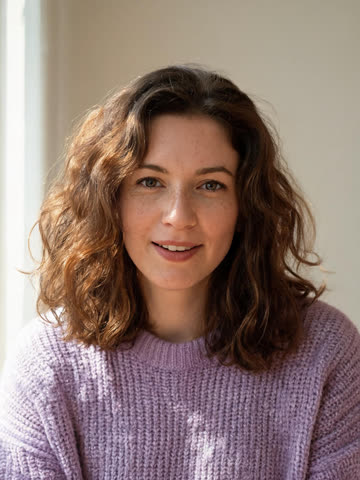

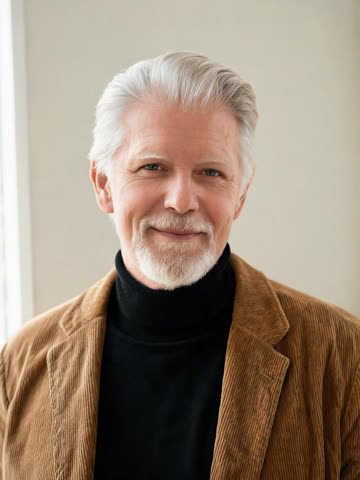
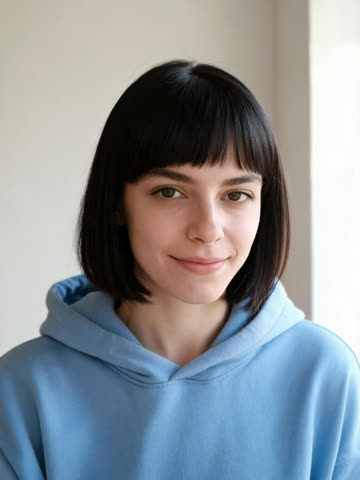
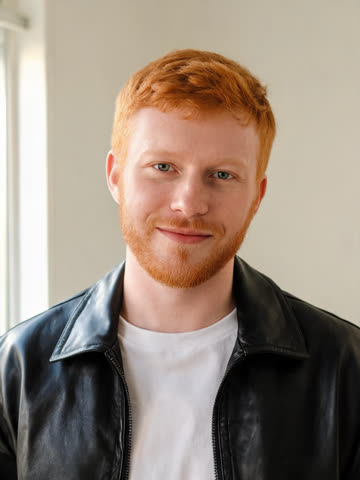
What works best:
- One person per photo. Skip group shots: a face cropped small out of one comes out soft, and a soft photo gives a soft bandmate.
- Facing the camera, face sharp and evenly lit. Side angles and harsh shadows are where likeness drops first.
- No sunglasses, hats or heavy filters. The model has to guess what is under them.
- No screenshots. Compression blocks turn into skin texture.
- Dress the part. The clothes in each photo are the clothes in the video, so a hoodie stays a hoodie.
- JPG, PNG or WebP, up to 10 MB each.
The lead's photo matters most. The two close-ups fill the whole screen, so a soft or dark photo shows most there.
3. Pick the sound
By default, the trend's sound is laid under the finished video, so it plays like the clip people know. Choose Silent if you would rather add the audio yourself when you post, for example from the app's own sound library on TikTok or Reels.
4. Render, download, post
Choose 720p or 1080p and press Generate. A render usually takes 5 to 10 minutes. You can close the page, and the finished video waits in My videos. You get a 19-second 9:16 MP4 with no watermark, ready for TikTok, Reels or YouTube Shorts.
What we check before we call a render good
We made a lot of test renders before we put an example on the page. These are the things we watch for. They are also worth checking in your own video before you post it.
- Every face stays its own. The classic failure in multi-person AI video is one face leaking into another, with a backup singer suddenly looking like the lead. That is why each part is cast from its own photo.
- The mouth against the music. Singing is the hardest thing for a video model to get right. We watch the long close-up with the sound on before we use a render as an example, and we would rather not publish one where the mouth drifts off the beat.
- Cuts on the beat. The five cuts land where they do in the original. When they drift by even half a second, the clip feels "off" even to people who cannot say why.
- Hands on instruments. Fingers on keys and a saxophone are classic AI weak spots. Look at the solo in particular.
Spot something clearly wrong, such as a bandmate who was not replaced? Write to support and we will look at it. If a render fails outright, the credits return to your balance on their own.
Tiny Desk AI prompt: making it by hand
You can get part of the way with any image-to-video tool and an editor. A basic starting prompt looks like this:
The person in the photo sings into a microphone behind a cluttered wooden
office desk. A small band plays around them: a red keyboard, a saxophone and
two backup singers. Bookshelves and records fill the wall behind. Warm,
practical lighting, handheld live-concert camera, vertical 9:16.
It gives you a concert-looking shot. To get to the trend, you will run into four problems:
- One shot, not five. Most tools return one continuous shot. Building the close-up, wide, close-up, solo, wide sequence means several separate generations, and faces tend to drift between them.
- Five people from five photos. Many tools mix up faces as soon as there is more than one person in the frame.
- The music. The model does not sing the song. A track you add afterwards rarely matches the mouths.
- Time and credits. Getting 19 usable seconds this way takes many attempts, each of them paid.
The generator exists to close exactly that gap: the shots, the cuts and the sound are already done, and your photos fill the parts. If you enjoy building it by hand, the prompt above is a fair starting point.
What it costs
- 720p: 900 credits per video. 1080p: 1,350 credits. The price is the same whether you add one photo or five.
- The smallest one-time pack is 900 credits for $9.90 at the time of writing, which covers one 720p video. See pricing for the current packs and the monthly plan.
- A render that fails gives the credits straight back to your balance, with no ticket and no waiting.
Consent, music and the fine print
- Only people who agreed. Add yourself, or friends and coworkers who are happy to be in it. Everyone must be 18 or older. Photos of celebrities, athletes, coaches, politicians and other public figures are not allowed.
- Personal sharing only. The trend's sound belongs to its rights holders. Credits pay for the video, not a music license, so the videos are not for commercial use.
- Say it is AI. Most platforms ask you to mark AI-generated content. Turn on their label when you post.
- Not official. aiMakeVideo is an independent tool. We are not affiliated with NPR, Tiny Desk, Charlie Wilson, the song's rights holders, any sports league, TikTok or any creator. A Tiny Desk AI video is a parody, not a real Tiny Desk concert.
Tiny Desk AI FAQ
Is a Tiny Desk AI video a real Tiny Desk concert?
No. It is an AI-made remake of one well-known clip, with new people in the band. Nothing in it was filmed, and it has no connection to NPR.
Can I make a Tiny Desk AI video with just one photo?
Yes. One photo of the lead singer is enough. The other parts are played by AI musicians, and you can add up to four more photos to fill them.
Why is my lead singer also on the keyboard?
With a single photo, the lead takes the keyboard seat as well, so they are in nearly every shot. Add a second photo for the keyboard part if you want someone else there.
Who should sing lead?
The person the video is about, with the sharpest photo you have. The lead gets both close-ups, which fill the whole screen.
Is the Tiny Desk AI generator free?
No. A video costs 900 credits at 720p or 1,350 at 1080p. The smallest one-time pack, $9.90 at the time of writing, covers one 720p video, and a render that fails costs nothing.
Can I post it on TikTok, Reels and YouTube Shorts?
Yes. The output is a 9:16 vertical MP4 with no watermark. Mark it as AI-generated when you post, and keep it to personal accounts.
More AI video trends
- Gangnam Style AI: three photos, three friends in the night-time trio clip. Read the Gangnam Style AI trio guide.
- Damon Salvatore AI: one photo, a 20-second vampire-romance edit. Read the Damon Salvatore AI edit guide.
- All AI video trends on aiMakeVideo.
Written by the team behind the aiMakeVideo Tiny Desk AI generator. Everyone in the examples is AI-generated. Prices and features were checked in October 2026.