
The Give It All to Me AI trend asks for very little: one photo, and fifteen seconds later you are the one rapping under the hanging mic in BigXthaPlug's "Give It All" clip, with a lobby full of people at your back. Getting a version that actually looks like the person in the photo takes a bit more care, and most of that care goes into the photo.
Most of this guide is about the two things that decide how yours turns out: the photo you start with, and the minute of checking before you post. It also covers the song, the steps and the cost. We make the BigXthaPlug Give It All AI generator, so this is a maker's guide, not a neutral review. The photo advice should help with other tools too.
The short version: one adult, facing the camera, waist up, no cap and no sunglasses. Run the short preview to check the face, then make the full video. Before posting, pause at 9 to 12 seconds, the close shot of the face, and hold it next to your photo. Make your Give It All video.
Made from one AI-generated photo. The man in it is not real.
What the Give It All to Me AI trend is
The trend remakes one performance clip: BigXthaPlug rapping "Give It All" around a vintage microphone that hangs from above, in a cinema lobby under glowing orange showtime boards, with people packed in all around him.
Clips of it took off on TikTok in early November 2026, and AI remakes came right after. Early ones put cartoon characters and film heroes at the microphone. The version this guide covers puts you there instead.
You will see it under a few names: the Give It All to Me AI trend, the hanging mic AI trend, BigX From The Block, or just the BigXthaPlug AI trend. They all mean the same clip.
The song and the original video
The song is "Give It All" by BigXthaPlug, a rapper from Dallas. It is on Better Over Time, the album he released on October 30, 2026, which Complex covered on release day. A lot of people search for it as "give it all to me".
The original video is his From The Block performance. From The Block is a series from 4 Shooters Only in which each rapper performs at one hanging microphone, and you can watch the Give It All episode on YouTube. The AI version keeps its lobby, its camera moves and its cut, and puts the person from your photo at the microphone.
The lyrics are not reprinted here. If you keep the song, your video plays the same stretch of the track as the original clip: the AI changes who is rapping, not the words.
How to make one, step by step
1. Pick the photo. One adult, looking at the camera, from the waist up. The face matters most, because the video spends its middle stretch close on your face. The clothes matter next, because whatever you wear in the photo is what you wear at the microphone. The next section covers which photos hold up.
2. Run the preview. Below the create button there is a Preview option: four seconds at 480p, watermarked. It is too short and too soft to judge sharpness or the mouth, but it answers the one question that matters at this stage, which is whether the face looks like the person in the photo. If it does not, change the photo, not the settings.
3. Choose the sound and the quality. Either keep the song, or pick Silent and bring your own sound at posting time. Quality is 480p or 720p. The price is the same with or without the song.
4. Make the full video. Expect several minutes. Closing the tab is fine, since the result lands in My videos, and a failed render refunds its credits automatically.
5. Check it, then post. You get a 15-second vertical MP4 with no watermark, sized for TikTok, Reels and Shorts. The checks below take about a minute.
Which photos hold up
These come from our own test renders and from looking at the first videos people made with the tool.
| The photo | What we saw | What to do |
|---|---|---|
| One adult, waist up, clear face | The best results. In one of the first videos, a sports jersey from the photo carried through all three shots with the right colors and cut. | Use this if you can |
| A cap or a hat | Caps did not reliably survive, because the rapper in the clip is bareheaded. What was under the cap then gets guessed: one preview came back with long hair the person does not have. | Take a photo without it |
| Bare wrists | A watch or a bracelet can appear anyway. The clip opens with a long look at the wrist, and our own example picked up a watch. | Expect it, or wear your own watch in the photo |
| Sunglasses, a mask, heavy filters | The close shot of the face needs the whole face. Anything covering it leaves the likeness to guesswork. | Use a plain, uncovered face |
| Someone else in the frame | The tool expects one person and one face. | Crop everyone else out first |
| A celebrity, a film still or an ad | The video model can refuse these, and the run fails. The credits come back. | Use your own photo, or one you have permission for |
| A pet | This generator is for one adult only. | Dime Dime Baby AI has a pet option |
A plain photo against a wall is enough. This is the photo behind the example at the top of this post.
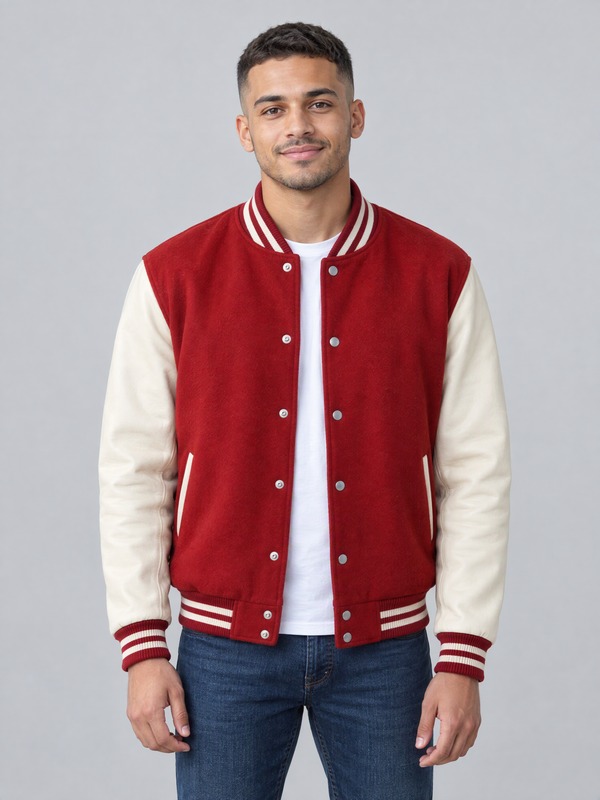
One more thing we learned before launch. On an early version of the generator, a test render of a slim woman with long curls came back with a baseball cap, broader shoulders and beaded bracelets, all borrowed from the original rapper. It looked sharp, and it was wrong. We changed how the template is prepared and the same photo came through as herself. It is the reason the checks below start with the face and not with the quality.
How to check your video before you post
Every video follows the same cut, so the moments worth pausing on never move.
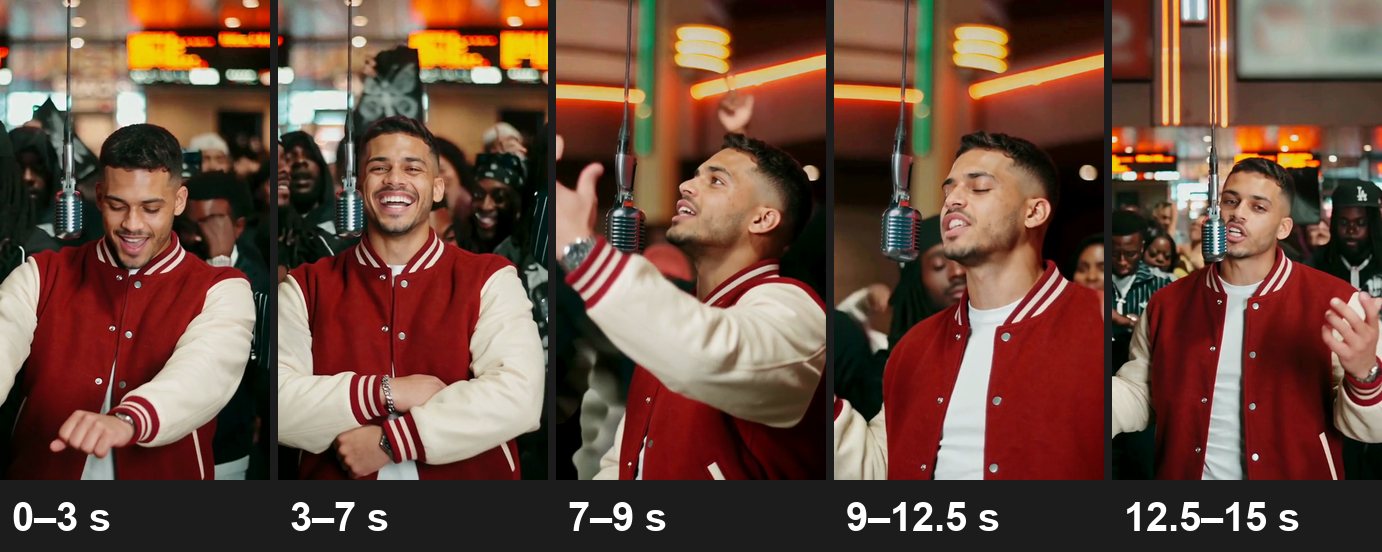
Frames from the example above.
- 0 to 3 seconds, from the front: the lean toward the microphone and the look at the wrist. Check the jacket or top, and whether a watch appeared.
- 3 to 7 seconds, the laugh: folded arms and a flick of the hand at the lens. Check the hands and the sleeves.
- 7 to 9 seconds, from the side: hands raised to the microphone while the camera circles to the front. Check the hair and the profile, the part your photo never showed.
- 9 to 12.5 seconds, the close shot: eyes closed, palms open, wrists crossing. This is the moment to judge the likeness.
- 12.5 to 15 seconds, the wider shot: you under the microphone with the crowd behind. Check the whole outfit.
Some things look like mistakes and are not:
- The microphone in front of your face. It hangs in the same place as in the original, so it covers part of the mouth in some shots.
- A mouth that is close, not exact. It opens on the stressed words of the rap. It is not word-perfect lip sync.
- A crowd that does not match the original. The lobby and the camera follow the clip, but the people behind you are generated fresh on every run.
- Less crowd at the sides. The original is wide. The video is a vertical cut of it that keeps you and the microphone in the middle.
If the face in the close shot is not the person in your photo, try a sharper, front-facing photo with no cap. If something is clearly broken, contact support.
What it costs and how long it takes
- 480p costs 600 credits and 720p costs 1,050, whether you keep the song or not. You get a 15-second 9:16 MP4 with no watermark.
- A preview is 10 credits. Where new accounts get a sign-up gift, that gift covers one.
- The smallest one-time pack is 900 credits for $9.90 at the time of writing, which covers one 480p video with credits left over. See pricing for the current packs.
- A failed render costs nothing: the credits return to your balance.
- Most videos take several minutes.
Posting it
The sound. If you keep the song, the file carries it. If the video is going to TikTok, you can also render it silent and pick the trending sound in the app, which files the post under that sound's page. Either way works. The song is a rap track and may include strong language, so Silent is also the safer pick for a family group chat.
The caption. Name the trend so people looking for it can find yours, and say it is AI. That saves you the questions in the comments.
Before you post: consent and rights
- Adults who said yes, nobody else. No photos of anyone under 18, and none of celebrities, politicians or other public figures.
- Personal sharing only. The song belongs to its rights holders. Credits pay for the video, not a music license, so the videos are not for commercial use.
- Use the AI label. TikTok, Instagram and YouTube each have a way to mark AI-generated content. Switch it on.
- Not official. aiMakeVideo is not affiliated with BigXthaPlug, with the From The Block series or 4 Shooters Only, or with TikTok. It is an independent fan tool.
Give It All to Me AI FAQ
What is the Give It All to Me AI trend?
AI remakes of one clip: BigXthaPlug performing "Give It All" for From The Block. The person from your photo takes his place at the hanging microphone, in the same crowded cinema lobby.
Is the hanging mic AI trend the same thing?
Yes. Hanging mic AI trend, BigX From The Block and Give It All to Me all point to the same clip. People name it after the microphone when they do not know the song.
What song is in the Give It All to Me AI trend?
"Give It All" by BigXthaPlug. It came out with his album Better Over Time on October 30, 2026, and a lot of people search for it as "give it all to me".
Where is the original Give It All video from?
From The Block, a performance series from 4 Shooters Only in which each rapper performs at one hanging microphone. The Give It All episode was filmed in a cinema lobby and is on the 4 Shooters Only YouTube channel.
Does the AI video change the lyrics?
No. If you keep the song, the video plays the same stretch of the track as the original clip. The AI changes who is rapping, not the words.
Which photo should I use?
One adult, facing the camera, framed from the waist up, with a sharp, evenly lit face and nothing on the head or over the eyes.
Why did the cap in my photo disappear?
The rapper in the clip is bareheaded, and caps did not reliably survive in the videos we checked. The hair under the cap then has to be guessed, so take a photo without one.
Why is there a watch on my wrist?
The clip opens with a long look at the wrist, and that move can pull in a watch or a bracelet your photo never had. Our own example shows one.
Can two people do it together?
Not in this clip: one person stands at the microphone. For two people trading lines at one hanging mic, try the 58th Floor template.
Can I add the trending sound myself?
Yes. Choose Silent, then pick the sound in TikTok, Reels or Shorts when you post. You will need to line it up with the moves yourself.
Does the mouth match the rap?
Close, not exact. The mouth keeps the rhythm and hits the stressed words without matching every syllable, and in a few shots the microphone hides part of it, just like in the real clip.
More AI video templates
- 58th Floor AI: two people, one hanging microphone, trading lines on a teal studio set.
- Tiny Desk AI: one to five photos, your band in the office concert. Read the Tiny Desk AI trend guide.
- Gangnam Style AI: three photos, three friends in the night-time trio clip. Read the Gangnam Style AI trio guide.
- Damon Salvatore AI: one photo, a 20-second vampire-romance edit. Read the Damon Salvatore AI edit guide.
- Dime Dime Baby AI: one photo, the 8-second wedding-party dance. Read what our Dime Dime Baby AI tests found.
- All templates on aiMakeVideo.
About this guide: the aiMakeVideo team wrote it about our own generator. The example shown was made from an AI-generated photo. Prices and features are from November 2026.