
The whole dancer, not a face sticker
Your face, hair, build, outfit and shoes replace the dancer. The room, the guests and the woman in red stay.
AI Video Trends · Dance
One photo puts you in the 8-second wedding-party dance everyone is posting: the camera follows you through the room, past the guests and the woman in red, and you own the entrance.
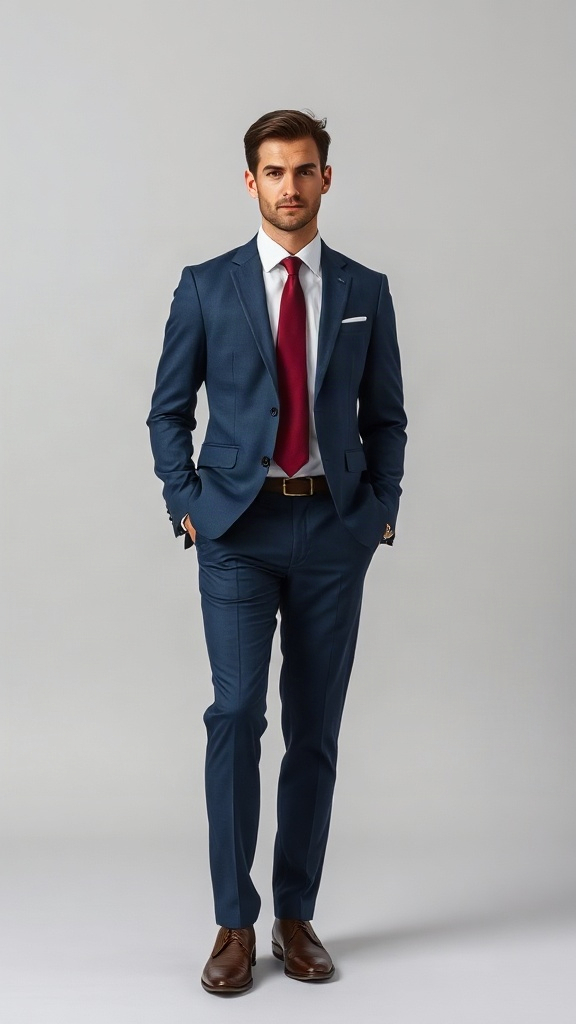
DancerFace, outfit and shoes all come from this photo.
No photo handy? .
750 credits · 8 seconds · 720p · 9:16
Sign in to add photos. Credits stay valid for 6 months. Get creditsOne photo in, one 8-second dance entrance out. Same room, same guests, same camera — a different dancer.
Made from one AI-generated photo. Not a real person. The example keeps the reference track; original audio is included by default.
The wedding-party dance entrance is back on TikTok, with someone new leading the walk every time.
Your face, hair, build, outfit and shoes replace the dancer. The room, the guests and the woman in red stay.
The walk, the turn, the camera follow and the timing are fixed. You do not write a prompt or re-roll a scene.
A suit, a dress or a party outfit — the outfit comes from your photo, not from a template.
Upload one full-body photo and get an 8-second 9:16 MP4. Credits come back if the run fails.
No prompt. No editing app. One upload.
One person, full body if you can. Face, outfit and shoes all come from this photo.
The dance is already blocked out; you do not write a prompt.
An 8-second 9:16 MP4 with the original track, no watermark. Choose silent if you want to add the trending sound in TikTok, Reels or Shorts.
The AI recreates the wedding-party walk with you as the dancer.
The camera following you through the room, the guests on both sides, the woman in the red dress behind, the turn and the walk toward the lens.
Your face and hair, your body shape, and the outfit and shoes you are wearing. Nothing else.
The 'Dime Dime Baby' dance-entrance edit spread on TikTok in 2026: a guest walks through a wedding party while the camera follows, and the room reacts. This generator puts you in the walk from one photo, as an 8-second 9:16 MP4 with the original track or silent.
Pick the plan that matches your pace
Subscribers get +20% extra credits at the same price
Subscribers receive: 1,080
Subscribers receive: 3,600
Subscribers receive: 6,600
Subscribers receive: 14,400
Subscriptions renew until canceled. Credit packs are one-time and expire 180 days after grant. Refunds & Billing · Terms · Privacy Policy · Contact Us · Pricing
aiMakeVideo is an independent AI video platform and is not affiliated with the model providers.
Questions
It puts you in an 8-second wedding-party dance entrance: the camera follows you through the room while the guests and the woman in red react behind you.
Upload one photo, press generate, and download the 8-second 9:16 MP4. There is no prompt to write and no app to install.
One person, full body if you can, face clearly visible and even light. A waist-up photo works too, but the model has to guess the legs and shoes.
8 seconds, 9:16, 720p. The original track is muxed in by default; choose silent to add the trending sound in TikTok, Reels or Shorts.
Close, not a perfect copy. A clear, front-facing full-body photo gives the closest result; sunglasses, side angles and group photos make it worse.
Only with their permission, and only if they are 18 or older. Do not upload photos of children or of people who have not agreed.
750 credits per video. Credits come in one-time packs, and a failed run is refunded automatically.
No. This is an independent trend tool, not affiliated with any artist, label, venue or the people in the reference clip.
The credits are returned to your account automatically. You can try again with the same photo or a different one.
Every tool turns your photos into a short vertical video. One credit balance works on all of them.
An independent trend tool. Not affiliated with any artist, label, venue or the people in the reference clip.
One photo is enough to own the entrance.
Make my dance video