
The Dime Dime Baby AI dance looks like the easy kind of trend. One photo goes in, eight seconds of you dancing through a wedding party come out, and there is no prompt to write. It did not turn out to be easy. Over about a week we ran more than a dozen test renders of this one clip, went through the results closely, and changed how our generator works more than once.
This post is what we took from all that, written for anyone about to make their own: which photos hold up, what tends to go wrong, and how to check a video before you post it. We make the Dime Dime Baby AI video generator, so read it as a maker's notes and not a neutral review. The photo advice should carry over to other tools too, though ours is the only one we tested.
The short version: use one clear, full-body photo of one person, with no sunglasses and nobody else in the frame. Whatever the photo does not show, the AI has to invent. When the video comes back, check the face at 4 to 5 seconds, the shoes at the start and the end, and the back of the outfit in the last second or two. Make your Dime Dime Baby video.
Made from one AI-generated photo. The man in it is not real.
What the Dime Dime Baby AI trend is
Someone dances into a crowded party while the camera follows. They walk up to the lens, take a cheeky bite of food, hold the look for a moment, then turn and dance away. The room, the guests and the woman in the red dress are what make the clip easy to recognize. The fun is seeing someone new lead the walk.
The name comes from the hook of the song. "Dime dime baby" is Spanish for "tell me, tell me, baby". The song is called BbY WOW, so you will also see the trend as Baby Wow, BbY WOW or Dime Dime Dime Baby. They are all the same dance, and our Baby Wow AI page runs the same generator.
Why it is harder than it looks
The whole person is on screen. In eight seconds you see the dancer head to toe, then up close, then from behind. Swapping the face alone would leave someone else's clothes on your body, so your face, outfit and shoes all have to carry through, including a back view your photo probably never showed.
The room has to stay the same room. One version we tried rebuilt the party from scratch. The clothes came out well and the hall looked great, but it was a different party, and people know this trend by its room. We dropped that version.
The lights never stop moving. Pink, green and purple wash over everything, so the same shirt looks like a different color from one second to the next. That makes real mistakes harder to spot, and it makes good renders look wrong if you are not expecting it.
What the tests taught us
Whatever your photo leaves out gets invented
This came up more than anything else. When a photo stopped at the waist, the AI had to make up the legs and shoes. On older versions of our generator that went badly: trousers that looked see-through, a ragged shirt hem, shoes that changed partway through. A long garment also came back much shorter than it was in the photo.
A later version handled a waist-up photo much better, with plain dark trousers and one pair of sneakers for the whole clip. They were still made up, though. With a full-body photo, the clothes and shoes came from the photo and held from the front and from behind.
Anything hiding your face stays on
Sunglasses and hats stayed on for the whole clip. In one render a low cap left the eyes in shadow in the close-up. When the face in the photo was very small and behind sunglasses, the outfit came through fine, but we could not honestly say whether the face looked like the person. A clear face is the one thing you cannot make up for later.
Looking like the original dancer was the hardest case
Our strangest failure came from an AI-generated test person who looked and dressed a lot like the original dancer. One earlier version handed back something very close to the original clip, with the original dancer's face and tie, and it looked like a finished video. A different test person in the same kind of suit came through fine, so the outfit alone was not the cause. It seemed to take both, but we only have a handful of renders on this, so we would not call it proven.
We changed how the generator works, and that same look-alike now comes through with his own face and his own tie. On the approach we use now, all four test renders, each with a different person, replaced the dancer and kept the room, the lights and the guests. Four is a small number, so read that as encouraging and not as a promise.
The takeaway for you: a finished video is not automatically a correct one. Compare the face with your photo before you post.
Pets need their own setting
An early version treated every photo as a person, and a dog photo came back as a complete stranger with nothing of the dog left. That is why the tool now has a Who's dancing choice. Pick A pet or character and the pet stands on its hind legs and does the dance. In the dog renders we reviewed, the markings held, and so did whatever the dog was wearing. An upright dog shows its belly, which most pet photos hide, so that is where the AI has to guess: in one render the belly and front paws drifted in color.
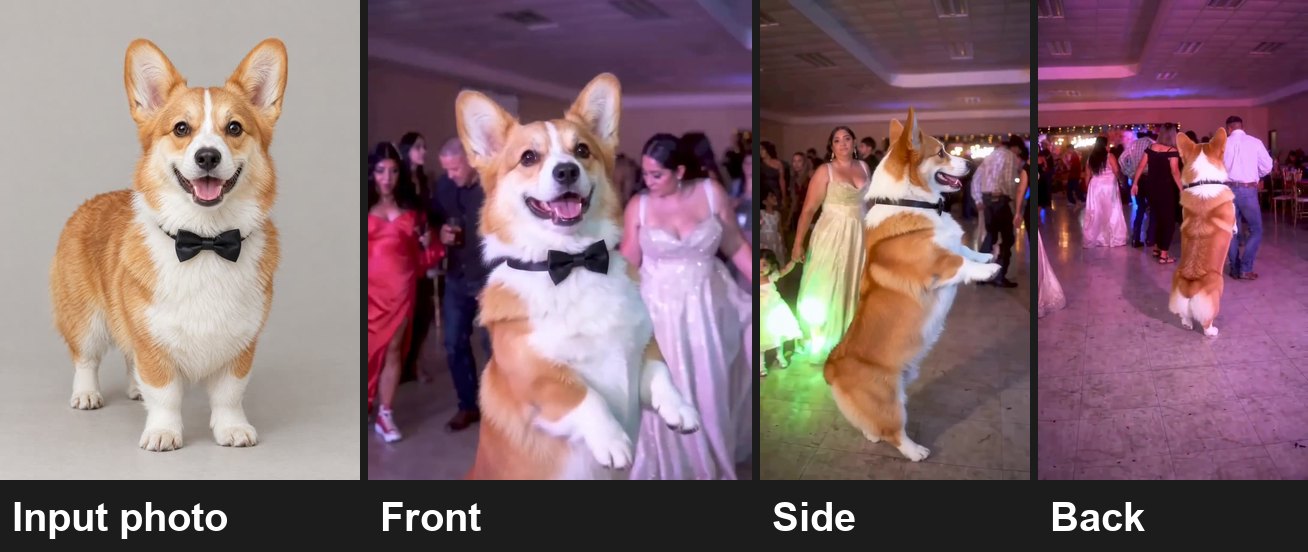
The corgi example from our generator page, beside its input photo. The corgi is AI-generated too.
That choice is set for you when the tool finds no human face in the photo, and it can misread a person. A hat, sunglasses and a small face together can be enough. If you are uploading a person, make sure it says A person before you press generate.
Which photos hold up
| The photo | What we saw | What to do |
|---|---|---|
| One person, full body, clear face | The best results. Face, clothes and shoes came from the photo, front and back. | Use this if you can |
| Waist-up | Legs and shoes are invented. It improved a lot from version to version, but we have not reviewed one on the newest version yet. | Fine if you do not mind what the legs and shoes look like |
| Full body, but small in the frame | The outfit carries over. The face is the weak point. | Stand closer to the camera |
| Sunglasses, hat or cap | They stay on. Sunglasses make the likeness hard to judge, and a low cap can shade the eyes. | Take them off, unless they are the point |
| Someone else in the frame | On an older version the dancer picked up a hat they were not wearing, most likely from a person at the edge of the photo. | Crop them out first |
| Dress, skirt or long robe | Hems are the weak spot. A long garment came back shorter on an older version, and we have seen a small split at a hem more recently. | Fine, but check the hem |
| A suit like the original dancer's | On the approach we use now, test people in navy suits kept their own face and tie. | Go ahead, then check the face |
| A dog | Markings and accessories held, upright for the whole clip. | Choose A pet or character |
You do not need a studio shot. A full-length mirror selfie is fine. This is the photo behind the example at the top of this post, and it is about as easy as a photo gets: one person, head to toe, plain background.
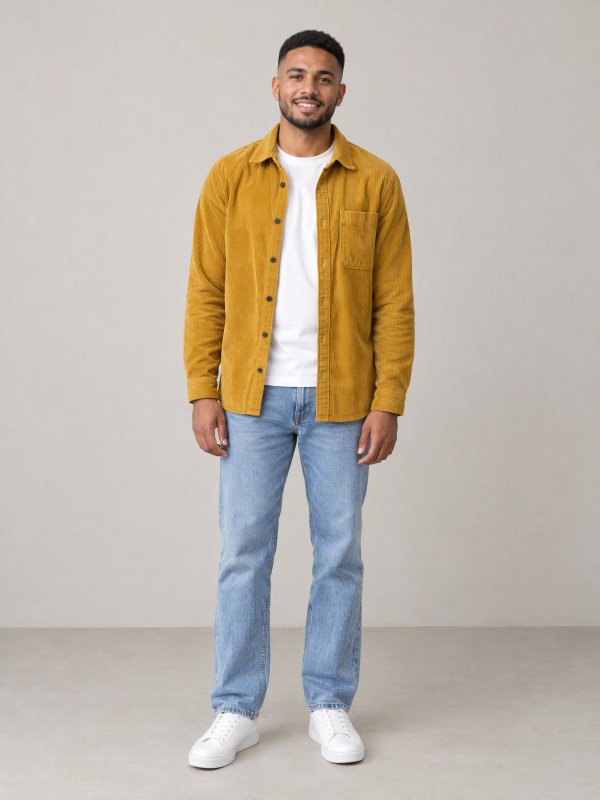
Photos can be JPG, PNG or WebP, up to 10 MB.
How to check your video before you post
The moves and the timing are the same in every person render, so you always know where to pause:
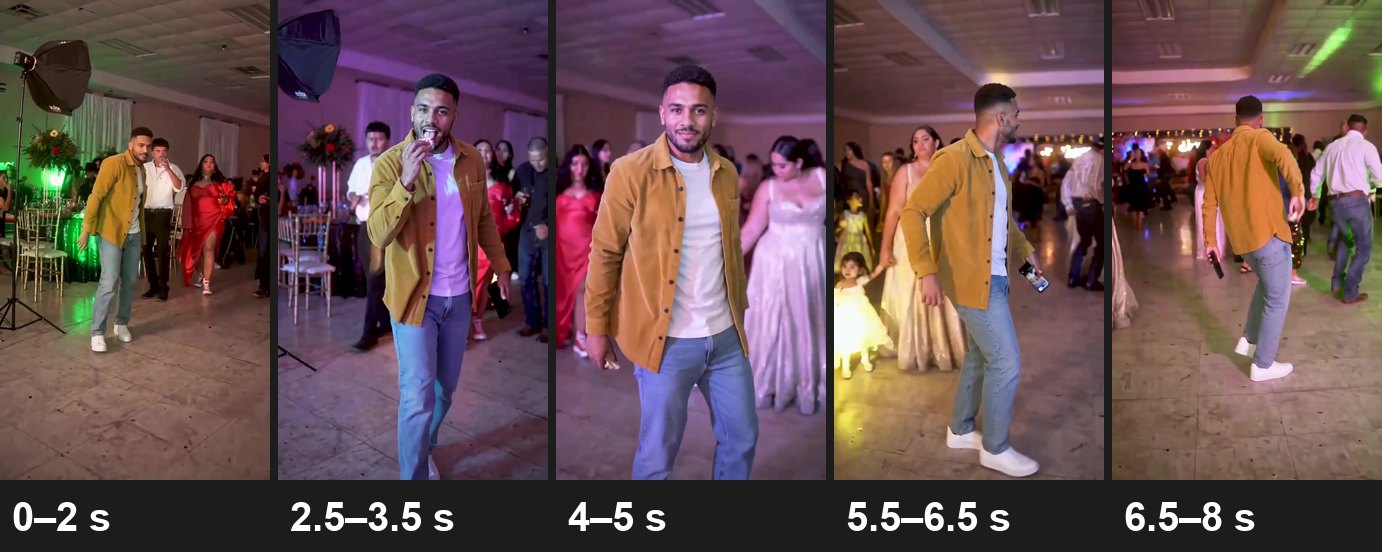
Frames from the example above. Same overshirt, very different light.
- 0 to 2 seconds, head to toe: the outfit and the shoes.
- 2.5 to 3.5 seconds, the bite: the hand and fingers, and whether they reach the mouth.
- 4 to 5 seconds, the closest shot: the face. This is the moment to judge the likeness.
- 5.5 to 6.5 seconds, the turn: the side of the outfit.
- 6.5 to 8 seconds, from behind: the back of the outfit and the shoes.
Three things look like problems and are not:
- A bigger smile than in your photo. The expression belongs to the routine, so expect a cheeky smile. Hair can also come out a little fuller. The result is close, not a perfect copy.
- Clothes changing color. Judge the color in a steady moment, not during a flash. Near the end the lights can wash a shirt out almost white for an instant.
- A mouth that is not singing. The dancer does not lip-sync in this clip. The mouth smiles and takes a bite, so there is nothing to sync.
These are worth a second look. The extra hats, shoe swaps and see-through legs come from older versions and we have not seen them since, but they only take a moment to check.
| What you notice | How to check | What to do |
|---|---|---|
| The face is not you | Pause at 4 to 5 seconds and hold it next to your photo. | Try a sharper, front-facing photo with no sunglasses. If it is still the original dancer's face, contact support. |
| A hat or glasses you were not wearing | Compare the head with your photo. | Crop out anyone else and try again. |
| Shoes that change | Compare the first second with the last. | Use a full-body photo that shows your shoes. |
| Legs that look see-through | Pause in the first two seconds and again near the end. | Use a full-body photo. |
| A torn-looking hem, or a lower neckline than in your photo | Pause when the dancer is closest, around 2 to 5 seconds. | Try another photo, or a plainer outfit. |
| The same guest twice in the crowd | Scan the people behind the dancer. | We only saw this on the version that rebuilt the room. Ours keeps the clip's guests now, but watch for it if you make this with a tool that generates the crowd. |
| Music drifting away from the moves | Watch with the sound on and follow the hand to the mouth. | The original track lined up from the first frame in every render we measured. If you chose Silent and added a sound yourself, slide it until the beat fits. |
Something clearly wrong, like the original dancer still being there? Contact support. A render that fails outright refunds its credits automatically.
What we have not proven yet
We would rather tell you this than let you find out:
- Waist-up photos on the newest version. They did well on the version before it, but we have not reviewed one since the latest change.
- A second person in the photo. We have not rechecked this since the hat problem above, so crop them out.
- Body shapes very different from the original dancer's. Our renders covered different people, but none far from that build.
- Cats and cartoon characters. The tool accepts them, but the pet renders we reviewed were all dogs.
What it costs and how long it takes
- 600 credits per video, person or pet, with the track or silent. You get an 8-second 9:16 MP4 at 720p with no watermark.
- The smallest one-time pack is 900 credits for $9.90 at the time of writing, which covers one video with 300 credits left over. See pricing for the current packs.
- A failed render costs nothing: the credits go back to your balance.
- The renders we timed took anywhere from a few minutes to about 20.
Before you post: consent and rights
- Only people who agreed, and adults only. Photos of celebrities, politicians and other public figures, and photos of anyone under 18, are not allowed.
- Personal sharing only. The track under the video belongs to its rights holders. Credits pay for the video, not a music license, so the videos are not for commercial use.
- Use the AI label. TikTok, Instagram and YouTube each have a way to mark AI-generated content. Switch it on for this video.
- Not official. aiMakeVideo is an independent tool and is not affiliated with the song, its performers, its rights holders, the people in the original clip, TikTok or any creator.
Dime Dime Baby AI FAQ
What does "dime dime baby" mean?
It is Spanish for "tell me, tell me, baby", the line from the song's hook that most people remember before the title.
Is Dime Dime Baby the same as Baby Wow?
Yes. Dime Dime Baby, Baby Wow and BbY WOW all name the same dance trend, and our two pages use the same generator.
What photo works best for the Dime Dime Baby AI dance?
One person, head to toe, with a clear face, even light, no sunglasses and nobody else in the frame.
Can I use a waist-up photo?
Yes, but the AI has to invent your legs and shoes, so you do not get to choose them. If the outfit matters to you, use a full-body photo.
Can I wear a suit like the original dancer?
Yes. In our recent test renders, people in navy suits came out with their own face and their own tie. Compare the face with your photo anyway.
Can my dog do the Dime Dime Baby dance?
Yes. Choose "A pet or character" under Who's dancing. In the dog renders we reviewed, the dog stayed upright for the whole clip and kept its markings and what it was wearing.
Will the video look exactly like me?
Close, not a perfect copy. A clear, front-facing, full-body photo gets closest. Expect a bigger smile than in your photo.
Can I add the trending sound myself?
Yes. Choose Silent, download the MP4 and add the sound in TikTok, Reels or Shorts. You will need to line it up with the moves yourself.
More AI video trends
- Tiny Desk AI: one to five photos, your band in the office concert. Read the Tiny Desk AI trend guide.
- Gangnam Style AI: three photos, three friends in the night-time trio clip. Read the Gangnam Style AI trio guide.
- Damon Salvatore AI: one photo, a 20-second vampire-romance edit. Read the Damon Salvatore AI edit guide.
- All AI video trends on aiMakeVideo.
About this post: the aiMakeVideo team wrote it about our own generator. The examples shown were made from AI-generated photos. Prices and features are from November 2026.