Dieser Artikel zerlegt einen vertikalen YouTube Short, der mit Seedance 2.5 entstanden ist. Das Hochzeitskleid der Braut Rumi wird durch einen Farbstreich ruiniert. Ihre Freundin Mira verwandelt es mit Sprühdosen in ein Graffiti-Kleid, und die Hochzeit endet mit einem Kostümwechsel der ganzen Kapelle. Der Ersteller hat ein vollständiges Arbeitsdokument geführt, und alle seine Prompts sind unten auf Englisch wiedergegeben, bereit zum Kopieren. Das Originaldokument ist auf Chinesisch geschrieben; die englischen Fassungen behalten Aufbau, Kameraanweisungen und Dialoge bei. Ersetze die Platzhalter in eckigen Klammern, etwa [reference image] oder [pink], durch deine eigenen Assets und Farben.
Das Dokument nennt rund 180.000 Aufrufe für diesen Short. Das ist das Ergebnis eines einzelnen Falls, kein Versprechen, dass dieselben Prompts viral gehen. Übernehmen sollte man die Reihenfolge der Arbeit: Figuren festlegen, ein Startbild erstellen, für jede Handlungsphase ein Keyframe erstellen und dann Take für Take mit Zeitachsen-Prompts Video generieren.
Überblick über den Ablauf
- Figuren: Referenzbilder von Bräutigam und Braut in sauberem, farbbeschmiertem und Graffiti-Outfit.
- Startbild: das Bild, von dem der erste Take ausgeht, plus eine stabile Referenz für den Bösewicht.
- Keyframes: ein Bild für jede Handlungsphase; wenn sich das Outfit ändert, verwende die Formulierung "X's appearance becomes [reference image]".
- Zeitachsen-Prompts: etwa 15 Sekunden pro Clip, geschrieben als Sekunden, Kamera, Handlung, Dialog und Ton.
- Schnitt: die besten Clips zum Short zusammenfügen.
Alle Bilder im Originaldokument sind Hochformat 9:16 im fotorealistischen 3D-Stil. Die Referenz-Thumbnails werden klein in 9:16 neben dem Schritt gezeigt, in dem sie verwendet werden.
1. Figuren festlegen
Besetzung
Das Dokument gibt jeder Figur einen Buchstaben, den die Keyframe-Prompts später verwenden:
Cast:
A: rumi
B: jinu
C: mira
D: abby
- A: Rumi, die Braut, lange lila Zöpfe.
- B: Jinu, der Bräutigam, kurze schwarze Haare.
- C: Mira, die Freundin der Braut, rote Zöpfe, die das Kleid mit Sprühdosen rettet.
- D: Abby, der Bösewicht: ein Mann in geblümtem Hemd und gelber Kappe. Die Zeitachsen-Prompts nennen ihn "yellow-shirt man" oder "floral-shirt man".
Vorzubereitende Outfit-Zustände
Das Dokument führt unter den Figuren fünf Zustände auf; spätere Takes wechseln je nach Handlung zwischen ihnen:
Groom: suit state / Groom: graffiti suit state
Bride: dress state / Bride: paint-stained dress state / Bride: graffiti dress state
2. Outfit festlegen: die Figuren in Hochzeitskleidung stecken
Gehe von einem gewöhnlichen Bild eines Mannes und einer Frau aus und kleide sie mit Image to Image für die Hochzeit ein. Das [reference image] am Anfang jedes Prompts ist die Stelle für das Referenzbild; es sagt dem Modell, welcher Mann und welche Frau gemeint ist:
[reference image] Put this man in a wedding groom's suit.
[reference image] Put this woman in a wedding bride's dress.
Danach nennt das Dokument die Generierungseinstellungen:
4 results, 9:16, white background, 3D photoreal style, 1K
Ein sauberes Ganzkörperbild auf Weiß ist die beste Grundlage für spätere Outfit-Änderungen. Wähle das stärkste Ergebnis und speichere es als "sauberen" Zustand.

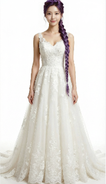
3. Farbe festlegen: Versionen mit Farbe und mit Graffiti
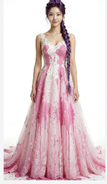
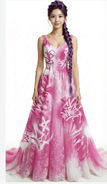
Mit den sauberen Outfits geht dieselbe Kleidung mit Image to Image durch "beschmiert, dann Graffiti". Das Dokument verlangt beide Stufen in einem Prompt und betont, dass das Design des Kleidungsstücks gleich bleiben muss, nur Farbe hinzukommt:
[Groom suit] Paint some [pink] paint stains onto this man's suit, then repaint his suit completely into an artistic spray-can graffiti-style suit, mainly [pink] with white as the secondary color. The garment design must stay the same; it only gets paint on it.
[Bride dress] Put a lot of [pink] paint onto this woman's wedding dress, then repaint the dress into an artistic spray-can graffiti-style dress, mainly [pink] with white as the secondary color. The garment design must stay the same; it only gets paint on it.
4 results each, 9:16, white background, 3D photoreal style, 1K
[Groom suit] und [Bride dress] sind Platzhalter für die jeweiligen Referenzbilder, [pink] ist ein änderbarer Farbplatzhalter. Der Bräutigam braucht nur den Graffiti-Zustand; die Braut braucht den farbbeschmierten und den Graffiti-Zustand.

4. Startbild: das erste Bild des Videos
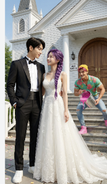
Das Startbild entscheidet, was der Zuschauer zuerst sieht: das glücklich einander ansehende Paar, während der Bösewicht im Hintergrund mit einem Farbeimer heranschleicht. [groom], [bride] und [villain] sind Platzhalter für die jeweiligen Referenzen, [pink] ist die Farbe der Farbe:
Outside the doors of an American wedding chapel, [groom] and [bride] stand at the entrance, happily looking at each other. [villain], holding a bucket of [pink] paint, grins and sneaks toward the woman from the background, in the pose of about to throw the paint at her.
4 results, 1K, 9:16, 3D photoreal style
Das Dokument zeigt in diesem Schritt zwei Bilder: das Startbild und eine Einzelreferenz des Bösewichts Abby. Alle drei Figuren erscheinen im ersten Take, daher braucht auch der Bösewicht eine stabile Referenz.

5. Keyframes: ein Bild für jede Handlungsphase
Keyframes sind die Standbilder der Geschichte. Sie sorgen dafür, dass jede Figur nach Outfit-Wechseln dieselbe Person bleibt. Das Dokument nennt zuerst die Regeln:
Keyframes
Use a different state at each stage.
Note: if an appearance change is needed, use the phrasing "X's appearance becomes [reference image link]".
Danach folgen fünf Keyframe-Prompts. A, B, C und D sind die Buchstaben der Besetzung; [bride, a little paint], [bride, graffiti dress], [groom, a little paint] und [groom, graffiti suit] sind die zuvor erstellten Outfit-Referenzen.
1. Weinend vor dem beschmierten Kleid (zu diesem Prompt gibt es im Originaldokument kein Bild)
Outside the chapel, A cries sadly while looking at her paint-covered wedding dress. A's appearance becomes [bride, a little paint].
2. Mira kommt mit Sprühdosen
Outside the chapel, A weeps sadly while looking at her wedding dress. Reference [bride, a little paint]. C stands anxiously in front of A holding white and [orange] graffiti spray cans.
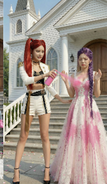
3. Graffiti-Kleid fertig; Jinu schleift den bewusstlosen Abby zurück
Outside the chapel, A is shocked and amazed as she looks at her wedding dress. Reference [bride, graffiti dress]. C happily stands in front of A holding white and orange graffiti spray cans. B stands at the edge of the frame looking at A in surprise; B's appearance becomes [groom, a little paint]. With one hand B drags D by the collar; D has comically huge bumps all over his head and is knocked out cold and dazed.
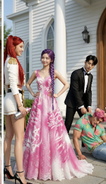
4. Beide in Graffiti-Outfits, kurz vor dem Betreten der Kapelle
At the chapel entrance, A's appearance becomes [bride, graffiti dress] and B's appearance becomes [groom, graffiti suit]. They smile at each other, backs to the camera, about to walk into the cathedral, which is full of blurred American guests in formal wear.
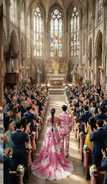
5. Die ganze Kapelle applaudiert
Inside the chapel, a wide shot. Guests fill the chapel, all wearing formal clothes in [pink] as the main color and white as the secondary color, backs to the camera, applauding and cheering for A and B. A's appearance becomes [bride, graffiti dress] and B's appearance becomes [groom, graffiti suit]. They stand facing each other on the stage, hand in hand, smiling at each other. C stands behind the two of them, smiling and holding a Bible, saying something to A.
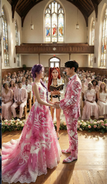
6. Zeitachsen-Prompts: 15-Sekunden-Clips generieren
Diese Zeitachsen-Prompts sind der Kern des Shorts. Wähle in Image to Video Seedance 2.5 und generiere jedes Segment mit etwa 15 Sekunden; Seedance 2.5 unterstützt im Studio 4–30 Sekunden pro Generierung.
Jedes Segment im Dokument beginnt mit "Reference [number]". Nach der Reihenfolge der Bilder im Dokument ist Reference [0] das Startbild und Reference [1] bis [4] sind der Reihe nach die Keyframes 2 bis 5. Das ist eine Schlussfolgerung aus der Anordnung; das Dokument beschriftet sie nicht einzeln. Jedes Segment sagt zuerst, wer in der Referenz wer ist, und gibt dann die Zeitachse an.
Hinweise zur Anwendung:
- Um genau von einem Bild zu starten, nutze den Startbild-Modus von Image to Video; um mehrere Bilder als Figuren- oder Szenenreferenzen zu behandeln, nutze den Referenzmodus. Gehe nicht davon aus, dass sich beide Modi kombinieren lassen; richte dich nach den Steuerelementen des gewählten Modells.
- In aiMakeVideo kannst du hochgeladene Assets als
@Image1,@Image2usw. erwähnen, was den Markierungen [0], [1] im Dokument entspricht. - Jedes Segment endet mit "Rich effects and sound effects, no background music, no subtitles", wodurch Ton- und Untertitelanforderungen direkt im Prompt festgelegt werden.
Reference [0]: der Farbangriff
Reference [0]
Is the black-haired man, is the purple-braid woman, is the yellow-shirt man.
[0-3s] Fixed-camera frontal medium shot, camera at eye level with the characters, slow dolly zoom in. The purple-braid woman and the black-haired man stand facing each other, exchanging smiling looks. The woman says happily and excitedly, "We’re finally getting married." Her eyes are tender and happy; the lighting is soft. At the same time the floral-shirt man grins, carries a huge bucket of paint in both hands, and runs up to the purple-braid woman.
[4-8s] Cut to a side tracking shot at the floral-shirt man's shoulder height, with slight handheld shake for tension. The floral-shirt man suddenly tips the paint bucket; in slow motion a large amount of paint pours down and splashes across the front of the purple-braid woman's wedding dress, and a little paint splashes onto the black-haired man's clothes. The sound effect is an exaggerated liquid splash. The slow motion ends and it cuts back to the side tracking shot; the floral-shirt man grins, throws away the empty bucket, turns and runs out of frame.
[9-15s] Cut back to the fixed frontal medium shot. The purple-braid woman and the black-haired man are shocked and look at the woman's wedding dress. The purple-braid woman's expression goes from shock to instant collapse; the camera slowly pushes in to a close-up of her face, sad and in pain; she covers her face with both hands and wails, "No!!" Cut to a close-up of the black-haired man's face, low-angle shot to emphasize his presence; his eyes turn from disbelief to burning rage; he grits his teeth and roars, "I'm gonna KILL him!!" and rushes out of frame. The camera cuts back to the frontal medium shot, left with only the purple-braid woman, slowly pushing in toward her as she looks at the ruined wedding dress with trembling hands, big tears rolling down.
Rich effects and sound effects, no background music, no subtitles.
Reference [1]: Mira kommt und beginnt die Rettung mit Sprühdosen
Reference [1]
Is the red-twin-tail woman.
[0-4s] Fixed frontal medium shot, camera at the characters' waist height, slightly low angle. We see the purple-braid woman crying alone in a low voice, shoulders shaking; the red-twin-tail woman is not yet visible. The red-twin-tail woman hurries into frame, the camera panning slightly with her; out of breath, she rushes up beside the purple-braid woman and stops, and the camera steadies again. Her eyes lock onto the wedding dress and her expression freezes. Cut to an over-the-shoulder view from behind the red-twin-tail woman's shoulder, a close-up of the dress as she sees it, then back to the frontal two-person medium shot; she looks up and asks anxiously, "What happened?!"
[5-9s] Cut to a close-up of the purple-braid woman's face, straight-on, with slight handheld shake to suggest emotional instability. She tilts her head back and sobs, tears streaming; her voice trembling and choked, she says, "My wedding..everything is ruined!!" Cut back to the two-person medium shot; the red-twin-tail woman frowns and presses her lips together. Cut to a side close-up at her waist as she quickly pulls a [green] spray can from behind her back, then a close-up of her hand shaking the can hard.
[10-15s] Low-angle shot with the camera close to the ground, from the point of view of the red-twin-tail woman crouching down and looking up at the purple-braid woman. Her gaze is firm as she says, "Hey, I got you. Trust me." Then cut to a low side tracking shot of the red-twin-tail woman bending over and quickly spraying the hem of the purple-braid woman's wedding dress. The purple-braid woman watches her through blurred tears and says sadly, "nothing's gonna fix this..."
Rich effects and sound effects, no background music, no subtitles.
Reference [1] (Fortsetzung): das Kleid bemalen
Das Dokument verwendet Reference [1] für den nächsten Teil derselben Szene erneut:
Reference [1]
[0-5s] Side tracking shot, camera at the red-twin-tail woman's waist height, slowly moving sideways to follow the direction of her spray painting. The purple-braid woman keeps crying, sad and broken down. The red-twin-tail woman is completely focused, smoothly and carefully using spray cans in both hands to create art on the hem of the wedding dress in [green] and white; her movements are continuous and natural, occasionally turning her face to glance at the result before continuing. With an anxious expression she says, "I WILL save this!I promise!!" Rich effects and sound effects, no background music, no subtitles.
Reference [2]: das Kleid ist fertig, Jinu schleift Abby zurück
Reference [2]
Is the purple-braid woman, is the red-twin-tail woman, is the black-haired man, is the [yellow-shirt man].
[0-4s] The frame shows the red-twin-tail woman and the purple-braid woman full-body. The red-twin-tail woman slowly stands up, puts away the spray can and lightly claps her hands; only these two are in frame. She smiles at the purple-braid woman and says, "Done!" The purple-braid woman looks down at her wedding dress; her expression goes from sobbing sadly to crying tears of joy, mouth slightly open, eyes red again, both hands gently covering her mouth. The red-twin-tail woman says proudly in an off-screen voice, "Way better now, right?"
[5-8s] Only the black-haired man is in frame, dragging the knocked-out [floral-shirt man] into the shot. He drops him on the ground without a care, with a dull thud; the [floral-shirt man] lies unconscious and motionless. The black-haired man looks up and sees the full figure of the purple-braid woman crying tears of joy; his expression instantly turns to extreme shock, mouth wide open.
[9-11s] Upper-body close-up of the black-haired man, looking anxiously at the red-twin-tail woman and saying, "That's AMAZING! can you make me a matching one?"
[12-14s] Cut to an upper-body close-up of the red-twin-tail woman. The corner of her mouth lifts; she confidently raises the spray can, raises an eyebrow at the camera and says, "Say no more." Then she sprays the can hard straight at the camera; paint quickly covers the entire lens, the camera rushes in toward the nozzle, and the screen goes completely black. The sound effects are the spray-can hiss and paint slapping against the lens. Rich effects and sound effects, no background music, no subtitles.
Rich effects and sound effects, no background music, no subtitles.
Reference [3]: das Paar stößt die Türen auf
Reference [3]
Is the purple-braid woman, is the black-haired man.
[0-3s] Fixed camera inside the chapel, low angle at floor level, aimed at the central aisle. The chapel's double doors are suddenly pushed open to both sides from the center of the frame, with a heavy sound effect. The first image is a big close-up of the purple-braid woman's and the black-haired man's ankles and shoes, the camera extremely close to the ground; with their backs to the camera, the two slowly step into the chapel, in slow motion.
[4-8s] The camera tilts up slowly in an elegant arc, combined with a dolly out, rising from their feet to the full figures of the two, revealing the full wedding dress of the purple-braid woman and the black-haired man's outfit. The two walk hand in hand slowly toward the depths of the chapel, looking only at each other with gentle smiles; light from deep in the chapel creates a rim-light effect. The camera finally settles on a wide shot of their backs.
[9-13s] Cut to a fixed wide-angle camera at the side of the chapel; the camera pans across the seating. The guests see the purple-braid woman and the black-haired man walk in and gasp in shock; the whole chapel falls into a brief silence, with a suspense sound effect.
Rich effects and sound effects, no background music, no subtitles.
Reference [3] (Fortsetzung): Mira verwandelt die Kleidung der Gäste
Das Dokument bezeichnet auch dieses nächste Segment als "Reference [3]". Verwende dasselbe Kapellen-Referenzbild:
Reference [3]
Is the red-twin-tail woman.
[0-4s] Inside the chapel in front of the doors, low-angle shot. The red-twin-tail woman faces the guests, whose backs are to the camera, raises an oversized [green] spray can high and sprays hard into the chapel. The camera tilts down slowly from a close-up of her hand to a close-up of her mischievous, excited face. A large cloud of [green] smoke spreads into the chapel. She shouts excitedly and passionately, "Let the ceremony begin!!"
[5-10s] Cut to a wide overhead view of the whole chapel interior, with the camera mounted at the center of the ceiling. A dazzling magic effect sweeps in from the direction of the camera, [green] light spreading in waves toward the depths of the chapel. As the light passes over all the guests, all their clothes must turn into [green]-and-white graffiti art style, but the appearance of the bride (purple-braid woman) and groom (black-haired man) in the aisle must not change; they keep walking slowly and gracefully forward along the aisle. The camera slowly pushes down. After each guest's clothes change color, they look in shock at their own clothes and those of the people beside them.
[11-15s] Cut to a fixed wide-angle camera at the side inside the chapel. The whole audience is dressed in [green] graffiti art style and bursts into cheers and applause; the wide angle shows the joyful full view of the chapel. Then the camera dollies in along a smooth arc and cuts back to a medium shot deep in the chapel; the bride (purple-braid woman) and groom (black-haired man) in the aisle must walk slowly forward, exchange a happy smile, and thunderous applause surrounds them.
Rich effects and sound effects, no background music, no subtitles.
Reference [4]: das Eheversprechen und der Kuss
Reference [4]
Is the red-twin-tail woman, is the purple-braid woman, is the black-haired man.
[0-2s] Low-angle camera at the side of the chapel; the camera slowly slides sideways in an arc and cranes up into the scene, gracefully pushing in to the center of the chapel. The purple-braid woman and the black-haired man stand facing each other, the whole room applauding and cheering; they look at each other with smiles. Cut to a side close-up of the purple-braid woman's face; her eyes are red and a tear slides from the corner of her eye. She doesn't wipe it away, just smiles happily.
[3-5s] Cut to a frontal medium shot of the red-twin-tail woman, camera level at chest height. She smiles at the black-haired man and says in a gentle, clear voice, "You may now kiss the bride."
[6-10s] Cut to a frontal close-up of the black-haired man's face, camera level with his eyes, slowly pushing in. His eyes are slightly red and he says in a low, choked voice, "I love you. So much."
[11-13s] Cut to a frontal close-up of the purple-braid woman's face. After hearing him, tears slide silently down, her lips tremble, and she says softly and chokingly, "I love you too." The sound consists only of the two of them breathing softly and the occasional sobs from the seats in the distance.
[14-15s] Cut to a level side shot of the two, in slow motion. The black-haired man slowly raises his hand and gently cups the purple-braid woman's face, his thumb tenderly wiping the tears from her cheek. Their foreheads touch and rest for a moment, then they kiss; the whole room erupts in cheers and applause, the camera slowly dollies out, the picture slowly fades out, and the sound is left with only applause and cheering.
Rich effects and sound effects, no background music, no subtitles.
Wie diese Prompts aufgebaut sind
- Eine klare Referenz pro Segment. Jeder Take beginnt mit "Reference [n]" und einer kurzen Zeile, wer wer ist; danach folgt die Handlung.
- Zeitachsen in kurzen Beats. Jeder Beat dauert 3–6 Sekunden und ist ein Take mit einem Ereignis: Kamerahöhe, Einstellungsgröße, Bewegung, Mimik, Dialog und Ton sind ausformuliert.
- Outfit-Wechsel kommen aus Referenzen, nicht aus Beschreibungen. Die Keyframes sagen "X's appearance becomes [reference]" und verlangen, dass das Design unverändert bleibt und nur Farbe hinzukommt.
- Dialoge sind kurz. Jede Zeile ist ein einzelner Satz; die Emotion (Zusammenbruch, Überraschung, brüchige Stimme) steht in der Handlungsbeschreibung.
- Der Ton wird jedes Mal festgelegt. Jedes Segment nennt Soundeffekte, keine Hintergrundmusik und keine Untertitel; Musik und Untertitel kommen im Schnitt dazu.
Prüfe das vor dem Nachbauen
Die Quelle ist eine Arbeitsnotiz, und einige Details sind nicht ganz konsistent. Kläre sie vor dem Generieren:
- Farbe der Sprühdosen: In den Keyframes hält Mira weiße und [orange] Dosen; in den Zeitachsen-Prompts sind sie [green]. Wähle eine Farbe und bleibe dabei.
- Name des Bösewichts: Dieselbe Figur heißt "villain", "yellow-shirt man" und "floral-shirt man". Verwende in deinen Prompts nur eine Bezeichnung.
- Reference [3] kommt zweimal vor: Das zweite Vorkommen ist Miras Sprühdosen-Verwandlung an den Kapellentüren; das Dokument schreibt weiterhin [3], also nutze dasselbe Kapellen-Referenzbild.
- Hauptfarbe des Graffitis: Startbild und Farbschritt verwenden [pink]; die Verwandlung in der Kapelle [green]. Behalte den Unterschied bei, wenn sich die Kleidung der Gäste von der des Paars abheben soll; andernfalls vereinheitliche alles auf eine Farbe.
In aiMakeVideo ausprobieren
- Erstelle Referenzbilder für Bräutigam, Braut, Freundin und Bösewicht mit Text to Image oder Image to Image.
- Erstelle die farbbeschmierten und Graffiti-Outfit-Zustände jeder Figur mit Image to Image.
- Erstelle das Startbild und ein Keyframe für jede Handlungsphase.
- Füge die Zeitachsen-Prompts Segment für Segment in Image to Video ein.
- Füge die Clips zum fertigen Short zusammen und ergänze bei Bedarf im Schnitt Untertitel.
Wenn du bereit bist, öffne das Create-Studio oder lies zuerst den Leitfaden zu Prompts und Modellen. Ein weiteres Praxisbeispiel, eine Zeitlupen-Komödie auf Basis eines einzigen Referenzbilds, findest du in Seedance 2.5 Zeitlupen-Komödie auf aiMakeVideo.