この記事では、Seedance 2.5 で作られた縦型 YouTube Shorts を分解します。花嫁 Rumi のウェディングドレスはペンキのいたずらで台無しになりますが、友人の Mira がスプレー缶でドレスをグラフィティ風に作り替え、結婚式は会場全員が衣装チェンジする楽しい展開で終わります。制作者は作業ドキュメントを残しており、そのプロンプトをすべて英語で下に掲載しています。そのままコピーして使えます。元のドキュメントは中国語で書かれており、英語版も構成、カメラ指示、セリフを保っています。[reference image] や [pink] のような角括弧の枠は、自分の素材や色に置き換えてください。
ドキュメントによると、このショートの再生回数は約 18 万回です。これは 1 つの事例の結果であり、同じプロンプトで必ずバズるという意味ではありません。参考にすべきは作業の順序です。キャラクターを固定し、開始フレームを作り、物語の各段階のキーフレームを作り、タイムライン付きプロンプトでショットごとに動画を生成します。
制作フローの全体像
- キャラクター設定: 新郎と新婦の「きれいな状態」「ペンキで汚れた状態」「グラフィティ状態」の参照画像。
- 開始フレーム: 最初のショットの元になる画像と、悪役の安定した参照画像。
- キーフレーム: 物語の各段階に 1 枚ずつ。衣装が変わるときは "X's appearance becomes [reference image]" という書き方を使います。
- タイムライン付きプロンプト: 1 クリップ約 15 秒。秒数、カメラ、動き、セリフ、音を書きます。
- 編集: 良いクリップをつないでショートにします。
元のドキュメントの画像はすべて 9:16 の縦型で、3D フォトリアル風です。参照画像は 9:16 のまま小さく、使われる手順の横に表示しています。
1. キャラクター設定
登場人物
ドキュメントは各キャラクターにアルファベットを割り当てており、後のキーフレームのプロンプトで使われます。
Cast:
A: rumi
B: jinu
C: mira
D: abby
- A:Rumi、新婦。長い紫の三つ編み。
- B:Jinu、新郎。黒い短髪。
- C:Mira、新婦の友人。赤いツインテール。スプレー缶でドレスを救います。
- D:Abby、悪役。花柄シャツに黄色い帽子の男性。タイムライン付きプロンプトでは "yellow-shirt man" や "floral-shirt man" と呼ばれます。
用意する衣装の状態
ドキュメントはキャラクター設定として 5 つの状態を挙げており、後のショットでは物語に合わせて切り替えます。
Groom: suit state / Groom: graffiti suit state
Bride: dress state / Bride: paint-stained dress state / Bride: graffiti dress state
2. 衣装を固定する:結婚式の服を着せる
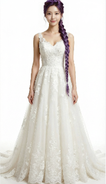
男性と女性の普通の画像から始め、Image to Image で結婚式の衣装に着替えさせます。各プロンプトの先頭にある [reference image] は 参照画像を置く場所で、どの男性・どの女性かをモデルに伝えます。
[reference image] Put this man in a wedding groom's suit.
[reference image] Put this woman in a wedding bride's dress.
続いてドキュメントは生成設定を書いています。
4 results, 9:16, white background, 3D photoreal style, 1K
白背景のきれいな全身画像は、後の衣装編集のベースに最適です。最も良い結果を選び、「きれいな状態」として保存します。

3. 色を固定する:ペンキ汚れ版とグラフィティ版
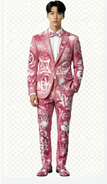
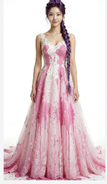
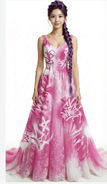
きれいな衣装ができたら、同じ服を Image to Image で「汚れ → グラフィティ」の順に変えます。ドキュメントは 1 つのプロンプトで両方の段階を指示し、服のデザインは同じまま、ペンキが付くだけと強調しています。
[Groom suit] Paint some [pink] paint stains onto this man's suit, then repaint his suit completely into an artistic spray-can graffiti-style suit, mainly [pink] with white as the secondary color. The garment design must stay the same; it only gets paint on it.
[Bride dress] Put a lot of [pink] paint onto this woman's wedding dress, then repaint the dress into an artistic spray-can graffiti-style dress, mainly [pink] with white as the secondary color. The garment design must stay the same; it only gets paint on it.
4 results each, 9:16, white background, 3D photoreal style, 1K
[Groom suit] と [Bride dress] は対応する参照画像を入れる枠、[pink] は変更できる色の枠です。新郎に必要なのはグラフィティ状態だけで、新婦にはペンキ汚れとグラフィティの両方が必要です。
4. 開始フレーム:動画の最初の画面
開始フレームは、視聴者が最初に目にするものを決めます。幸せそうに見つめ合う二人と、背景でペンキのバケツを持って忍び寄る悪役です。[groom]、[bride]、[villain] は対応する参照画像の枠、[pink] はペンキの色です。
Outside the doors of an American wedding chapel, [groom] and [bride] stand at the entrance, happily looking at each other. [villain], holding a bucket of [pink] paint, grins and sneaks toward the woman from the background, in the pose of about to throw the paint at her.
4 results, 1K, 9:16, 3D photoreal style
ドキュメントはこの手順に 2 枚の画像を置いています。開始フレームと、悪役 Abby の単独参照画像です。最初のショットには 3 人全員が登場するため、悪役にも安定した参照画像が必要です。


5. キーフレーム:物語の段階ごとに 1 枚
キーフレームは物語の静止画です。衣装が変わってもキャラクターが同じ人物に見えるようにします。ドキュメントはまずルールを示しています。
Keyframes
Use a different state at each stage.
Note: if an appearance change is needed, use the phrasing "X's appearance becomes [reference image link]".
続いて 5 つのキーフレーム用プロンプトです。A、B、C、D は上の登場人物の記号で、[bride, a little paint]、[bride, graffiti dress]、[groom, a little paint]、[groom, graffiti suit] は先に作った衣装の参照画像です。
1. 汚れたドレスを見て泣く(元のドキュメントではこのプロンプトに画像なし)
Outside the chapel, A cries sadly while looking at her paint-covered wedding dress. A's appearance becomes [bride, a little paint].
2. Mira がスプレー缶を持って駆けつける
Outside the chapel, A weeps sadly while looking at her wedding dress. Reference [bride, a little paint]. C stands anxiously in front of A holding white and [orange] graffiti spray cans.
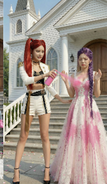
3. グラフィティドレスが完成、Jinu が気絶した Abby を引きずってくる
Outside the chapel, A is shocked and amazed as she looks at her wedding dress. Reference [bride, graffiti dress]. C happily stands in front of A holding white and orange graffiti spray cans. B stands at the edge of the frame looking at A in surprise; B's appearance becomes [groom, a little paint]. With one hand B drags D by the collar; D has comically huge bumps all over his head and is knocked out cold and dazed.
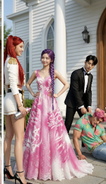
4. 二人ともグラフィティ衣装で礼拝堂に入る直前
At the chapel entrance, A's appearance becomes [bride, graffiti dress] and B's appearance becomes [groom, graffiti suit]. They smile at each other, backs to the camera, about to walk into the cathedral, which is full of blurred American guests in formal wear.
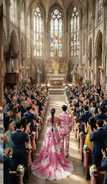
5. 礼拝堂全体が拍手する
Inside the chapel, a wide shot. Guests fill the chapel, all wearing formal clothes in [pink] as the main color and white as the secondary color, backs to the camera, applauding and cheering for A and B. A's appearance becomes [bride, graffiti dress] and B's appearance becomes [groom, graffiti suit]. They stand facing each other on the stage, hand in hand, smiling at each other. C stands behind the two of them, smiling and holding a Bible, saying something to A.
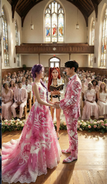
6. タイムライン付きプロンプト:15 秒クリップを生成する
このタイムライン付きプロンプトがショートの核心です。Image to Video で Seedance 2.5 を選び、各セグメントを約 15 秒で生成します。スタジオの Seedance 2.5 は 1 回の生成で 4〜30 秒に対応しています。
ドキュメントの各セグメントは "Reference [number]" で始まります。ドキュメント内の画像の並び順から見ると、Reference [0] は開始フレーム、Reference [1]〜[4] は順にキーフレーム 2〜5 に対応します。これは並び順からの推測で、ドキュメントに 1 つずつ明記されているわけではありません。各セグメントは、まず参照画像の誰が誰かを示し、次にタイムラインを書きます。
使うときの注意:
- 1 枚の画像からそのまま始めたいときは Image to Video の最初のフレームモードを、複数の画像をキャラクターや場面の参照にしたいときは参照モードを使います。両者を組み合わせられると決めつけず、選択したモデルに表示されるコントロールに従ってください。
- aiMakeVideo ではアップロードした素材を
@Image1、@Image2のように指定できます。ドキュメントの [0]、[1] の表記に対応します。 - 各セグメントは "Rich effects and sound effects, no background music, no subtitles" で終わり、音と字幕の条件をプロンプトの中で指定しています。
Reference [0]:ペンキ攻撃
Reference [0]
Is the black-haired man, is the purple-braid woman, is the yellow-shirt man.
[0-3s] Fixed-camera frontal medium shot, camera at eye level with the characters, slow dolly zoom in. The purple-braid woman and the black-haired man stand facing each other, exchanging smiling looks. The woman says happily and excitedly, "We’re finally getting married." Her eyes are tender and happy; the lighting is soft. At the same time the floral-shirt man grins, carries a huge bucket of paint in both hands, and runs up to the purple-braid woman.
[4-8s] Cut to a side tracking shot at the floral-shirt man's shoulder height, with slight handheld shake for tension. The floral-shirt man suddenly tips the paint bucket; in slow motion a large amount of paint pours down and splashes across the front of the purple-braid woman's wedding dress, and a little paint splashes onto the black-haired man's clothes. The sound effect is an exaggerated liquid splash. The slow motion ends and it cuts back to the side tracking shot; the floral-shirt man grins, throws away the empty bucket, turns and runs out of frame.
[9-15s] Cut back to the fixed frontal medium shot. The purple-braid woman and the black-haired man are shocked and look at the woman's wedding dress. The purple-braid woman's expression goes from shock to instant collapse; the camera slowly pushes in to a close-up of her face, sad and in pain; she covers her face with both hands and wails, "No!!" Cut to a close-up of the black-haired man's face, low-angle shot to emphasize his presence; his eyes turn from disbelief to burning rage; he grits his teeth and roars, "I'm gonna KILL him!!" and rushes out of frame. The camera cuts back to the frontal medium shot, left with only the purple-braid woman, slowly pushing in toward her as she looks at the ruined wedding dress with trembling hands, big tears rolling down.
Rich effects and sound effects, no background music, no subtitles.
Reference [1]:Mira が駆けつけ、スプレーで救出を始める
Reference [1]
Is the red-twin-tail woman.
[0-4s] Fixed frontal medium shot, camera at the characters' waist height, slightly low angle. We see the purple-braid woman crying alone in a low voice, shoulders shaking; the red-twin-tail woman is not yet visible. The red-twin-tail woman hurries into frame, the camera panning slightly with her; out of breath, she rushes up beside the purple-braid woman and stops, and the camera steadies again. Her eyes lock onto the wedding dress and her expression freezes. Cut to an over-the-shoulder view from behind the red-twin-tail woman's shoulder, a close-up of the dress as she sees it, then back to the frontal two-person medium shot; she looks up and asks anxiously, "What happened?!"
[5-9s] Cut to a close-up of the purple-braid woman's face, straight-on, with slight handheld shake to suggest emotional instability. She tilts her head back and sobs, tears streaming; her voice trembling and choked, she says, "My wedding..everything is ruined!!" Cut back to the two-person medium shot; the red-twin-tail woman frowns and presses her lips together. Cut to a side close-up at her waist as she quickly pulls a [green] spray can from behind her back, then a close-up of her hand shaking the can hard.
[10-15s] Low-angle shot with the camera close to the ground, from the point of view of the red-twin-tail woman crouching down and looking up at the purple-braid woman. Her gaze is firm as she says, "Hey, I got you. Trust me." Then cut to a low side tracking shot of the red-twin-tail woman bending over and quickly spraying the hem of the purple-braid woman's wedding dress. The purple-braid woman watches her through blurred tears and says sadly, "nothing's gonna fix this..."
Rich effects and sound effects, no background music, no subtitles.
Reference [1](続き):ドレスにペイントする
ドキュメントは同じ場面の続きに Reference [1] を再び使っています。
Reference [1]
[0-5s] Side tracking shot, camera at the red-twin-tail woman's waist height, slowly moving sideways to follow the direction of her spray painting. The purple-braid woman keeps crying, sad and broken down. The red-twin-tail woman is completely focused, smoothly and carefully using spray cans in both hands to create art on the hem of the wedding dress in [green] and white; her movements are continuous and natural, occasionally turning her face to glance at the result before continuing. With an anxious expression she says, "I WILL save this!I promise!!" Rich effects and sound effects, no background music, no subtitles.
Reference [2]:ドレス完成、Jinu が Abby を引きずって戻る
Reference [2]
Is the purple-braid woman, is the red-twin-tail woman, is the black-haired man, is the [yellow-shirt man].
[0-4s] The frame shows the red-twin-tail woman and the purple-braid woman full-body. The red-twin-tail woman slowly stands up, puts away the spray can and lightly claps her hands; only these two are in frame. She smiles at the purple-braid woman and says, "Done!" The purple-braid woman looks down at her wedding dress; her expression goes from sobbing sadly to crying tears of joy, mouth slightly open, eyes red again, both hands gently covering her mouth. The red-twin-tail woman says proudly in an off-screen voice, "Way better now, right?"
[5-8s] Only the black-haired man is in frame, dragging the knocked-out [floral-shirt man] into the shot. He drops him on the ground without a care, with a dull thud; the [floral-shirt man] lies unconscious and motionless. The black-haired man looks up and sees the full figure of the purple-braid woman crying tears of joy; his expression instantly turns to extreme shock, mouth wide open.
[9-11s] Upper-body close-up of the black-haired man, looking anxiously at the red-twin-tail woman and saying, "That's AMAZING! can you make me a matching one?"
[12-14s] Cut to an upper-body close-up of the red-twin-tail woman. The corner of her mouth lifts; she confidently raises the spray can, raises an eyebrow at the camera and says, "Say no more." Then she sprays the can hard straight at the camera; paint quickly covers the entire lens, the camera rushes in toward the nozzle, and the screen goes completely black. The sound effects are the spray-can hiss and paint slapping against the lens. Rich effects and sound effects, no background music, no subtitles.
Rich effects and sound effects, no background music, no subtitles.
Reference [3]:二人が扉を押し開ける
Reference [3]
Is the purple-braid woman, is the black-haired man.
[0-3s] Fixed camera inside the chapel, low angle at floor level, aimed at the central aisle. The chapel's double doors are suddenly pushed open to both sides from the center of the frame, with a heavy sound effect. The first image is a big close-up of the purple-braid woman's and the black-haired man's ankles and shoes, the camera extremely close to the ground; with their backs to the camera, the two slowly step into the chapel, in slow motion.
[4-8s] The camera tilts up slowly in an elegant arc, combined with a dolly out, rising from their feet to the full figures of the two, revealing the full wedding dress of the purple-braid woman and the black-haired man's outfit. The two walk hand in hand slowly toward the depths of the chapel, looking only at each other with gentle smiles; light from deep in the chapel creates a rim-light effect. The camera finally settles on a wide shot of their backs.
[9-13s] Cut to a fixed wide-angle camera at the side of the chapel; the camera pans across the seating. The guests see the purple-braid woman and the black-haired man walk in and gasp in shock; the whole chapel falls into a brief silence, with a suspense sound effect.
Rich effects and sound effects, no background music, no subtitles.
Reference [3](続き):Mira が招待客の服を変える
ドキュメントでは、この次のセグメントも "Reference [3]" と表記されています。同じ礼拝堂の参照画像を使います。
Reference [3]
Is the red-twin-tail woman.
[0-4s] Inside the chapel in front of the doors, low-angle shot. The red-twin-tail woman faces the guests, whose backs are to the camera, raises an oversized [green] spray can high and sprays hard into the chapel. The camera tilts down slowly from a close-up of her hand to a close-up of her mischievous, excited face. A large cloud of [green] smoke spreads into the chapel. She shouts excitedly and passionately, "Let the ceremony begin!!"
[5-10s] Cut to a wide overhead view of the whole chapel interior, with the camera mounted at the center of the ceiling. A dazzling magic effect sweeps in from the direction of the camera, [green] light spreading in waves toward the depths of the chapel. As the light passes over all the guests, all their clothes must turn into [green]-and-white graffiti art style, but the appearance of the bride (purple-braid woman) and groom (black-haired man) in the aisle must not change; they keep walking slowly and gracefully forward along the aisle. The camera slowly pushes down. After each guest's clothes change color, they look in shock at their own clothes and those of the people beside them.
[11-15s] Cut to a fixed wide-angle camera at the side inside the chapel. The whole audience is dressed in [green] graffiti art style and bursts into cheers and applause; the wide angle shows the joyful full view of the chapel. Then the camera dollies in along a smooth arc and cuts back to a medium shot deep in the chapel; the bride (purple-braid woman) and groom (black-haired man) in the aisle must walk slowly forward, exchange a happy smile, and thunderous applause surrounds them.
Rich effects and sound effects, no background music, no subtitles.
Reference [4]:誓いとキス
Reference [4]
Is the red-twin-tail woman, is the purple-braid woman, is the black-haired man.
[0-2s] Low-angle camera at the side of the chapel; the camera slowly slides sideways in an arc and cranes up into the scene, gracefully pushing in to the center of the chapel. The purple-braid woman and the black-haired man stand facing each other, the whole room applauding and cheering; they look at each other with smiles. Cut to a side close-up of the purple-braid woman's face; her eyes are red and a tear slides from the corner of her eye. She doesn't wipe it away, just smiles happily.
[3-5s] Cut to a frontal medium shot of the red-twin-tail woman, camera level at chest height. She smiles at the black-haired man and says in a gentle, clear voice, "You may now kiss the bride."
[6-10s] Cut to a frontal close-up of the black-haired man's face, camera level with his eyes, slowly pushing in. His eyes are slightly red and he says in a low, choked voice, "I love you. So much."
[11-13s] Cut to a frontal close-up of the purple-braid woman's face. After hearing him, tears slide silently down, her lips tremble, and she says softly and chokingly, "I love you too." The sound consists only of the two of them breathing softly and the occasional sobs from the seats in the distance.
[14-15s] Cut to a level side shot of the two, in slow motion. The black-haired man slowly raises his hand and gently cups the purple-braid woman's face, his thumb tenderly wiping the tears from her cheek. Their foreheads touch and rest for a moment, then they kiss; the whole room erupts in cheers and applause, the camera slowly dollies out, the picture slowly fades out, and the sound is left with only applause and cheering.
Rich effects and sound effects, no background music, no subtitles.
これらのプロンプトの書き方
- 1 セグメントに 1 つの明確な参照画像。 各ショットは "Reference [n]" と、誰が誰かを示す短い 1 行で始まり、そのあと動きを説明します。
- タイムラインは短い区切りで。 1 区切りは 3〜6 秒、1 ショットにつき 1 つの出来事で、カメラの高さ、ショットサイズ、動き、表情、セリフ、音まで書き分けます。
- 衣装の変更は説明ではなく参照画像で。 キーフレームは "X's appearance becomes [reference]" と書き、服のデザインは変えずペンキだけを加えるよう指定しています。
- セリフは短く。 1 行は 1 文だけで、感情(崩れ落ちる、驚き、声を詰まらせる)は動きの描写に書き込みます。
- 音は毎回指定する。 各セグメントで効果音、BGM なし、字幕なしを明記し、音楽と字幕は編集で加えます。
再現する前に確認すること
元の資料は作業メモで、いくつか細部に不一致があります。生成する前にそろえてください。
- スプレー缶の色: キーフレームでは Mira は白と [orange] の缶を持ち、タイムライン付きプロンプトでは [green] です。1 色に決めて統一します。
- 悪役の呼び方: 同じキャラクターが "villain"、"yellow-shirt man"、"floral-shirt man" と呼ばれています。プロンプトでは 1 つの言い方に統一します。
- Reference [3] が 2 回出てくる: 2 回目は礼拝堂の扉での Mira のスプレー変身で、ドキュメントでは [3] のままです。同じ礼拝堂の参照画像を使います。
- グラフィティの主色: 開始フレームと色の固定では [pink]、礼拝堂の変身では [green] です。招待客の服を二人の服と見分けたいなら違いを残し、そうでなければ 1 色に統一します。
aiMakeVideo で試す
- Text to Image または Image to Image で、新郎、新婦、友人、悪役の参照画像を作ります。
- Image to Image で、各キャラクターのペンキ汚れ状態とグラフィティ状態の衣装を作ります。
- 開始フレームと、物語の各段階のキーフレームを作ります。
- タイムライン付きプロンプトを 1 セグメントずつ Image to Video に貼り付けます。
- クリップをつないでショートを完成させ、必要なら編集で字幕を足します。
準備ができたら 作成スタジオ を開くか、先に プロンプトとモデルのガイド を読んでください。もう 1 つの実例として、1 枚の参照画像だけで作るスローモーションコメディは aiMakeVideo の Seedance 2.5 で作るスローモーションコメディ をご覧ください。