This article breaks down a vertical YouTube Short made with Seedance 2.5. A bride, Rumi, has her wedding dress ruined by a paint prank. Her friend Mira turns the dress into a graffiti gown with spray cans, and the wedding ends in a joyful, whole-chapel costume change. The creator kept a complete working document, and every prompt from it is reproduced below in English, ready to copy. The source document is written in Chinese; the English versions keep its structure, camera directions and dialogue. Replace the bracketed slots, such as [reference image] or [pink], with your own assets and colors.
The document records about 180,000 views for this Short. That is one case-study result, not a promise that the same prompts will go viral. What is worth copying is the order of work: lock the characters, make an opening frame, make a keyframe for each story stage, then generate video shot by shot from timed prompts.
Pipeline overview
- Character setup: reference images of the groom and bride in clean, paint-stained and graffiti outfits.
- Opening frame: the picture the first shot starts from, plus a stable reference for the villain.
- Keyframes: one image for each story stage; when an outfit changes, use the phrase "X's appearance becomes [reference image]".
- Timed prompts: about 15 seconds per clip, written as seconds, camera, action, dialogue and sound.
- Edit: assemble the best clips into the Short.
Every image in the source document is 9:16 portrait in a 3D photoreal style. The reference thumbnails below are shown small, at 9:16, next to the step where they are used.
1. Character setup
Cast
The document gives each character a letter, which the keyframe prompts use later:
Cast:
A: rumi
B: jinu
C: mira
D: abby
- A: Rumi, the bride, long purple braids.
- B: Jinu, the groom, short black hair.
- C: Mira, the bride's friend, red twin tails, who rescues the dress with spray cans.
- D: Abby, the villain: a man in a floral shirt and yellow cap. The timed prompts call him the "yellow-shirt man" or "floral-shirt man".
Outfit states to prepare
The document lists five states under character setup; later shots switch between them as the story advances:
Groom: suit state / Groom: graffiti suit state
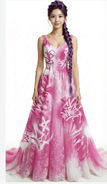
Bride: dress state / Bride: paint-stained dress state / Bride: graffiti dress state
2. Outfit lock: put the characters in wedding clothes
Start from an ordinary image of a man and a woman and use Image to Image to dress them for the wedding. The [reference image] at the start of each prompt is where the reference image goes; it tells the model which man and which woman:
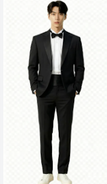
[reference image] Put this man in a wedding groom's suit.
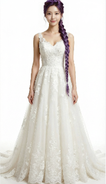
[reference image] Put this woman in a wedding bride's dress.
The document then writes the generation settings:
4 results, 9:16, white background, 3D photoreal style, 1K
A clean full-body image on white is the best base for later outfit edits. Pick the strongest result and save it as the "clean" state.
3. Color lock: paint-stained and graffiti versions
With the clean outfits ready, the same clothing goes through "stained, then graffiti" with Image to Image. The document asks for both stages in one prompt and stresses that the garment design must stay the same, only paint is added:
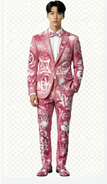
[Groom suit] Paint some [pink] paint stains onto this man's suit, then repaint his suit completely into an artistic spray-can graffiti-style suit, mainly [pink] with white as the secondary color. The garment design must stay the same; it only gets paint on it.
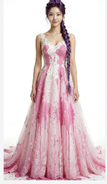
[Bride dress] Put a lot of [pink] paint onto this woman's wedding dress, then repaint the dress into an artistic spray-can graffiti-style dress, mainly [pink] with white as the secondary color. The garment design must stay the same; it only gets paint on it.
4 results each, 9:16, white background, 3D photoreal style, 1K
[Groom suit] and [Bride dress] are slots for the matching reference images, and [pink] is a color slot you can change. The groom only needs the graffiti state; the bride needs both the paint-stained and graffiti states.
4. Opening frame: the first picture of the video
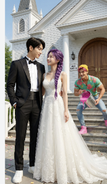
The opening frame decides what the viewer sees first: the couple gazing happily at each other while the villain sneaks up in the background with a bucket of paint. [groom], [bride] and [villain] are slots for the matching references, and [pink] is the paint color:
Outside the doors of an American wedding chapel, [groom] and [bride] stand at the entrance, happily looking at each other. [villain], holding a bucket of [pink] paint, grins and sneaks toward the woman from the background, in the pose of about to throw the paint at her.
4 results, 1K, 9:16, 3D photoreal style
The document places two images at this step: the opening frame, and a single-character reference for the villain Abby. All three characters appear in the first shot, so the villain needs a stable reference too.

5. Keyframes: one image for each story stage
Keyframes are the story's freeze-frames. They keep each character the same person after outfit changes. The document first states the rules:
Keyframes
Use a different state at each stage.
Note: if an appearance change is needed, use the phrasing "X's appearance becomes [reference image link]".
Then come five keyframe prompts. A, B, C and D are the cast letters above; [bride, a little paint], [bride, graffiti dress], [groom, a little paint] and [groom, graffiti suit] are the outfit references made earlier.
1. Crying over the stained dress (this prompt has no image in the source document)
Outside the chapel, A cries sadly while looking at her paint-covered wedding dress. A's appearance becomes [bride, a little paint].
2. Mira arrives with spray cans
Outside the chapel, A weeps sadly while looking at her wedding dress. Reference [bride, a little paint]. C stands anxiously in front of A holding white and [orange] graffiti spray cans.
3. Graffiti dress done; Jinu drags the knocked-out Abby back
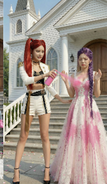
Outside the chapel, A is shocked and amazed as she looks at her wedding dress. Reference [bride, graffiti dress]. C happily stands in front of A holding white and orange graffiti spray cans. B stands at the edge of the frame looking at A in surprise; B's appearance becomes [groom, a little paint]. With one hand B drags D by the collar; D has comically huge bumps all over his head and is knocked out cold and dazed.
4. Both in graffiti outfits, about to enter the chapel
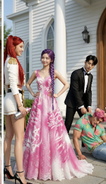
At the chapel entrance, A's appearance becomes [bride, graffiti dress] and B's appearance becomes [groom, graffiti suit]. They smile at each other, backs to the camera, about to walk into the cathedral, which is full of blurred American guests in formal wear.
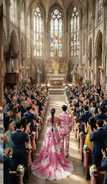
5. The whole chapel applauds
Inside the chapel, a wide shot. Guests fill the chapel, all wearing formal clothes in [pink] as the main color and white as the secondary color, backs to the camera, applauding and cheering for A and B. A's appearance becomes [bride, graffiti dress] and B's appearance becomes [groom, graffiti suit]. They stand facing each other on the stage, hand in hand, smiling at each other. C stands behind the two of them, smiling and holding a Bible, saying something to A.
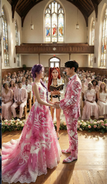
6. Timed prompts: generate 15-second clips
These timed prompts are the core of the Short. In Image to Video, choose Seedance 2.5 and generate each segment at around 15 seconds; Seedance 2.5 in the studio supports 4–30 seconds per generation.
Every segment in the document starts with "Reference [number]". Judging from the order of the images in the document, Reference [0] is the opening frame and References [1] to [4] are keyframes 2 to 5 in order. This is an inference from the layout; the document does not label them one by one. Each segment first says who is who in the reference, then gives the timeline.
Notes on using them:
- To start exactly from one image, use the first-frame mode of Image to Video; to treat several images as character or scene references, use the reference mode. Do not assume the two modes can be combined; follow the controls shown for the selected model.
- In aiMakeVideo you can mention uploaded assets as
@Image1,@Image2and so on, which corresponds to the document's [0], [1] markers. - Each segment ends with "Rich effects and sound effects, no background music, no subtitles", which sets the sound and subtitle requirements inside the prompt itself.
Reference [0]: the paint attack
Reference [0]
Is the black-haired man, is the purple-braid woman, is the yellow-shirt man.
[0-3s] Fixed-camera frontal medium shot, camera at eye level with the characters, slow dolly zoom in. The purple-braid woman and the black-haired man stand facing each other, exchanging smiling looks. The woman says happily and excitedly, "We’re finally getting married." Her eyes are tender and happy; the lighting is soft. At the same time the floral-shirt man grins, carries a huge bucket of paint in both hands, and runs up to the purple-braid woman.
[4-8s] Cut to a side tracking shot at the floral-shirt man's shoulder height, with slight handheld shake for tension. The floral-shirt man suddenly tips the paint bucket; in slow motion a large amount of paint pours down and splashes across the front of the purple-braid woman's wedding dress, and a little paint splashes onto the black-haired man's clothes. The sound effect is an exaggerated liquid splash. The slow motion ends and it cuts back to the side tracking shot; the floral-shirt man grins, throws away the empty bucket, turns and runs out of frame.
[9-15s] Cut back to the fixed frontal medium shot. The purple-braid woman and the black-haired man are shocked and look at the woman's wedding dress. The purple-braid woman's expression goes from shock to instant collapse; the camera slowly pushes in to a close-up of her face, sad and in pain; she covers her face with both hands and wails, "No!!" Cut to a close-up of the black-haired man's face, low-angle shot to emphasize his presence; his eyes turn from disbelief to burning rage; he grits his teeth and roars, "I'm gonna KILL him!!" and rushes out of frame. The camera cuts back to the frontal medium shot, left with only the purple-braid woman, slowly pushing in toward her as she looks at the ruined wedding dress with trembling hands, big tears rolling down.
Rich effects and sound effects, no background music, no subtitles.
Reference [1]: Mira arrives and starts the spray-can rescue
Reference [1]
Is the red-twin-tail woman.
[0-4s] Fixed frontal medium shot, camera at the characters' waist height, slightly low angle. We see the purple-braid woman crying alone in a low voice, shoulders shaking; the red-twin-tail woman is not yet visible. The red-twin-tail woman hurries into frame, the camera panning slightly with her; out of breath, she rushes up beside the purple-braid woman and stops, and the camera steadies again. Her eyes lock onto the wedding dress and her expression freezes. Cut to an over-the-shoulder view from behind the red-twin-tail woman's shoulder, a close-up of the dress as she sees it, then back to the frontal two-person medium shot; she looks up and asks anxiously, "What happened?!"
[5-9s] Cut to a close-up of the purple-braid woman's face, straight-on, with slight handheld shake to suggest emotional instability. She tilts her head back and sobs, tears streaming; her voice trembling and choked, she says, "My wedding..everything is ruined!!" Cut back to the two-person medium shot; the red-twin-tail woman frowns and presses her lips together. Cut to a side close-up at her waist as she quickly pulls a [green] spray can from behind her back, then a close-up of her hand shaking the can hard.
[10-15s] Low-angle shot with the camera close to the ground, from the point of view of the red-twin-tail woman crouching down and looking up at the purple-braid woman. Her gaze is firm as she says, "Hey, I got you. Trust me." Then cut to a low side tracking shot of the red-twin-tail woman bending over and quickly spraying the hem of the purple-braid woman's wedding dress. The purple-braid woman watches her through blurred tears and says sadly, "nothing's gonna fix this..."
Rich effects and sound effects, no background music, no subtitles.
Reference [1] (continued): painting the dress
The document reuses Reference [1] for the next part of the same scene:
Reference [1]
[0-5s] Side tracking shot, camera at the red-twin-tail woman's waist height, slowly moving sideways to follow the direction of her spray painting. The purple-braid woman keeps crying, sad and broken down. The red-twin-tail woman is completely focused, smoothly and carefully using spray cans in both hands to create art on the hem of the wedding dress in [green] and white; her movements are continuous and natural, occasionally turning her face to glance at the result before continuing. With an anxious expression she says, "I WILL save this!I promise!!" Rich effects and sound effects, no background music, no subtitles.
Reference [2]: the dress is done, Jinu drags Abby back
Reference [2]
Is the purple-braid woman, is the red-twin-tail woman, is the black-haired man, is the [yellow-shirt man].
[0-4s] The frame shows the red-twin-tail woman and the purple-braid woman full-body. The red-twin-tail woman slowly stands up, puts away the spray can and lightly claps her hands; only these two are in frame. She smiles at the purple-braid woman and says, "Done!" The purple-braid woman looks down at her wedding dress; her expression goes from sobbing sadly to crying tears of joy, mouth slightly open, eyes red again, both hands gently covering her mouth. The red-twin-tail woman says proudly in an off-screen voice, "Way better now, right?"
[5-8s] Only the black-haired man is in frame, dragging the knocked-out [floral-shirt man] into the shot. He drops him on the ground without a care, with a dull thud; the [floral-shirt man] lies unconscious and motionless. The black-haired man looks up and sees the full figure of the purple-braid woman crying tears of joy; his expression instantly turns to extreme shock, mouth wide open.
[9-11s] Upper-body close-up of the black-haired man, looking anxiously at the red-twin-tail woman and saying, "That's AMAZING! can you make me a matching one?"
[12-14s] Cut to an upper-body close-up of the red-twin-tail woman. The corner of her mouth lifts; she confidently raises the spray can, raises an eyebrow at the camera and says, "Say no more." Then she sprays the can hard straight at the camera; paint quickly covers the entire lens, the camera rushes in toward the nozzle, and the screen goes completely black. The sound effects are the spray-can hiss and paint slapping against the lens. Rich effects and sound effects, no background music, no subtitles.
Rich effects and sound effects, no background music, no subtitles.
Reference [3]: the couple pushes open the doors
Reference [3]
Is the purple-braid woman, is the black-haired man.
[0-3s] Fixed camera inside the chapel, low angle at floor level, aimed at the central aisle. The chapel's double doors are suddenly pushed open to both sides from the center of the frame, with a heavy sound effect. The first image is a big close-up of the purple-braid woman's and the black-haired man's ankles and shoes, the camera extremely close to the ground; with their backs to the camera, the two slowly step into the chapel, in slow motion.
[4-8s] The camera tilts up slowly in an elegant arc, combined with a dolly out, rising from their feet to the full figures of the two, revealing the full wedding dress of the purple-braid woman and the black-haired man's outfit. The two walk hand in hand slowly toward the depths of the chapel, looking only at each other with gentle smiles; light from deep in the chapel creates a rim-light effect. The camera finally settles on a wide shot of their backs.
[9-13s] Cut to a fixed wide-angle camera at the side of the chapel; the camera pans across the seating. The guests see the purple-braid woman and the black-haired man walk in and gasp in shock; the whole chapel falls into a brief silence, with a suspense sound effect.
Rich effects and sound effects, no background music, no subtitles.
Reference [3] (continued): Mira changes the guests' outfits
The document also labels this next segment "Reference [3]". Use the same chapel reference image:
Reference [3]
Is the red-twin-tail woman.
[0-4s] Inside the chapel in front of the doors, low-angle shot. The red-twin-tail woman faces the guests, whose backs are to the camera, raises an oversized [green] spray can high and sprays hard into the chapel. The camera tilts down slowly from a close-up of her hand to a close-up of her mischievous, excited face. A large cloud of [green] smoke spreads into the chapel. She shouts excitedly and passionately, "Let the ceremony begin!!"
[5-10s] Cut to a wide overhead view of the whole chapel interior, with the camera mounted at the center of the ceiling. A dazzling magic effect sweeps in from the direction of the camera, [green] light spreading in waves toward the depths of the chapel. As the light passes over all the guests, all their clothes must turn into [green]-and-white graffiti art style, but the appearance of the bride (purple-braid woman) and groom (black-haired man) in the aisle must not change; they keep walking slowly and gracefully forward along the aisle. The camera slowly pushes down. After each guest's clothes change color, they look in shock at their own clothes and those of the people beside them.
[11-15s] Cut to a fixed wide-angle camera at the side inside the chapel. The whole audience is dressed in [green] graffiti art style and bursts into cheers and applause; the wide angle shows the joyful full view of the chapel. Then the camera dollies in along a smooth arc and cuts back to a medium shot deep in the chapel; the bride (purple-braid woman) and groom (black-haired man) in the aisle must walk slowly forward, exchange a happy smile, and thunderous applause surrounds them.
Rich effects and sound effects, no background music, no subtitles.
Reference [4]: the vows and the kiss
Reference [4]
Is the red-twin-tail woman, is the purple-braid woman, is the black-haired man.
[0-2s] Low-angle camera at the side of the chapel; the camera slowly slides sideways in an arc and cranes up into the scene, gracefully pushing in to the center of the chapel. The purple-braid woman and the black-haired man stand facing each other, the whole room applauding and cheering; they look at each other with smiles. Cut to a side close-up of the purple-braid woman's face; her eyes are red and a tear slides from the corner of her eye. She doesn't wipe it away, just smiles happily.
[3-5s] Cut to a frontal medium shot of the red-twin-tail woman, camera level at chest height. She smiles at the black-haired man and says in a gentle, clear voice, "You may now kiss the bride."
[6-10s] Cut to a frontal close-up of the black-haired man's face, camera level with his eyes, slowly pushing in. His eyes are slightly red and he says in a low, choked voice, "I love you. So much."
[11-13s] Cut to a frontal close-up of the purple-braid woman's face. After hearing him, tears slide silently down, her lips tremble, and she says softly and chokingly, "I love you too." The sound consists only of the two of them breathing softly and the occasional sobs from the seats in the distance.
[14-15s] Cut to a level side shot of the two, in slow motion. The black-haired man slowly raises his hand and gently cups the purple-braid woman's face, his thumb tenderly wiping the tears from her cheek. Their foreheads touch and rest for a moment, then they kiss; the whole room erupts in cheers and applause, the camera slowly dollies out, the picture slowly fades out, and the sound is left with only applause and cheering.
Rich effects and sound effects, no background music, no subtitles.
How these prompts are written
- One clear reference per segment. Each shot opens with "Reference [n]" and a short line saying who is who, then describes the action.
- Timelines in short beats. Each beat is 3–6 seconds and one shot with one event: camera height, shot size, movement, expression, dialogue and sound are all spelled out.
- Outfit changes come from references, not descriptions. The keyframes say "X's appearance becomes [reference]" and insist that the garment design is unchanged and only paint is added.
- Dialogue is short. Each line is a single sentence; the emotion (collapse, surprise, choking up) is written into the action description.
- Sound is specified every time. Each segment states sound effects, no background music and no subtitles; music and captions are added in the edit.
Check these before you reproduce it
The source is a working note, and a few details are not fully consistent. Settle them before generating:
- Spray-can color: in the keyframes Mira holds white and [orange] cans; in the timed prompts they are [green]. Pick one color and keep it consistent.
- The villain's name: the same character is called "villain", "yellow-shirt man" and "floral-shirt man". Use one phrase in your prompts.
- Reference [3] appears twice: the second occurrence is Mira's spray-can transformation at the chapel doors; the document still writes it as [3], so use the same chapel reference image.
- Graffiti main color: the opening frame and color-lock steps use [pink]; the chapel transformation uses [green]. Keep that difference if you want the guests' outfits to read differently from the couple's; otherwise change them all to one color.
Try it in aiMakeVideo
- Make reference images for the groom, bride, friend and villain with Text to Image or Image to Image.
- Create each character's paint-stained and graffiti outfit states with Image to Image.
- Make the opening frame and a keyframe for each story stage.
- Paste the timed prompts into Image to Video one segment at a time.
- Assemble the clips into the final Short and add captions in the edit if you need them.
When you are ready, open the Create studio or read the prompt and model guide first. For another worked example, a slow-motion comedy built on a single reference image, see Seedance 2.5 Slow-Motion Comedy on aiMakeVideo.