Este artículo desglosa un YouTube Short vertical creado con Seedance 2.5. La novia, Rumi, ve cómo una broma con pintura arruina su vestido. Su amiga Mira lo convierte en un vestido de graffiti con aerosoles, y la boda termina con un cambio de vestuario de toda la capilla. El creador conservó un documento de trabajo completo y todos sus prompts se reproducen abajo en inglés, listos para copiar. El documento original está escrito en chino; las versiones en inglés mantienen su estructura, indicaciones de cámara y diálogos. Sustituye los campos entre corchetes, como [reference image] o [pink], por tus propios recursos y colores.
El documento indica unas 180 000 visualizaciones para este Short. Es el resultado de un solo caso, no una promesa de que los mismos prompts se vuelvan virales. Lo que merece copiarse es el orden de trabajo: fijar los personajes, crear un fotograma inicial, crear un fotograma clave para cada etapa de la historia y generar el vídeo toma a toma con prompts con línea de tiempo.
Resumen del proceso
- Personajes: imágenes de referencia del novio y la novia con el traje limpio, manchado de pintura y de graffiti.
- Fotograma inicial: la imagen de la que parte la primera toma, más una referencia estable del villano.
- Fotogramas clave: una imagen para cada etapa de la historia; cuando cambia el vestuario, usa la frase "X's appearance becomes [reference image]".
- Prompts con línea de tiempo: unos 15 segundos por clip, escritos con segundos, cámara, acción, diálogo y sonido.
- Edición: une los mejores clips en el Short.
Todas las imágenes del documento original son verticales 9:16 en estilo 3D fotorrealista. Las miniaturas de referencia se muestran pequeñas, en 9:16, junto al paso donde se usan.
1. Personajes
Reparto
El documento asigna una letra a cada personaje, y los prompts de fotogramas clave la usan después:
Cast:
A: rumi
B: jinu
C: mira
D: abby
- A: Rumi, la novia, largas trenzas moradas.
- B: Jinu, el novio, pelo corto negro.
- C: Mira, la amiga de la novia, coletas rojas, que salva el vestido con aerosoles.
- D: Abby, el villano: un hombre con camisa de flores y gorra amarilla. Los prompts con línea de tiempo lo llaman "yellow-shirt man" o "floral-shirt man".
Estados de vestuario que debes preparar
El documento enumera cinco estados en la configuración de personajes; las tomas posteriores alternan entre ellos según avanza la historia:
Groom: suit state / Groom: graffiti suit state
Bride: dress state / Bride: paint-stained dress state / Bride: graffiti dress state
2. Fijar el vestuario: vestir a los personajes de boda
Parte de una imagen normal de un hombre y una mujer y usa Image to Image para vestirlos de boda. El [reference image] al inicio de cada prompt es el lugar donde va la imagen de referencia; indica al modelo qué hombre y qué mujer son:
[reference image] Put this man in a wedding groom's suit.
[reference image] Put this woman in a wedding bride's dress.
Después el documento escribe los ajustes de generación:
4 results, 9:16, white background, 3D photoreal style, 1K
Una imagen de cuerpo entero limpia sobre fondo blanco es la mejor base para las siguientes ediciones de vestuario. Elige el mejor resultado y guárdalo como estado "limpio".

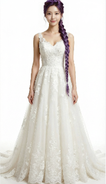
3. Fijar el color: versiones con pintura y con graffiti
Con los trajes limpios listos, la misma ropa pasa por "manchada y luego graffiti" con Image to Image. El documento pide ambas etapas en un solo prompt y recalca que el diseño de la prenda debe ser el mismo, solo se añade pintura:
[Groom suit] Paint some [pink] paint stains onto this man's suit, then repaint his suit completely into an artistic spray-can graffiti-style suit, mainly [pink] with white as the secondary color. The garment design must stay the same; it only gets paint on it.
[Bride dress] Put a lot of [pink] paint onto this woman's wedding dress, then repaint the dress into an artistic spray-can graffiti-style dress, mainly [pink] with white as the secondary color. The garment design must stay the same; it only gets paint on it.
4 results each, 9:16, white background, 3D photoreal style, 1K
[Groom suit] y [Bride dress] son campos para las imágenes de referencia correspondientes, y [pink] es un campo de color que puedes cambiar. El novio solo necesita el estado graffiti; la novia necesita el estado manchado de pintura y el de graffiti.
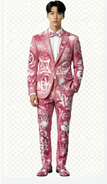
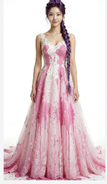
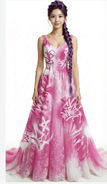
4. Fotograma inicial: la primera imagen del vídeo
El fotograma inicial decide lo primero que ve el espectador: la pareja mirándose felices mientras el villano se acerca al fondo con un cubo de pintura. [groom], [bride] y [villain] son campos para las referencias correspondientes, y [pink] es el color de la pintura:
Outside the doors of an American wedding chapel, [groom] and [bride] stand at the entrance, happily looking at each other. [villain], holding a bucket of [pink] paint, grins and sneaks toward the woman from the background, in the pose of about to throw the paint at her.
4 results, 1K, 9:16, 3D photoreal style
El documento coloca dos imágenes en este paso: el fotograma inicial y una referencia individual del villano Abby. Los tres personajes aparecen en la primera toma, así que el villano también necesita una referencia estable.
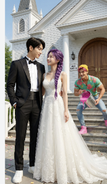

5. Fotogramas clave: una imagen por cada etapa de la historia
Los fotogramas clave son las imágenes fijas de la historia. Mantienen a cada personaje como la misma persona tras los cambios de vestuario. El documento empieza con las reglas:
Keyframes
Use a different state at each stage.
Note: if an appearance change is needed, use the phrasing "X's appearance becomes [reference image link]".
Después vienen cinco prompts de fotogramas clave. A, B, C y D son las letras del reparto; [bride, a little paint], [bride, graffiti dress], [groom, a little paint] y [groom, graffiti suit] son las referencias de vestuario creadas antes.
1. Llorando ante el vestido manchado (este prompt no tiene imagen en el documento original)
Outside the chapel, A cries sadly while looking at her paint-covered wedding dress. A's appearance becomes [bride, a little paint].
2. Mira llega con los aerosoles
Outside the chapel, A weeps sadly while looking at her wedding dress. Reference [bride, a little paint]. C stands anxiously in front of A holding white and [orange] graffiti spray cans.
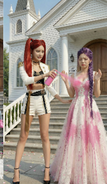
3. Vestido de graffiti terminado; Jinu arrastra a Abby inconsciente
Outside the chapel, A is shocked and amazed as she looks at her wedding dress. Reference [bride, graffiti dress]. C happily stands in front of A holding white and orange graffiti spray cans. B stands at the edge of the frame looking at A in surprise; B's appearance becomes [groom, a little paint]. With one hand B drags D by the collar; D has comically huge bumps all over his head and is knocked out cold and dazed.
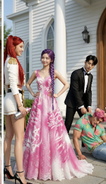
4. Ambos con trajes de graffiti, a punto de entrar en la capilla
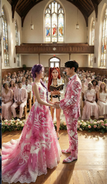
At the chapel entrance, A's appearance becomes [bride, graffiti dress] and B's appearance becomes [groom, graffiti suit]. They smile at each other, backs to the camera, about to walk into the cathedral, which is full of blurred American guests in formal wear.
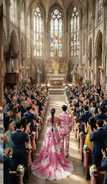
5. Toda la capilla aplaude
Inside the chapel, a wide shot. Guests fill the chapel, all wearing formal clothes in [pink] as the main color and white as the secondary color, backs to the camera, applauding and cheering for A and B. A's appearance becomes [bride, graffiti dress] and B's appearance becomes [groom, graffiti suit]. They stand facing each other on the stage, hand in hand, smiling at each other. C stands behind the two of them, smiling and holding a Bible, saying something to A.
6. Prompts con línea de tiempo: clips de 15 segundos
Estos prompts con línea de tiempo son el núcleo del Short. En Image to Video, elige Seedance 2.5 y genera cada segmento con unos 15 segundos; Seedance 2.5 admite de 4 a 30 segundos por generación en el estudio.
Cada segmento del documento empieza con "Reference [number]". Por el orden de las imágenes en el documento, Reference [0] es el fotograma inicial y Reference [1] a [4] son los fotogramas clave 2 a 5, en orden. Es una deducción a partir de la disposición; el documento no los etiqueta uno por uno. Cada segmento indica primero quién es quién en la referencia y luego da la línea de tiempo.
Notas de uso:
- Para empezar exactamente desde una imagen, usa el modo de primer fotograma de Image to Video; para tratar varias imágenes como referencias de personajes o escenas, usa el modo de referencias. No des por hecho que se pueden combinar; sigue los controles que muestre el modelo seleccionado.
- En aiMakeVideo puedes mencionar los recursos subidos como
@Image1,@Image2, etc., que equivalen a las marcas [0], [1] del documento. - Cada segmento termina con "Rich effects and sound effects, no background music, no subtitles", que fija los requisitos de sonido y subtítulos dentro del propio prompt.
Reference [0]: el ataque de pintura
Reference [0]
Is the black-haired man, is the purple-braid woman, is the yellow-shirt man.
[0-3s] Fixed-camera frontal medium shot, camera at eye level with the characters, slow dolly zoom in. The purple-braid woman and the black-haired man stand facing each other, exchanging smiling looks. The woman says happily and excitedly, "We’re finally getting married." Her eyes are tender and happy; the lighting is soft. At the same time the floral-shirt man grins, carries a huge bucket of paint in both hands, and runs up to the purple-braid woman.
[4-8s] Cut to a side tracking shot at the floral-shirt man's shoulder height, with slight handheld shake for tension. The floral-shirt man suddenly tips the paint bucket; in slow motion a large amount of paint pours down and splashes across the front of the purple-braid woman's wedding dress, and a little paint splashes onto the black-haired man's clothes. The sound effect is an exaggerated liquid splash. The slow motion ends and it cuts back to the side tracking shot; the floral-shirt man grins, throws away the empty bucket, turns and runs out of frame.
[9-15s] Cut back to the fixed frontal medium shot. The purple-braid woman and the black-haired man are shocked and look at the woman's wedding dress. The purple-braid woman's expression goes from shock to instant collapse; the camera slowly pushes in to a close-up of her face, sad and in pain; she covers her face with both hands and wails, "No!!" Cut to a close-up of the black-haired man's face, low-angle shot to emphasize his presence; his eyes turn from disbelief to burning rage; he grits his teeth and roars, "I'm gonna KILL him!!" and rushes out of frame. The camera cuts back to the frontal medium shot, left with only the purple-braid woman, slowly pushing in toward her as she looks at the ruined wedding dress with trembling hands, big tears rolling down.
Rich effects and sound effects, no background music, no subtitles.
Reference [1]: llega Mira y empieza el rescate con aerosoles
Reference [1]
Is the red-twin-tail woman.
[0-4s] Fixed frontal medium shot, camera at the characters' waist height, slightly low angle. We see the purple-braid woman crying alone in a low voice, shoulders shaking; the red-twin-tail woman is not yet visible. The red-twin-tail woman hurries into frame, the camera panning slightly with her; out of breath, she rushes up beside the purple-braid woman and stops, and the camera steadies again. Her eyes lock onto the wedding dress and her expression freezes. Cut to an over-the-shoulder view from behind the red-twin-tail woman's shoulder, a close-up of the dress as she sees it, then back to the frontal two-person medium shot; she looks up and asks anxiously, "What happened?!"
[5-9s] Cut to a close-up of the purple-braid woman's face, straight-on, with slight handheld shake to suggest emotional instability. She tilts her head back and sobs, tears streaming; her voice trembling and choked, she says, "My wedding..everything is ruined!!" Cut back to the two-person medium shot; the red-twin-tail woman frowns and presses her lips together. Cut to a side close-up at her waist as she quickly pulls a [green] spray can from behind her back, then a close-up of her hand shaking the can hard.
[10-15s] Low-angle shot with the camera close to the ground, from the point of view of the red-twin-tail woman crouching down and looking up at the purple-braid woman. Her gaze is firm as she says, "Hey, I got you. Trust me." Then cut to a low side tracking shot of the red-twin-tail woman bending over and quickly spraying the hem of the purple-braid woman's wedding dress. The purple-braid woman watches her through blurred tears and says sadly, "nothing's gonna fix this..."
Rich effects and sound effects, no background music, no subtitles.
Reference [1] (continuación): pintar el vestido
El documento reutiliza Reference [1] para la siguiente parte de la misma escena:
Reference [1]
[0-5s] Side tracking shot, camera at the red-twin-tail woman's waist height, slowly moving sideways to follow the direction of her spray painting. The purple-braid woman keeps crying, sad and broken down. The red-twin-tail woman is completely focused, smoothly and carefully using spray cans in both hands to create art on the hem of the wedding dress in [green] and white; her movements are continuous and natural, occasionally turning her face to glance at the result before continuing. With an anxious expression she says, "I WILL save this!I promise!!" Rich effects and sound effects, no background music, no subtitles.
Reference [2]: el vestido está listo, Jinu arrastra a Abby de vuelta
Reference [2]
Is the purple-braid woman, is the red-twin-tail woman, is the black-haired man, is the [yellow-shirt man].
[0-4s] The frame shows the red-twin-tail woman and the purple-braid woman full-body. The red-twin-tail woman slowly stands up, puts away the spray can and lightly claps her hands; only these two are in frame. She smiles at the purple-braid woman and says, "Done!" The purple-braid woman looks down at her wedding dress; her expression goes from sobbing sadly to crying tears of joy, mouth slightly open, eyes red again, both hands gently covering her mouth. The red-twin-tail woman says proudly in an off-screen voice, "Way better now, right?"
[5-8s] Only the black-haired man is in frame, dragging the knocked-out [floral-shirt man] into the shot. He drops him on the ground without a care, with a dull thud; the [floral-shirt man] lies unconscious and motionless. The black-haired man looks up and sees the full figure of the purple-braid woman crying tears of joy; his expression instantly turns to extreme shock, mouth wide open.
[9-11s] Upper-body close-up of the black-haired man, looking anxiously at the red-twin-tail woman and saying, "That's AMAZING! can you make me a matching one?"
[12-14s] Cut to an upper-body close-up of the red-twin-tail woman. The corner of her mouth lifts; she confidently raises the spray can, raises an eyebrow at the camera and says, "Say no more." Then she sprays the can hard straight at the camera; paint quickly covers the entire lens, the camera rushes in toward the nozzle, and the screen goes completely black. The sound effects are the spray-can hiss and paint slapping against the lens. Rich effects and sound effects, no background music, no subtitles.
Rich effects and sound effects, no background music, no subtitles.
Reference [3]: la pareja abre las puertas
Reference [3]
Is the purple-braid woman, is the black-haired man.
[0-3s] Fixed camera inside the chapel, low angle at floor level, aimed at the central aisle. The chapel's double doors are suddenly pushed open to both sides from the center of the frame, with a heavy sound effect. The first image is a big close-up of the purple-braid woman's and the black-haired man's ankles and shoes, the camera extremely close to the ground; with their backs to the camera, the two slowly step into the chapel, in slow motion.
[4-8s] The camera tilts up slowly in an elegant arc, combined with a dolly out, rising from their feet to the full figures of the two, revealing the full wedding dress of the purple-braid woman and the black-haired man's outfit. The two walk hand in hand slowly toward the depths of the chapel, looking only at each other with gentle smiles; light from deep in the chapel creates a rim-light effect. The camera finally settles on a wide shot of their backs.
[9-13s] Cut to a fixed wide-angle camera at the side of the chapel; the camera pans across the seating. The guests see the purple-braid woman and the black-haired man walk in and gasp in shock; the whole chapel falls into a brief silence, with a suspense sound effect.
Rich effects and sound effects, no background music, no subtitles.
Reference [3] (continuación): Mira cambia la ropa de los invitados
El documento también etiqueta este segmento como "Reference [3]". Usa la misma imagen de referencia de la capilla:
Reference [3]
Is the red-twin-tail woman.
[0-4s] Inside the chapel in front of the doors, low-angle shot. The red-twin-tail woman faces the guests, whose backs are to the camera, raises an oversized [green] spray can high and sprays hard into the chapel. The camera tilts down slowly from a close-up of her hand to a close-up of her mischievous, excited face. A large cloud of [green] smoke spreads into the chapel. She shouts excitedly and passionately, "Let the ceremony begin!!"
[5-10s] Cut to a wide overhead view of the whole chapel interior, with the camera mounted at the center of the ceiling. A dazzling magic effect sweeps in from the direction of the camera, [green] light spreading in waves toward the depths of the chapel. As the light passes over all the guests, all their clothes must turn into [green]-and-white graffiti art style, but the appearance of the bride (purple-braid woman) and groom (black-haired man) in the aisle must not change; they keep walking slowly and gracefully forward along the aisle. The camera slowly pushes down. After each guest's clothes change color, they look in shock at their own clothes and those of the people beside them.
[11-15s] Cut to a fixed wide-angle camera at the side inside the chapel. The whole audience is dressed in [green] graffiti art style and bursts into cheers and applause; the wide angle shows the joyful full view of the chapel. Then the camera dollies in along a smooth arc and cuts back to a medium shot deep in the chapel; the bride (purple-braid woman) and groom (black-haired man) in the aisle must walk slowly forward, exchange a happy smile, and thunderous applause surrounds them.
Rich effects and sound effects, no background music, no subtitles.
Reference [4]: los votos y el beso
Reference [4]
Is the red-twin-tail woman, is the purple-braid woman, is the black-haired man.
[0-2s] Low-angle camera at the side of the chapel; the camera slowly slides sideways in an arc and cranes up into the scene, gracefully pushing in to the center of the chapel. The purple-braid woman and the black-haired man stand facing each other, the whole room applauding and cheering; they look at each other with smiles. Cut to a side close-up of the purple-braid woman's face; her eyes are red and a tear slides from the corner of her eye. She doesn't wipe it away, just smiles happily.
[3-5s] Cut to a frontal medium shot of the red-twin-tail woman, camera level at chest height. She smiles at the black-haired man and says in a gentle, clear voice, "You may now kiss the bride."
[6-10s] Cut to a frontal close-up of the black-haired man's face, camera level with his eyes, slowly pushing in. His eyes are slightly red and he says in a low, choked voice, "I love you. So much."
[11-13s] Cut to a frontal close-up of the purple-braid woman's face. After hearing him, tears slide silently down, her lips tremble, and she says softly and chokingly, "I love you too." The sound consists only of the two of them breathing softly and the occasional sobs from the seats in the distance.
[14-15s] Cut to a level side shot of the two, in slow motion. The black-haired man slowly raises his hand and gently cups the purple-braid woman's face, his thumb tenderly wiping the tears from her cheek. Their foreheads touch and rest for a moment, then they kiss; the whole room erupts in cheers and applause, the camera slowly dollies out, the picture slowly fades out, and the sound is left with only applause and cheering.
Rich effects and sound effects, no background music, no subtitles.
Cómo están escritos estos prompts
- Una referencia clara por segmento. Cada toma empieza con "Reference [n]" y una línea breve que dice quién es quién; luego describe la acción.
- Líneas de tiempo en pulsos cortos. Cada pulso dura de 3 a 6 segundos y es una toma con un solo suceso: altura de cámara, tamaño de plano, movimiento, expresión, diálogo y sonido están especificados.
- Los cambios de vestuario vienen de referencias, no de descripciones. Los fotogramas clave dicen "X's appearance becomes [reference]" y exigen que el diseño de la prenda no cambie y solo se añada pintura.
- Los diálogos son cortos. Cada línea es una sola frase; la emoción (desmoronarse, sorpresa, voz quebrada) se escribe en la descripción de la acción.
- El sonido se especifica siempre. Cada segmento indica efectos de sonido, sin música de fondo y sin subtítulos; la música y los subtítulos se añaden en la edición.
Revisa esto antes de reproducirlo
La fuente es una nota de trabajo y algunos detalles no son del todo coherentes. Resuélvelos antes de generar:
- Color de los aerosoles: en los fotogramas clave Mira sostiene botes blancos y [orange]; en los prompts con línea de tiempo son [green]. Elige un color y mantenlo.
- El nombre del villano: el mismo personaje se llama "villain", "yellow-shirt man" y "floral-shirt man". Usa una sola expresión en tus prompts.
- Reference [3] aparece dos veces: la segunda es la transformación con aerosol de Mira en las puertas de la capilla; el documento sigue escribiendo [3], así que usa la misma imagen de referencia de la capilla.
- Color principal del graffiti: el fotograma inicial y el paso de color usan [pink]; la transformación de la capilla usa [green]. Mantén la diferencia si quieres que la ropa de los invitados se distinga de la de la pareja; si no, unifícalo en un solo color.
Pruébalo en aiMakeVideo
- Crea imágenes de referencia del novio, la novia, la amiga y el villano con Text to Image o Image to Image.
- Crea los estados de vestuario manchado de pintura y graffiti de cada personaje con Image to Image.
- Crea el fotograma inicial y un fotograma clave para cada etapa de la historia.
- Pega los prompts con línea de tiempo en Image to Video, un segmento cada vez.
- Une los clips en el Short final y añade subtítulos en la edición si los necesitas.
Cuando estés listo, abre el estudio de creación o lee primero la guía de prompts y modelos. Para otro ejemplo práctico, una comedia a cámara lenta construida sobre una sola imagen de referencia, consulta Comedia a cámara lenta con Seedance 2.5 en aiMakeVideo.