Open studio

Veo 3.1 AI Video Generator

Generate video with Veo 3.1, Google’s video model, from a prompt, a first frame or reference images. Choose Fast or Pro, 4, 6 or 8 seconds, and start from the sample prompts below.

References stay in this session only. Reattach them after reopening a draft.

Estimated cost: 180 credits (Veo 3.1 Fast)

What Veo 3.1 can do

Both clips below were made with Veo 3.1 Fast at 720p, 4 seconds. Tap Recreate to load the exact prompt into the generator above.

  • Veo 3.1 Fast
  • Veo 3.1 Pro
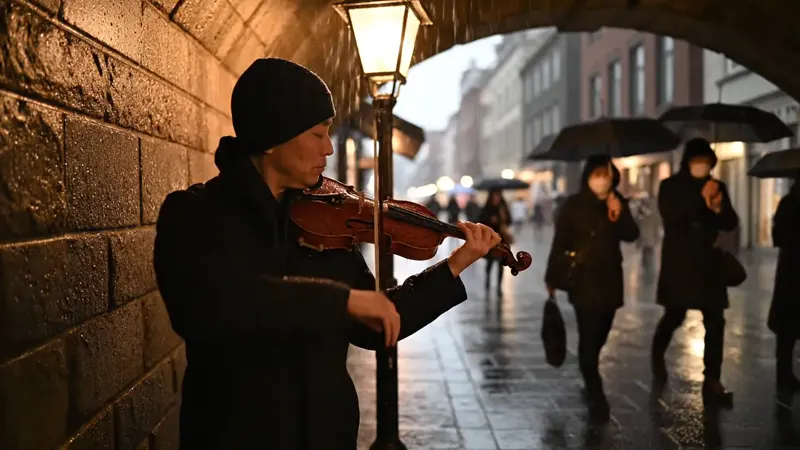
AI-generated video of a street musician playing a violin under a stone archway on a rainy evening, warm lantern light and passers-by with umbrellas — Veo 3.1 Fast, 720p, 4 seconds, 16:916:9 · 4s

A street musician plays a violin under a stone archway on a rainy evening, warm lantern light, passers-by with umbrellas blur past, camera slowly pushes in, natural ambient rain sound and soft violin.

Fast to try, Pro to finish

Fast returns a clip in roughly two minutes for iteration; Pro takes about four minutes and is aimed at the final take.
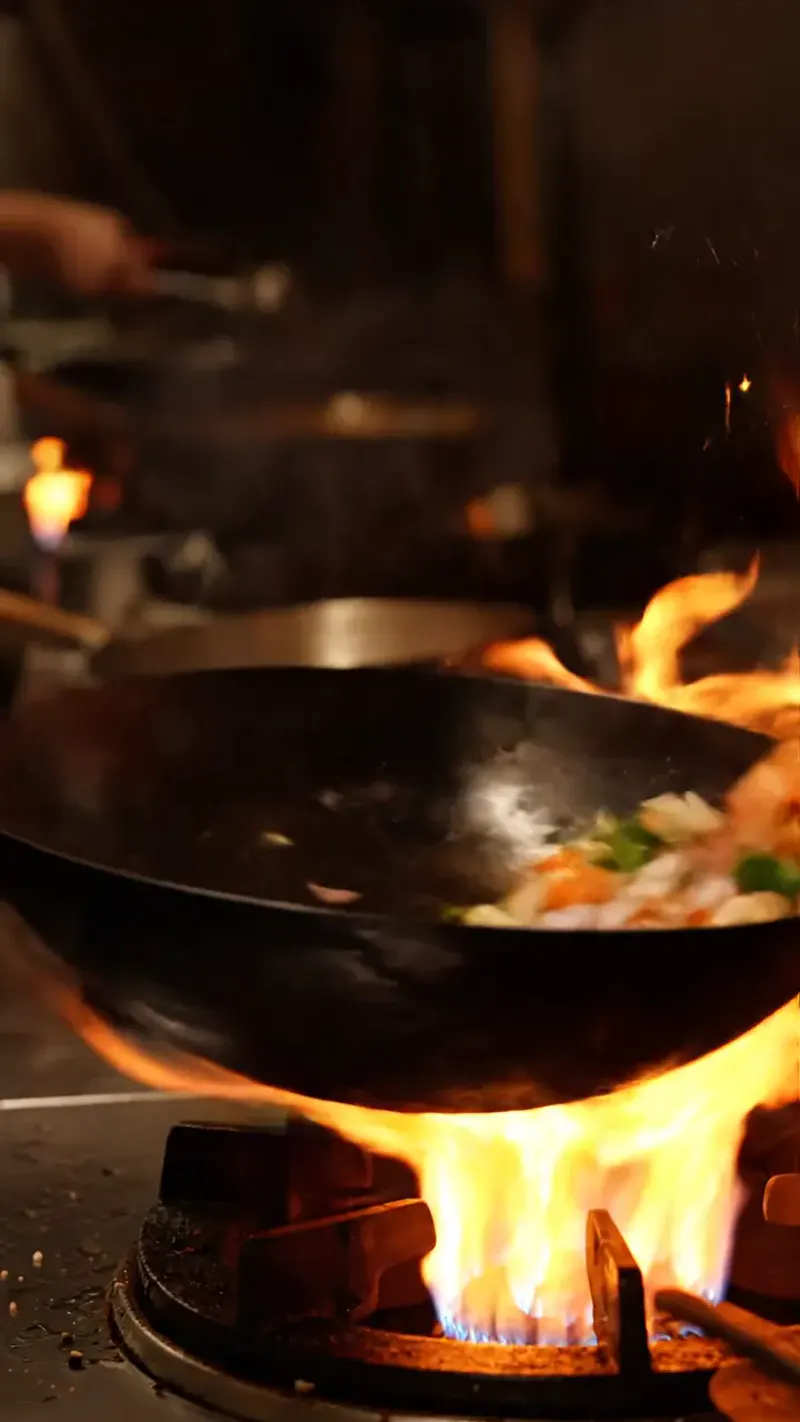
AI-generated vertical video of a chef flipping a pan of vegetables over a roaring flame in a night kitchen, sparks and steam rising — Veo 3.1 Fast, 720p, 4 seconds, 9:169:16 · 4s

A chef flips a pan of vegetables over a roaring flame in a busy night kitchen, sparks and steam rise, close handheld camera, sizzling sound, dramatic warm lighting.

Four, six or eight seconds

Pick the length per shot, from 720p up to 4K, in 16:9, 9:16 or adaptive framing. Sound is part of the render: Veo 3.1 generates the audio together with the picture, so there is no separate Sound switch here.

Veo 3.1 specs

Versions availableVeo 3.1 Fast and Veo 3.1 Pro
Resolution720p, 1080p and 4K
Duration4, 6 or 8 seconds per clip
Aspect ratios16:9, 9:16 or adaptive
InputsText, a first frame, first and last frames, or up to 3 reference images (8 seconds)

Veo 3.1 Fast vs Veo 3.1 Pro

Same model, two speeds. What changes for you:

ComparisonVeo 3.1 FastVeo 3.1 Pro
Typical waitAbout 2 minutesAbout 4 minutes
CostLower per clipHigher per clip
Pick it forQuick iteration on promptsFinal, higher-fidelity clips

How to use Veo 3.1

  1. Describe the shot and the sound

    Describe the subject, the action, the camera and the light. Veo 3.1 generates sound, so say what should be heard.

  2. Choose version and length

    Pick Fast to iterate or Pro for finals, a resolution, a ratio, and 4, 6 or 8 seconds. Add a first frame or up to 3 reference images if you have them.

  3. Generate, review, refine

    Run it, watch the result, then change one clause of the prompt at a time.

What people make with Veo 3.1

Clips with sound

Scenes where ambient sound, music or speech matter, such as street scenes and kitchens.

Product and brand shots

Short, polished clips from a first frame or reference images.

Storyboards and previs

Quick 4-second shots to test a camera move or a mood before a bigger production.

Tips for better Veo 3.1 results

  • Name the sound you want: rain, footsteps, a violin or a crowd.
  • Iterate on Fast, then re-run the best prompt on Pro at a higher resolution.
  • One scene and one camera move per clip keeps the result coherent.

Pricing - AI Video Maker Credit Packs & Plans

Pick the plan that matches your pace

New accounts get up to 10 free credits — no credit card required. Plans and credit packs work worldwide.

Subscribers get +20% extra credits at the same price

900 Credits

$9.9/ one-time

Subscribers receive: 1,080

  • Up to 450 fast images
  • Up to 18 basic videos
  • Every image and video model
  • Valid for 6 months
  • No subscription, never auto-renews

5,500 Credits

$49.9/ one-time

Subscribers receive: 6,600

  • Up to 2,750 fast images
  • Up to 110 basic videos
  • Every image and video model
  • Valid for 6 months
  • No subscription, never auto-renews

12,000 Credits

$99.9/ one-time

Subscribers receive: 14,400

  • Up to 6,000 fast images
  • Up to 240 basic videos
  • Every image and video model
  • Valid for 6 months
  • No subscription, never auto-renews

Subscriptions renew until canceled. Credit packs are one-time and expire 180 days after grant. Refunds & Billing · Terms · Privacy Policy · Contact Us · Pricing

aiMakeVideo is an independent AI video platform and is not affiliated with the model providers.

Veo 3.1 FAQ

What is Veo 3.1?

Veo 3.1 is Google’s video generation model. It creates short clips from text, a first frame, first and last frames or reference images, and generates sound together with the video. Here it comes in two versions, Fast and Pro.

How much does Veo 3.1 cost on aiMakeVideo?

It runs on credits: Veo 3.1 prices each clip by version (Fast or Pro), resolution and 4, 6 or 8 seconds, and the exact cost appears on the Generate button. A run that fails for a technical reason is refunded automatically.

Do I need an account to use Veo 3.1?

Yes. Sign in with a free account; every Veo 3.1 run is billed to your credit balance.

What is the difference between Veo 3.1 Fast and Pro?

Both are Veo 3.1. Fast is built for quick iteration, at about two minutes per clip and a lower price. Pro is the higher-fidelity version for final clips, at about four minutes and a higher price.

How long can a Veo 3.1 clip be?

4, 6 or 8 seconds. Reference-image mode always renders 8 seconds.