Open studio

GPT Image 2.6 AI Image Generator

Make and edit images with GPT Image 2.6, OpenAI's newest image model, released in November 2026. Start on Flare for quick drafts, switch to Sunburst for detailed finals, and add up to 16 reference images.

References stay in this session only. Reattach them after reopening a draft.

Estimated cost: 9 credits (GPT Image 2.6 Flare)

What GPT Image 2.6 does well

The first two images were made with GPT Image 2.6 Flare, the last two with Sunburst; each caption names the quality and size. Tap Recreate to load the prompt and those settings into the generator above.

AI-generated flat illustration of a red fox reading a picture book under a desk lamp. Made with GPT Image 2.6 Flare at 1K, low quality.1:1

A cheerful flat illustration of a small red fox reading a picture book under a warm desk lamp, a mug of cocoa and a stack of books beside it, simple rounded shapes, limited palette of orange, teal and cream, children's book style.

Flare: drafts in seconds

Flare is the fast variant. OpenAI says it can return an image in as little as six seconds at low quality, so you can try ten ideas before you commit to one. This fox is a low-quality Flare render.
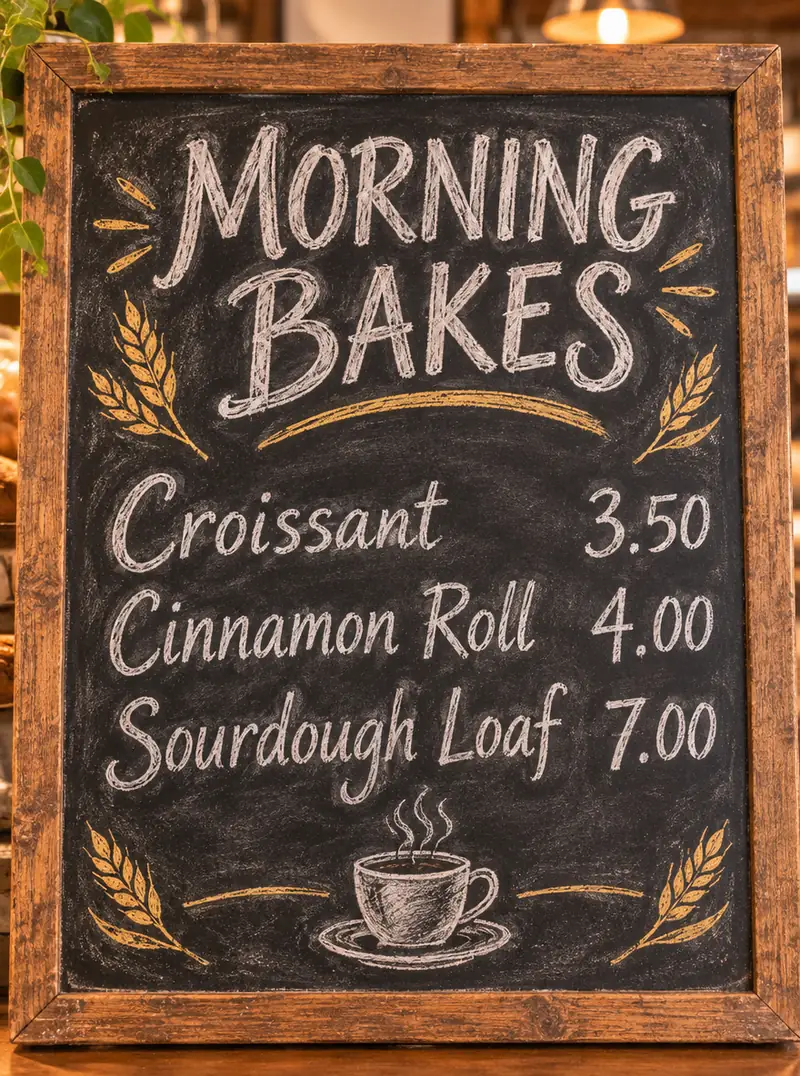
AI-generated chalkboard bakery menu headed MORNING BAKES with three priced items. Made with GPT Image 2.6 Flare at 1K, medium quality.3:4

A hand-lettered chalkboard menu for a small neighborhood bakery. Headline "MORNING BAKES" at the top, then three lines: "Croissant 3.50", "Cinnamon Roll 4.00", "Sourdough Loaf 7.00". Chalk texture, small doodles of wheat and a coffee cup, wooden frame, warm cafe light.

Text that comes out spelled right

Menus, signs and short labels render legibly: every word and price on this board came out as written. Put the exact words in quotation marks and keep each line short.

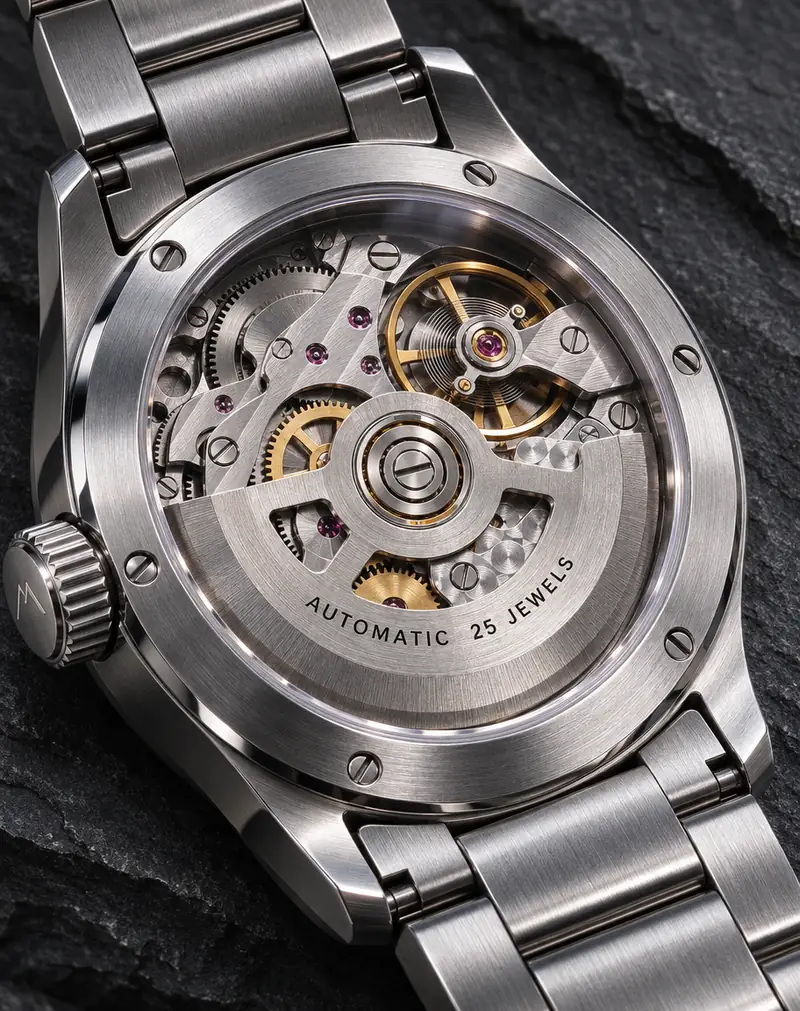
AI-generated macro photo of a steel mechanical watch caseback engraved AUTOMATIC 25 JEWELS. Made with GPT Image 2.6 Sunburst at 1K, high quality.4:5

Macro product photo of a brushed stainless steel mechanical wristwatch lying on dark slate, the open caseback showing gears and a balance wheel, tiny engraved text "AUTOMATIC 25 JEWELS" on the rotor, crisp reflections, soft rim light, high-end catalog style.

Sunburst: detail for finals

Sunburst is the quality variant. OpenAI says it adds detail and keeps edits more consistent from one run to the next. Engraving, brushed steel and reflections hold up in this high-quality render.

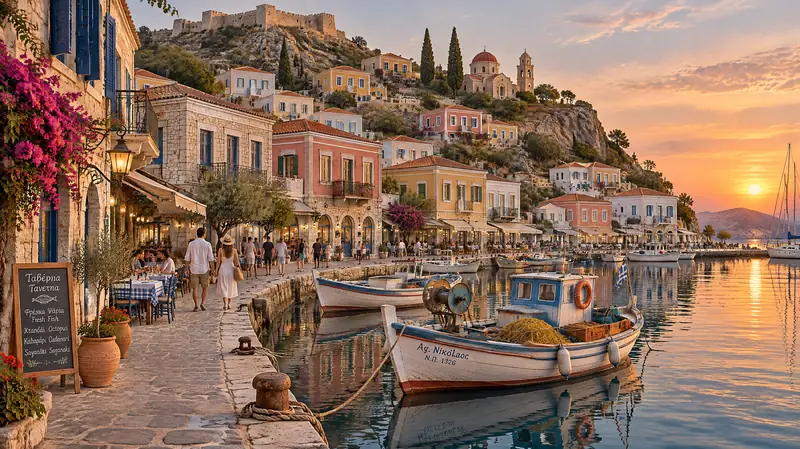
AI-generated wide view of a Mediterranean harbor at golden hour with pastel houses and fishing boats. Made with GPT Image 2.6 Sunburst at 2K, medium quality.16:9

Wide cinematic view of a small Mediterranean harbor at golden hour, pastel houses stacked up a hillside, wooden fishing boats reflected in calm water, people strolling along the stone quay, fine architectural detail, natural colors.

Wide and tall frames up to 4K

Fifteen ratios from 1:3 to 3:1, including 21:9 and 9:16, at 1K, 2K or 4K. This harbor is a 16:9 Sunburst render at 2K.

GPT Image 2.6 specs

Quality tiersFive: low, medium, high, xhigh and max
Output resolution1K, 2K and 4K output
Image referencesUp to 16 images to edit, restyle or combine
Frame ratios15 ratios from 1:3 to 3:1, including 21:9, 16:9, 9:16 and 1:1, or auto
Output formatsPNG, JPEG or WebP
Images per requestUp to 4; each runs as its own job, and one that never arrives is not charged

GPT Image 2.6 Flare vs Sunburst

One model, two variants, the same settings. Where they differ:

Side by sideFlareSunburst
Built forSpeed and quick iterationDetail and consistent edits
Speed (OpenAI)As little as six seconds at low qualitySlower; OpenAI quotes no time
In our sample runsAbout 20 seconds at 1KAbout a minute at 1K high or at 2K
Use it forDrafts, concepts, many variationsProduct shots, fine text, final images

GPT Image 2 vs GPT Image 2.6

GPT Image 2 came out in April 2026 and GPT Image 2.6 in November. Both run in the generator above. What changed:

Side by sideGPT Image 2.6GPT Image 2
VersionsTwo: Flare for speed, Sunburst for detailOne
Quality tiersFive: low, medium, high, xhigh and maxThree: low, medium and high
Sizes and references1K, 2K or 4K, 15 ratios, up to 16 referencesThe same: 1K, 2K or 4K, 15 ratios, up to 16 references
Time per image hereFlare about 8–45 seconds, Sunburst about 12–60About 15–90 seconds
Cost per imageHigher; the exact price shows on the Generate buttonLower: its cheapest image costs under half a Flare one

GPT Image 2 is still one switch away in the model picker above, under OpenAI, and the full free signup gift, where offered, covers two GPT Image 2 images at 1K and low quality. Pick it for quick, simple images; pick GPT Image 2.6 for finer quality control, Flare's speed and Sunburst's consistent edits. Weighing an open-weight model instead? See MiniMax H3 Image vs GPT Image 2.6.

How to use GPT Image 2.6

  1. Pick Flare or Sunburst

    The generator opens on Flare. Switch to Sunburst in the model picker when detail matters more than speed.

  2. Set quality, size and frame

    Start at low or medium and 1K, pick a ratio, and add up to 16 reference images if you are editing or combining.

  3. Generate and iterate

    Keep the best result, raise the quality or size for the final, or feed it back in as a reference and change one thing at a time.

What people make with GPT Image 2.6

Menus, signs and posters

Short headlines, prices and labels. Check every word before you print.

Product and catalog images

Sunburst at high quality for close-ups, metal, glass and fine engraving.

Concept art and storyboards

Flare at low quality to explore many directions quickly and cheaply.

Tips for better GPT Image 2.6 results

  • Draft on Flare at low quality, then re-run the winning prompt on Sunburst.
  • Put exact words in quotation marks and keep each line of text short.
  • Raise quality and size only for finals: both add to the cost of every image.

Pricing - AI Video Maker Credit Packs & Plans

Pick the plan that matches your pace

New accounts get up to 10 free credits — no credit card required. Plans and credit packs are available in most countries.

Subscribers get +20% extra credits at the same price

900 Credits

$9.9/ one-time

≈ 18 videos5s · 480p each

Subscribers receive: 1,080

  • Up to 450 fast images
  • Up to 18 basic videos
  • Every image and video model
  • Valid for 6 months
  • No subscription, never auto-renews

5,500 Credits

$49.9/ one-time

≈ 110 videos5s · 480p each

Subscribers receive: 6,600

  • Up to 2,750 fast images
  • Up to 110 basic videos
  • Every image and video model
  • Valid for 6 months
  • No subscription, never auto-renews

12,000 Credits

$99.9/ one-time

≈ 240 videos5s · 480p each

Subscribers receive: 14,400

  • Up to 6,000 fast images
  • Up to 240 basic videos
  • Every image and video model
  • Valid for 6 months
  • No subscription, never auto-renews

Subscriptions renew automatically at the price shown until you cancel, and we'll tell you before any price change. Cancel anytime in Settings → Billing; you keep access until the paid period ends. Credit packs are one-time and expire 180 days after grant. Prices include any tax collected at checkout. Refunds & Billing · Terms · Privacy Policy · Contact Us · Pricing

aiMakeVideo is an independent AI video platform and is not affiliated with the model providers.

GPT Image 2.6 FAQ

What is GPT Image 2.6?

GPT Image 2.6 is OpenAI's image generation and editing model, released in November 2026 in two variants: Flare (model ID gpt-image-2.6-flare), built for speed, and Sunburst (gpt-image-2.6-sunburst), built for detail and consistent edits.

How much does GPT Image 2.6 cost on aiMakeVideo?

It runs on credits. GPT Image 2.6 bills per image, and the price rises with the quality tier and size you pick. The exact cost always shows on the Generate button, credits are refunded if a run fails for a technical reason, and an image that never arrives is not charged.

Should I use Flare or Sunburst?

Use Flare to explore: it is the faster variant and the cheaper way to try many prompts. Use Sunburst for the final image, especially product shots, fine text and edits that need to stay consistent. Both take the same sizes, quality tiers and references.

What sizes and quality settings does it support?

Five quality tiers (low, medium, high, xhigh and max), 1K, 2K and 4K output, and 15 aspect ratios from 1:3 to 3:1, including 21:9, 16:9, 9:16 and 1:1, or auto.

Can GPT Image 2.6 edit my photos?

Yes. Add up to 16 reference images and describe the change; Sunburst keeps edits more consistent across runs. Only use images you own or have permission to edit.

Can it make GIFs or SVG files here?

Not on aiMakeVideo. OpenAI introduced GIF and SVG output with this release, but the generator here returns PNG, JPEG or WebP images.

Is GPT Image 2.6 free?

Not unlimited. The full free signup gift, where offered, covers one Flare image at 1K and low quality, the cheapest setting; after that it needs a plan or credit pack. The free trial, where offered, makes Z Image Turbo images with no account.

Is aiMakeVideo the official GPT Image 2.6 site?

No. GPT Image is OpenAI's model, and the name belongs to its owner. aiMakeVideo is an independent platform, not affiliated with or endorsed by OpenAI, where you can run GPT Image 2.6 in the browser alongside other models.