Open studio

MiniMax H3 Image AI Generator

Make and edit images with MiniMax H3 Image, the open-weight image model from MiniMax. Render at 1K, 2K or full 4K in 15 aspect ratios, and add up to 16 reference images to edit or combine.

References stay in this session only. Reattach them after reopening a draft.

Estimated cost: 10 credits (MiniMax H3 Image)

What MiniMax H3 Image does well

The first image was made with MiniMax H3 Image at 4K, the other three at 2K; each caption names the size. Tap Recreate to load the prompt and those settings into the generator above.

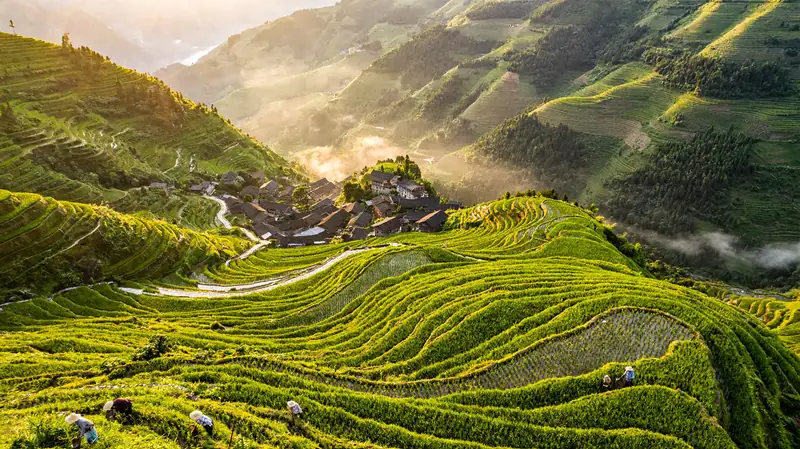
AI-generated aerial photo of green rice terraces in a misty mountain valley at sunrise, with a small village. Made with MiniMax H3 Image at 4K.16:9

Aerial photo of green rice terraces winding around a mountain valley at sunrise, low mist between the ridges, a small village with dark tiled roofs, tiny farmers working in the fields, ultra-detailed, natural light.

Real 4K output

Pick 4K and you get the full-size file: this 16:9 terrace scene came back at 5472 × 3072 pixels. MiniMax says 4K takes under 10 seconds on its own platform; here it took about a minute.

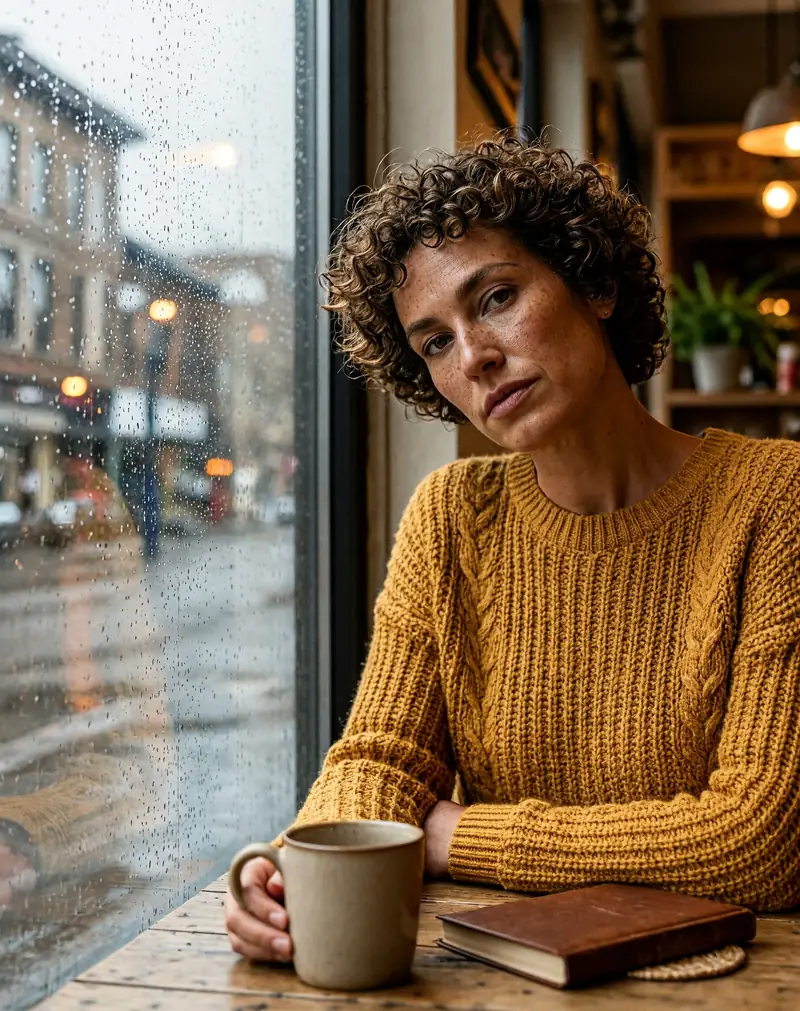
AI-generated portrait of a woman with short curly hair and freckles in a mustard sweater by a rainy cafe window. Made with MiniMax H3 Image at 2K.4:5

Natural light portrait of a woman in her thirties with short curly hair and freckles, wearing a mustard knit sweater, sitting by a rainy cafe window, soft reflections on the glass, realistic skin texture, 50mm lens, shallow depth of field.

Photoreal skin and light

Portraits keep skin texture, freckles and soft window light instead of a plastic sheen. This 4:5 portrait was made at 2K from a plain description.

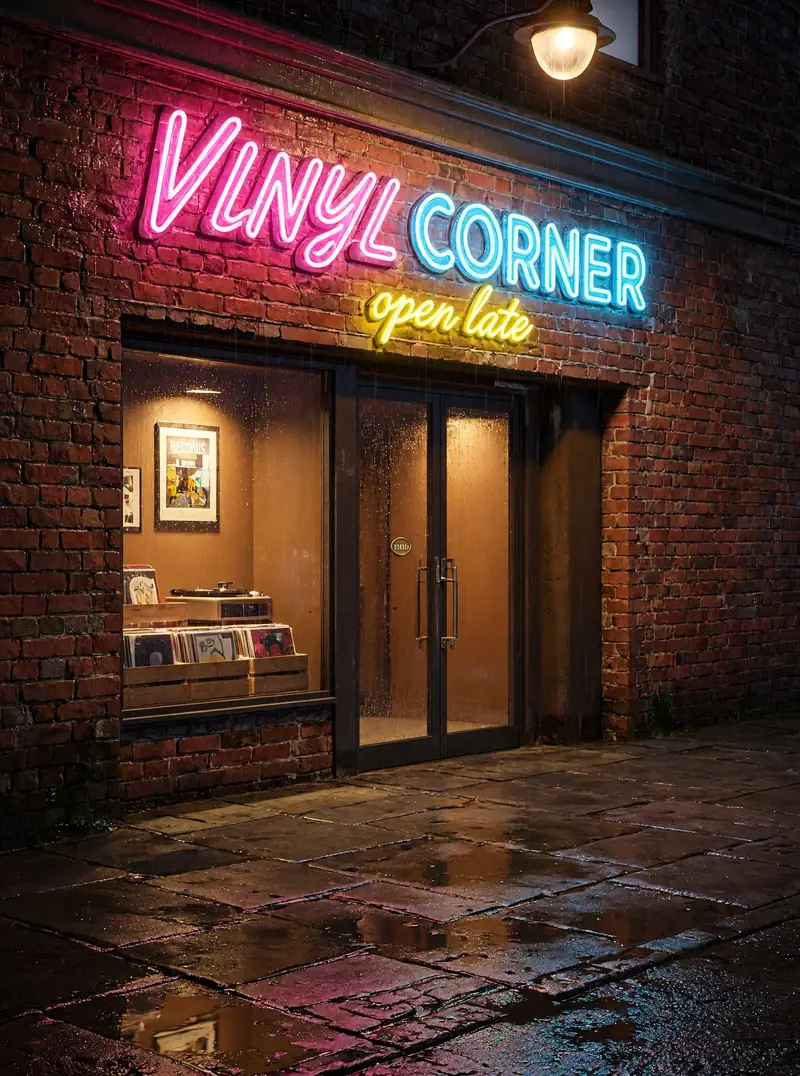
AI-generated night photo of a neon sign reading VINYL CORNER above a record shop on a wet street. Made with MiniMax H3 Image at 2K.3:4

A vintage neon sign above a small record shop at night that reads "VINYL CORNER", with a smaller line "open late" underneath, red brick wall, rain-soaked sidewalk reflecting pink and blue light, photorealistic.

Short signs that read right

Both lines of neon on this record shop came out exactly as written. MiniMax makes no promise about text, so keep it to a few words in quotation marks and check it before you use it.

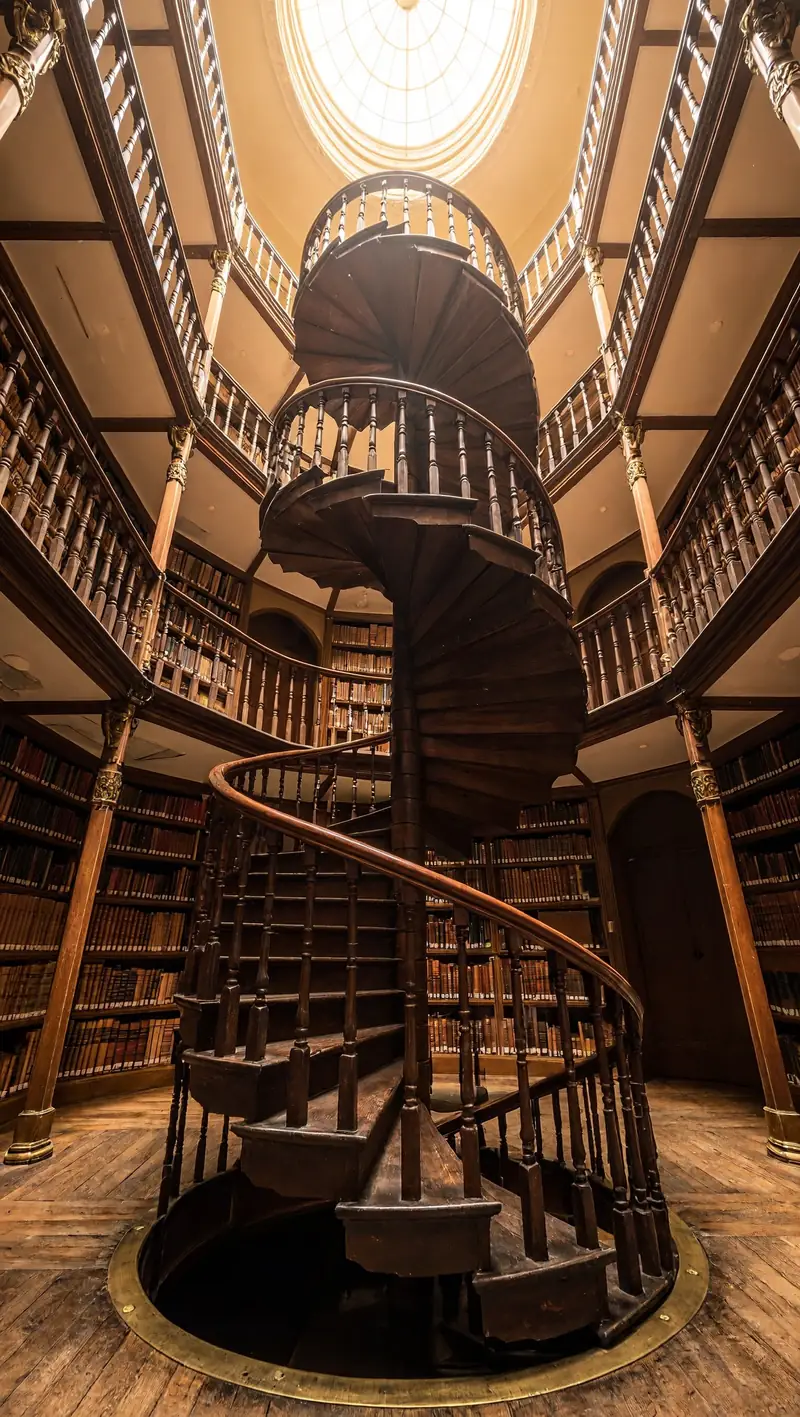
AI-generated view looking up a wooden spiral staircase in an old library toward a round skylight. Made with MiniMax H3 Image at 2K.9:16

Looking straight up a spiral staircase in an old library, warm wooden railings curling toward a round skylight, shelves of books on every floor, soft daylight falling from the top, symmetrical composition.

Tall 9:16 frames

Fifteen ratios from 1:3 to 3:1. This spiral staircase is a 9:16 render at 2K, ready for phone wallpapers, stories and posters.

MiniMax H3 Image specs

Output size1K, 2K and 4K (4K at 16:9 is 5472 × 3072)
Frame shapes15, from 1:3 to 3:1 (21:9, 16:9, 9:16, 1:1 and more), or auto
Image inputsUp to 16 images for edits and multi-image composition
TasksText to image, image editing, and combining several images into one
WeightsOpen, published on Hugging Face
Images per runUp to 4, each its own job; one that never arrives costs nothing

MiniMax H3 Image vs GPT Image 2.6

Both are new on aiMakeVideo, and GPT Image 2.6 has its own page with samples. Where they differ:

PointMiniMax H3 ImageGPT Image 2.6
SettingsSize only: 1K, 2K or 4KFive quality tiers, plus 1K, 2K or 4K
WeightsOpen, on Hugging FaceClosed, API only
Maker's speed claim4K in under 10 seconds on MiniMax's platformFlare in as little as six seconds at low quality
Choose it forBig 4K prints, photoreal people, tall framesText-heavy layouts, fast drafts, fine quality control

MiniMax H3 Image in ComfyUI and on your own GPU

The generator above runs MiniMax H3 Image through MiniMax's API, with nothing to install. The same open-weight model also runs locally. What it is, and what running it yourself takes:

One model, three similar names

MiniMax H3 Image is MiniMax's image checkpoint: a 33.1B-parameter diffusion transformer for text to image and editing, released in November 2026. MiniMax H3, without "Image", is the video model behind the MiniMax H3 video generator. P-H3-Image, which also has ComfyUI templates, is a different model: Pruna AI's build on MiniMax H3.

Steps: 6, not 8

MiniMax distilled the official checkpoint to 6 sampling steps with no classifier-free guidance: set steps to 6 and CFG to 1, and leave the negative prompt out. MiniMax's API rejects any other step count. The 8-step workflows you may find belong to P-H3-Image, which renders about 8 MP instead of 16.

How to write the prompt

The model expects a detailed English description of the whole image: subject, setting, light, lens, and any text in quotation marks. A short prompt, or one in another language, is first expanded into that description, automatically on MiniMax's API and locally by the optional MiniMax-H3-Image-PE model. The generator here keeps expansion on, so a short prompt in your own language works. For edits, the model card calls uploads <Picture 1>, <Picture 2> and so on, in upload order.

Which size and ratio to pick

Locally, the native sizes are about 16 MP: 4096 × 4096 (1:1), 4736 × 3552 (4:3), 5024 × 3360 (3:2), 5472 × 3072 (16:9) and 6272 × 2688 (21:9), plus the tall versions. ComfyUI's template starts at about 4 MP so smaller GPUs do not run out of memory. Here you pick one of 15 ratios from 1:3 to 3:1 at 1K, 2K or 4K: 16:9 or 21:9 for banners and desktops, 9:16 for phone screens and stories, 4:5 or 3:4 for portraits and feed posts, 1:1 for avatars and thumbnails.

Weights, hardware and license

The weights are MiniMaxAI/MiniMax-H3-Image on Hugging Face, about 69 GB in BF16, plus a 66.7 GB text encoder from the MiniMax-H3 repo; ComfyUI's INT8 files come to about 55 GB. The model card's GPU examples are data-center cards such as the NVIDIA H200 and RTX PRO 6000 Blackwell. Its community license excludes the EU, the UK, South Korea and the US, and companies above 1 million USD in yearly revenue, or anyone hosting it for others, need MiniMax's written permission.
How to use MiniMax H3 Image

  1. Write the scene

    Describe the subject, setting, light and lens in plain sentences. Put any words that must appear in quotation marks.

  2. Pick size and frame

    1K and 2K cost the same, so start at 2K and save 4K for the final. Choose a ratio, and add up to 16 reference images to edit or combine.

  3. Keep the best, then go 4K

    Keep the best image, re-run it at 4K for print, or add it back as a reference and change one detail per run.

What people make with MiniMax H3 Image

Prints and wallpapers

4K landscapes and cityscapes big enough to print or use as desktop and phone backgrounds.

Portraits and lifestyle shots

Natural light, real skin texture and believable settings for blogs, ads and mood boards.

Edits from your own images

Up to 16 references to restyle a photo, swap a background or bring products into one scene.

Tips for better MiniMax H3 Image results

  • Name the light and the lens ("soft window light, 50mm") for a more photographic look.
  • Keep sign text to a few words in quotation marks, and check the spelling before you publish.
  • Find the composition at 2K, then render the keeper once at 4K.

Pricing - AI Video Maker Credit Packs & Plans

Pick the plan that matches your pace

New accounts get up to 10 free credits — no credit card required. Plans and credit packs are available in most countries.

Subscribers get +20% extra credits at the same price

900 Credits

$9.9/ one-time

≈ 18 videos5s · 480p each

Subscribers receive: 1,080

  • Up to 450 fast images
  • Up to 18 basic videos
  • Every image and video model
  • Valid for 6 months
  • No subscription, never auto-renews

5,500 Credits

$49.9/ one-time

≈ 110 videos5s · 480p each

Subscribers receive: 6,600

  • Up to 2,750 fast images
  • Up to 110 basic videos
  • Every image and video model
  • Valid for 6 months
  • No subscription, never auto-renews

12,000 Credits

$99.9/ one-time

≈ 240 videos5s · 480p each

Subscribers receive: 14,400

  • Up to 6,000 fast images
  • Up to 240 basic videos
  • Every image and video model
  • Valid for 6 months
  • No subscription, never auto-renews

Subscriptions renew automatically at the price shown until you cancel, and we'll tell you before any price change. Cancel anytime in Settings → Billing; you keep access until the paid period ends. Credit packs are one-time and expire 180 days after grant. Prices include any tax collected at checkout. Refunds & Billing · Terms · Privacy Policy · Contact Us · Pricing

aiMakeVideo is an independent AI video platform and is not affiliated with the model providers.

MiniMax H3 Image FAQ

What is MiniMax H3 Image?

MiniMax H3 Image is the image generation and editing model from MiniMax, the company behind the Hailuo video models. It renders at 1K, 2K or 4K, takes up to 16 reference images, and its weights are published on Hugging Face.

How much does MiniMax H3 Image cost on aiMakeVideo?

It runs on credits and bills per image: 1K and 2K cost the same, and 4K costs more. The exact cost always shows on the Generate button, credits are refunded if a run fails for a technical reason, and an image that never arrives is not charged.

Is the 4K output real 4K?

Yes. Our 16:9 sample at 4K came back at 5472 × 3072 pixels, about 16.8 megapixels, and the file you download is that full-size image.

How fast is MiniMax H3 Image?

In our sample runs a 2K image took about 20 seconds and a 4K image about a minute, end to end. MiniMax quotes under 10 seconds for 4K on its own platform; times here include the queue and the download.

Can it edit or combine my images?

Yes. Add up to 16 reference images and describe what to change or how to combine them. Only use images you own or have permission to edit.

Are the MiniMax H3 Image weights open?

Yes. MiniMax publishes the weights on Hugging Face, so you can run the model on your own GPUs. On aiMakeVideo it runs in the browser with nothing to install.

Is MiniMax H3 Image free?

Not unlimited. The full free signup gift, where offered, covers one image at 1K or 2K; 4K and further images need a plan or credit pack. The free trial, where offered, makes Z Image Turbo images with no account.

Is aiMakeVideo the official MiniMax site?

No. MiniMax H3 Image is MiniMax's model, and the name belongs to its owner. aiMakeVideo is an independent platform, not affiliated with or endorsed by MiniMax. Looking for video? The MiniMax H3 video generator has its own page.