Park path
15 seconds · One photo + AI stand-in · The song
Turn one or two photos into the Babydoll two step, the dance everyone films to Jamie Miller’s “Babydoll”: two people side by side, bouncing on the spot with loose swinging arms, a knee lift, a hand flick by the face, kicks and an arm thrown up high, in a park, on a sunny street or in a living room.
Left dancerDances on the left
Right dancerDances on the right
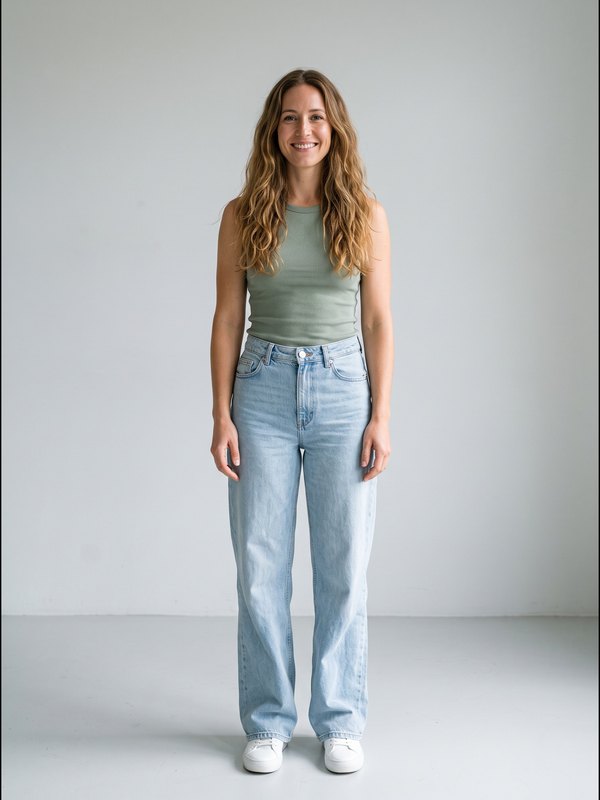
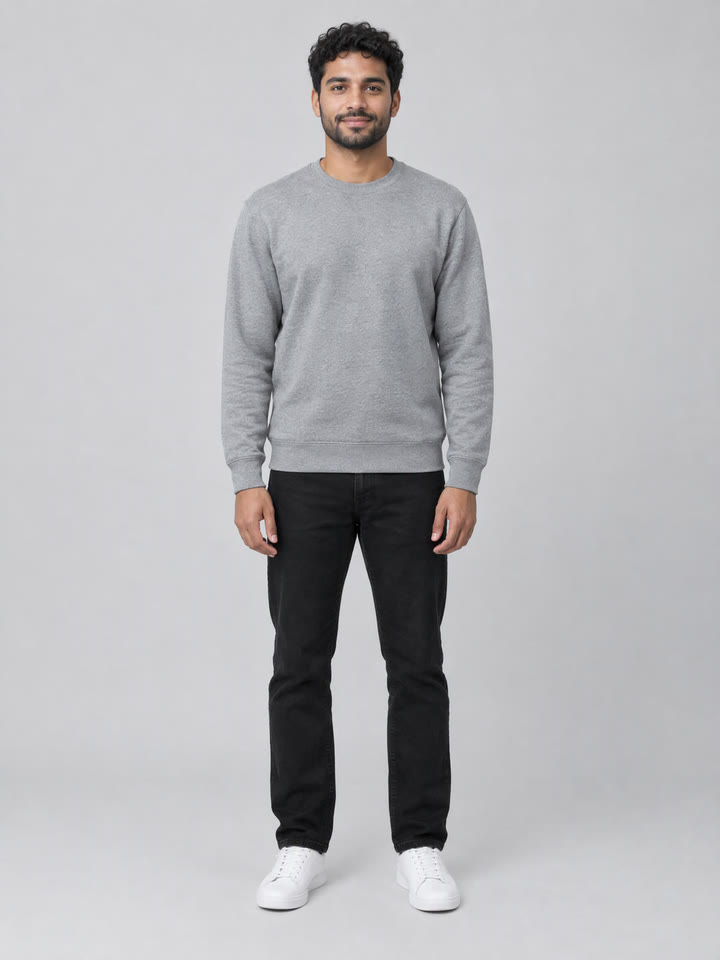
A clear, front-facing photo works best, ideally down to the waist or further: the dance shows you head to toe. One adult per photo.
800 credits · 15 s · 720p · 9:16
One $9.90 pack covers this video. Get creditsThe same photo in the park and on the street, fifteen seconds each; the AI stand-in dances on the right.
15 seconds · One photo + AI stand-in · The song
15 seconds · One photo + AI stand-in · The song
The examples use AI-generated people, not real ones.
The moves, the timing and the camera come from a real trend clip. Your photos decide who dances.
The bounce, the knee lift, the hand flick, the kicks and the arm thrown up high land on the same beats as the trend clip, filmed handheld like a friend’s phone video, with no cuts.
Dance on the clip’s own park path, on a sunny side street or in a bright living room, in the clothes from your own photos.
Add one photo and a fixed AI stand-in dances next to you, the same one every time and never a lookalike of anyone famous.
A render that fails returns to your balance. No ticket, no waiting.
The same routine and the same handheld camera in each; only the place around you changes.
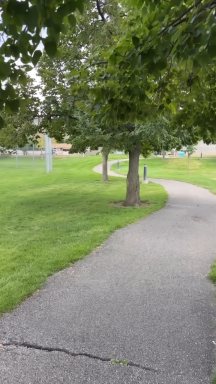
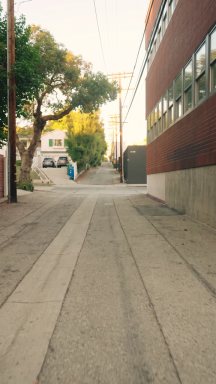
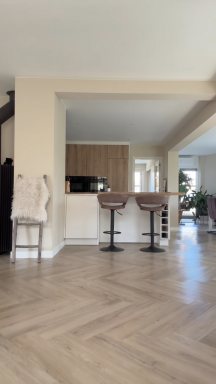
The park path is the trend clip’s own place. The street and the living room are new places in the style of other popular Babydoll clips.
Three steps, about ten minutes.
Park path, sunny street or living room. The moves and the camera are the same in all three.
One adult per photo, face clearly visible: the first photo dances on the left, the second on the right. Keep the song, or choose Silent and add your own sound when you post.
15 seconds, 720p, vertical 9:16, no watermark. Post it to TikTok, Reels or Shorts, or send it to the person you danced with.
The Babydoll two step is the dance people film to Jamie Miller’s “Babydoll”: two or three people side by side in front of a phone, doing a light, bouncy step on the spot with loose swinging arms, a few kicks and a lot of laughing. It is easy enough for anyone, so parents and kids, couples, friends and colleagues all post it, and it also goes by the Babydoll challenge.
This generator keeps the first fifteen seconds of a popular two-person version filmed on a park path, with its handheld camera, and puts the people in your photos in it, on that path, on a sunny street or in a living room.
“Babydoll” is a song by the Welsh singer Jamie Miller, released in August 2026. Miller posted a series of videos of himself singing and dancing to it, and actors and singers joined in, among them Jennifer Love Hewitt, Meghan Trainor, Jesse McCartney, Lucy Hale and Julianne Hough.
On September 18, 2026 Miller released a new version with the actor and singer Antonio Cipriano, who had joined one of the dance videos. On October 23, 2026 “Babydoll” went to Number 1 on the UK Official Singles Chart, making Miller the first Welsh artist since 2011 to top it.
Sources: uDiscover Music: the Antonio Cipriano version · Official Charts: Babydoll at Number 1
The timing of the video this page makes, the routine’s first fifteen seconds. Clips people post vary a little.
| 0–4.5 s | A turn to the lens, then the bounce on the spot: knees on every beat, loose arms swinging low, palms out |
|---|---|
| 4.5–7 s | A knee lift, a wide step with the arms open, feet together and apart, a little hop |
| 7–9.5 s | A hand flicked beside the face, bent knees and arm swings, then a kick each |
| 9.5–10.5 s | Hips turn toward each other for a look, then back to the lens |
| 10.5–13 s | Crossing steps and kicks, a hair flip, a kick up behind, side steps |
| 13–15 s | One arm thrown straight up high, an arm out wide and a last kick up behind |
Use one adult per photo, facing the camera, with the whole face sharp, evenly lit and uncovered. The dance is filmed head to toe from a few steps away, so a photo that shows the face clearly and the body down to the waist or further works best.
Each person dances in the clothes from their own photo; if a photo shows only the top half, plain trousers and shoes are added. Avoid sunglasses, heavy filters, group photos, celebrity photos and film stills; the photo’s background never reaches the video.
Pick the plan that matches your pace
Not sure yet? 10 credits buy one 4-second watermarked preview with your photos.Try the preview
Subscribers get +20% extra credits at the same price
≈ 18 videos5s · 480p eachor ≈ 1 trend template video
Subscribers receive: 1,080
≈ 38 videos5s · 480p eachor ≈ 2 trend template videos
Subscribers receive: 2,280
≈ 110 videos5s · 480p eachor ≈ 7 trend template videos
Subscribers receive: 6,600
≈ 240 videos5s · 480p eachor ≈ 15 trend template videos
Subscribers receive: 14,400
Subscriptions renew automatically at the price shown until you cancel, and we'll tell you before any price change. Cancel anytime in Settings → Billing; you keep access until the paid period ends. Credit packs are one-time and expire 180 days after grant. Prices include any tax collected at checkout. Refunds & Billing · Terms · Privacy Policy · Contact Us · Pricing
aiMakeVideo is an independent AI video platform and is not affiliated with the model providers.
A 15-second vertical video of the Babydoll two step starring the people in your photos: two dancers side by side, filmed like a friend’s phone video, on a park path, on a sunny street or in a living room. It costs 800 credits.
Yes. Add your photos and tap Preview below the create button: you get a 4-second, 480p clip with a watermark, so you can check the likeness before paying for the full video. A preview costs 10 credits; where the sign-up gift is offered, a new account's free credits cover one. The full video comes without the watermark.
“Babydoll” by the Welsh singer Jamie Miller, released in August 2026. A version with Antonio Cipriano followed on September 18, 2026, and the song reached Number 1 on the UK singles chart in October 2026. By default the trend’s sound plays under your video.
A light two-step bounce on the spot with loose, swinging arms, then a knee lift and wide steps with the arms open, a hand flicked beside the face, kicks and crossing steps, a turn toward each other and an arm thrown straight up high. This page makes the routine’s first fifteen seconds.
Jamie Miller himself, who posted videos of himself singing and dancing to the song. Actors and singers such as Jennifer Love Hewitt, Meghan Trainor, Jesse McCartney, Lucy Hale and Julianne Hough joined in, and families and friends everywhere followed. It is also called the Babydoll challenge.
Park path (the default): the trend clip’s own path under big trees. Sunny street: a side street with a brick building and golden evening sun. Living room: a bright open-plan room with a herringbone floor. The moves and the camera are the same in all three.
Yes. Add your photo to either side; a fixed AI-generated stand-in, the same one every time and not a real person, dances the other part. Add a second photo to put two real people in the video: your partner, a parent, a grown-up son or daughter, a sibling or a friend.
Yes. Tap “Use one photo of you both” under the photo slots: we find the two faces, cut the photo into one photo per person, left to right, and each goes to their own side. Faces should be clear and not overlapping; with more people in the photo we keep the two largest faces. A photo added straight to a slot should still show one person.
The clothes from your own photos: each person keeps the outfit they wear in their photo. If a photo shows only the top half, plain trousers and plain shoes are added in the same everyday style.
Pick a place, add one or two photos and pick the sound. We replace the two dancers in a fixed clip of the routine: the moves, the timing and the camera stay as they are, the place is the one you picked, and the people in your photos dance it.
One adult per photo, facing the camera, with the face sharp, evenly lit and uncovered, ideally showing the body to the waist or further. Avoid sunglasses, masks, heavy filters, group photos and celebrity photos or film stills, which the video model often refuses.
A flat 800 credits per video, any place, one photo or two, with sound or without. One $9.90 pack covers it, larger packs cost less per video, and a failed render gives the credits back.
No. Every video runs on a paid AI model, so a full 15-second video costs 800 credits. To check the likeness first, make a 4-second preview for 10 credits; where the sign-up gift is offered, a new account's free credits cover one.
Usually about ten minutes, sometimes longer; you can close the tab, and the finished video waits in My videos. A failed render returns the credits straight to your balance.
Yes. By default the trend’s sound runs under the whole video. Choose Silent if you want to add your own sound when you post.
There is nothing to install: the generator runs in the browser on a phone or a computer. Download the finished vertical MP4 and post it to TikTok, Instagram Reels or YouTube Shorts like any other video.
No. This is an independent fan tool with no connection to Jamie Miller, Antonio Cipriano, the song’s rights holders, TikTok, YouTube or any creator.
Every tool turns your photos into a short vertical video. One credit balance works on all of them.
An independent fan tool. Not affiliated with Jamie Miller, Antonio Cipriano, the song’s rights holders, TikTok, YouTube or any creator.
One or two photos. Fifteen seconds. Three places to dance in.
Make my Babydoll danceTell us the trend. When we build it, we'll email you.