900 Credits
$9.90/ one-time
≈ 18 videos5s · 480p eachor ≈ 1 trend template video
Subscribers receive: 1,080
- Up to 450 fast images
- Up to 18 basic videos
- Every image and video model
- Valid for 6 months
- No subscription, never auto-renews
The Need for Speed AI trend is the TikTok drift video made from one photo of your car: it burns out round a corner, slides past a car window, spins donuts in front of a chase car and drifts off in its own smoke. Car owners make it after seeing the clips; this page makes it in one step. It is not the AI opponents or mods of the Need for Speed games.
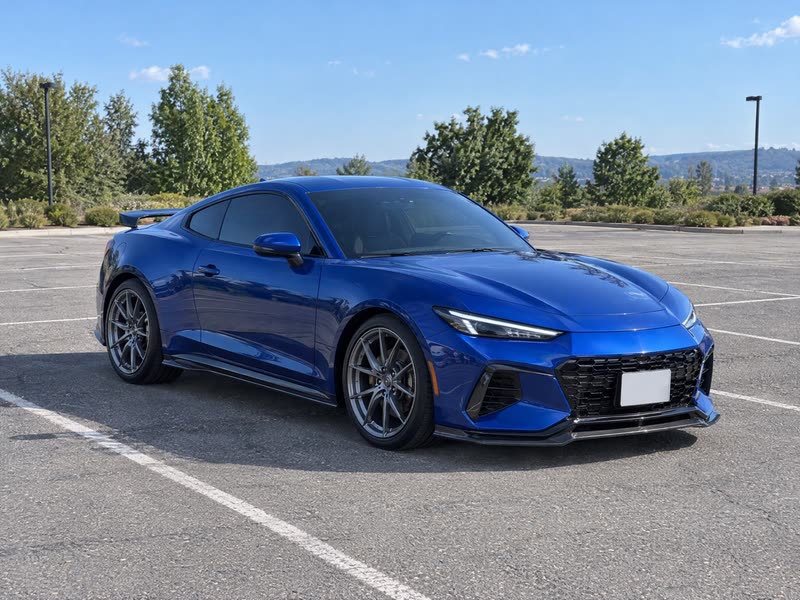
Your carThe whole car in view, side or three-quarter angle
The whole car in view, from the side or a three-quarter angle, in good light. No people needed.
390 credits · 13 s · 480p · 16:9
One $9.90 pack covers this video. Get creditsThe Need for Speed AI trend spread on TikTok in November 2026: car owners swap their own car into a raw street-takeover clip filmed on a grey day. A burnout round a corner, a drift past a car window, a chase car following through the smoke and a last slide out onto the road. The name comes from the street-racing games, but the clip looks like real footage.
This page is an AI car video generator for that one clip: it makes the 13-second, five-shot drift video from one photo of your car, with engine and tyre sound made by the AI. It uses no footage, logos or interface from any game, and the windows stay tinted, so nobody is shown at the wheel of your car.
A real run of this page with an AI-made car photo, at standard quality.
Uploaded photos
The car's body, colour and wheels come from the photo; the grey day, the car parks, the five shots, the smoke and the sound come from the template.
The whole car in the frame, side or three-quarter view. A photo in a car park is fine; the template puts it on the street.
For 10 credits you see the burnout and the drift with your car before you pay for the full clip.
Pick standard (480p) or HD (720p). It takes a few minutes, then download the MP4. It is 16:9 like the original, so it sits across the middle of a TikTok frame.
Pick the plan that matches your pace
Not sure yet? 10 credits buy one 4-second watermarked preview with your photos.Try the preview
Subscribers get +20% extra credits at the same price
≈ 18 videos5s · 480p eachor ≈ 1 trend template video
Subscribers receive: 1,080
≈ 38 videos5s · 480p eachor ≈ 2 trend template videos
Subscribers receive: 2,280
≈ 110 videos5s · 480p eachor ≈ 7 trend template videos
Subscribers receive: 6,600
≈ 240 videos5s · 480p eachor ≈ 17 trend template videos
Subscribers receive: 14,400
Subscriptions renew automatically at the price shown until you cancel, and we'll tell you before any price change. Cancel anytime in Settings → Billing; you keep access until the paid period ends. Credit packs are one-time and expire 180 days after grant. Prices include any tax collected at checkout. Refunds & Billing · Terms · Privacy Policy · Contact Us · Pricing
aiMakeVideo is an independent AI video platform and is not affiliated with the model providers.
It keeps the body shape, paint colour, wheels and lights from your photo. Small details such as badges and stickers can come out simplified, so try the 4-second preview first.
Yes. Add your photos and tap Preview below the create button: you get a 4-second, 480p clip with a watermark, so you can check the likeness before paying for the full video. A preview costs 10 credits; where the sign-up gift is offered, a new account's free credits cover one. The full video comes without the watermark.
Yes: the engine bouncing off the rev limiter, screeching tyres and wind, all made by the AI. There is no music or voice, so you can add your own sound on TikTok.
390 credits at standard (480p) and 850 at HD (720p) for a 13-second video. The 4-second preview is 10 credits. A failed run gives its credits back.
The original trend clip is 16:9, like real car-meet footage, and people post it that way inside the vertical TikTok frame. Your video comes out the same.
Every tool turns your photos into a short vertical video. One credit balance works on all of them.
 Cow Makeup Trend AIA cat flash, white paint, then full cow makeup
 Huss Huss Huss AIYou mouth the In This Town line and freestyle
 Boom Clap AIYou sing to the lens as confetti rains down
 BigXthaPlug Give It All AIYou rap at the hanging mic, a crowd behind you
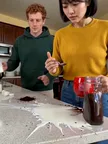 Coffee Making AITwo people, one kitchen, no coffee
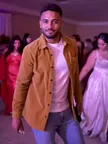 Baby Wow AIThe BbY WOW dance walk-inBirds of a Feather AIA slow spin on a floating chairDip On Em Dance AITwo of you side by side: hops, hair flips and the dip at the endNo Scrubs AIA finger wag, a silver spaceship, three friendsStormzy Shut Up AIYou rap the hook in front of a packed crowdCareless Whisper Car Meme AIStolen chips, a blind reach, a deadpan stareDime Dime Baby AIThe 8-second dance entranceI Love The Smiths AIOne elevator, one pair of headphones, one famous lineDog Grooming Time AIYour dog fights off two groomers like a kung fu movieMy Moon My Man AIYour couple photo becomes a soft launch clipWassup in a Minute AIThree friends, one hillside, one close-upBabydoll Dance AITwo of you doing the Babydoll two step in a park, on a street or at homeGangsta's Paradise AIYou rap the verse, a friend sings the chorus, a crowd behind youIce Ice Baby Dance AITwo people, one wet court, every move in stepBicep Heart AIFlex one arm, curl the other into a heart24K Magic AIDance on a cruise ship, then the flare goes off58th Floor AITwo of you trade verses at one micHop Hop Hop AIOne waves, one hops, then they swapSchooling Seniors AIYou rap into the camera in a night car parkMonkey Eating Apple AIA macaque fights you for an appleFancy Cafe AIMistake the tiny table for a stoolThriller Dance AILead the 15-second zombie danceTiny Desk AIAn office-concert band behind the deskGrease Dance AIDance the retro couple duetChristmas Dance AITwo of you in matching Christmas pajamas, doing the same three movesAI Christmas VideoBe an elf, or catch Santa on cameraNew Year AIHello 2027, midnight or Lunar New YearWYW My Sweetie Dance AIDance the jersey-club trendGangnam Style AIThe trio sing-along on a night plazaVossi Bop AIYou rap on an empty London bridge at dawnFunk Loading AIThe party walk-in as a 3D cartoon, set to the slowed funkHit the Road Dude AIState? This? Private property.Toc Toc Dance AIThe 10-second Toc Toc danceLorenzo Zurzolo AIThe 17-second moody fan editDamon Salvatore AIThe 20-second vampire romanceStereo Love Funk AIA 15-second funk dance, solo or groupCrazy Frog AIA 15-second invisible-moped chaseOzil Goal AIScore the 15-second goalZombie AI video generatorA zombie love story that ends in a sunny memory.Bulin 47 AIA 15-second freestyle rap videoBurning Bridges AIHost a chandelier party sceneRumpelstiltskin AI video generatorYour photo on the little tiptoe dancer, from one picture.Single Ladies Dog Dance AIYour pet takes the leadRaindance AI video makerYou on the sunset pier, from one or two photos.Hotel Lobby AI video generatorTwo of you rap side by side, lean in and finish on the shhMigos AI rap duet makerA duo rap video with an original song.James Bond Reveal AIYour photo in the dark spy-teaser guitar shotRide a Lion AIA lion roars beside you, then you ride it
Not affiliated with or endorsed by Electronic Arts or the Need for Speed games; the name only describes the TikTok trend. The driving is AI-made: don't drift on public roads.
One car photo, a 4-second preview, then the full 13-second clip.
Make my drift videoTell us the trend. When we build it, we'll email you.